Bring AI to where people already work: email
Lots of companies are putting AI into their chat applications. Add Claude to a Slack channel, tell “@Claude” to do something, and it reads the conversation, uses tools, does what you tell it to, and replies in the same chat.
Nice, for companies that use Slack a lot. (Many do. We don’t.)
Straive and many of our clients use email more. There’s Google Chat, Teams, and others too, but email’s what most people access. (Apart from WhatsApp.)
I’m not saying email is the top channel. Microsoft reports that employees receive over ~120 emails and over 150 Teams messages a day. But email is almost universal, cross-company, and blessedly asynchronous.
So, why not make email an interface to AI?
People often prefer a trusted human to asking AI
Recently, Lalana asked how she should find and approach companies that might buy organizational data.
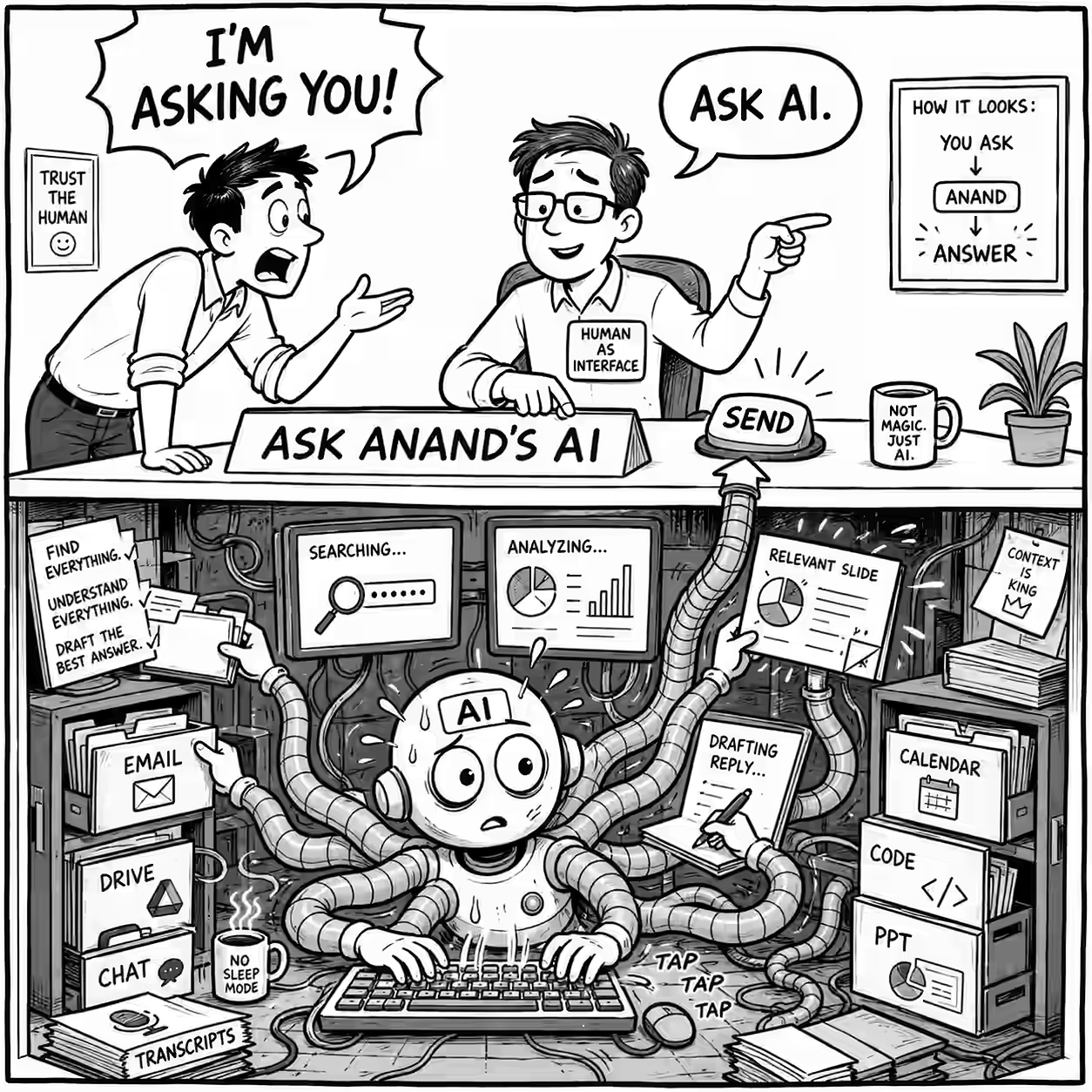
“Ask AI,” I said.
“I’m asking you!” she replied.
I have become what AI called a Human as an Interface. People ask me questions I may simply pass to ChatGPT.
Maybe because I could verify the results. Or curate the answer. Adapt it to their situation. Check if it’s sensible. Catch if it is wrong.
That’s useful. But (and I didn’t think of this at first) it also helps adoption. Someone not comfortable with AI would happily ask a person they know, get an AI answer, and slowly start trying it themselves.
I turned my email address into “Ask Anand’s AI”
Last Thursday, I sent this email internally:
If you email me with “Ask AI” in the subject, my AI agent - with access to my knowledge, code and tools - will reply within 24 hours.
Use it when AI wouldn’t know our company context, when the research would take me too long, or just to pick my brain, I told them.
Ten people mailed me on the first day.
I still trigger each reply using my email reply prompt, read it and manually send it. ChatGPT writes the answer and I make sure it’s OK.
I sent replies mostly verbatim. Changes were mostly like “Maybe try this?” instead of “You should do this.”
One nice reply solved a question I did not understand
Lori sent me half a line with a screenshot:
What do you do when the PPT doesn’t populate?
I didn’t get it. But the previous day, she’d asked which demos to show a media client. ChatGPT searched Google Drive and recommended a few slides. This email was a reply to that. Some of the text on one slide looked empty. So, ChatGPT:
- Found my earlier reply (it was connected to email)
- Downloaded the PPTs (it was connected to Google Drive)
- Extracted the slide (it could write and run code)
- Analyzed it (it knew how to edit PPTs)
- Found that it was white text on white background (it could read images)
- Shared the solution
But the coolest part was the next sentence. It said:
The workflow is probably too detailed for an introductory discussion anyway. I would use the first metadata slide and mention the 60% automation and 4,100 hours saved verbally.
This was a better reply than I could have written. I would not even have known which presentation she meant.
Other replies found things I’d forgotten
Shankar asked what I had presented to an industry analyst two weeks earlier.
ChatGPT went through my transcripts and:
- Reconstructed the storyline
- Searched my laptop to locate all seven demos
- Found their links - including some that I had opened but didn’t present
- Shared them all.
I remembered the meeting well, but I know I would have either missed a few or added some that I didn’t present.
More likely, I wouldn’t have replied to the email because it’d take me too long.
Vel sent a detailed question about improving an AI extraction workflow. ChatGPT converted his experiments into a step-by-step evaluation loop process.
He replied:
This is amazing Anand!
Manish asked what company I would start today and what Gramener might have missed. (A question I was curious about, too.)
ChatGPT went through years of emails, transcripts, notes, etc. and said:
… pick one workflow, deliver ten useful outputs, measure which are accepted or acted upon, and assetize every correction. If output ten is materially cheaper, faster or better than output one, there may be a company.
Manish replied:
This is very useful to read… Especially the last paragraph on the workflow experiment.
Same here - now I know how to figure out what company to start next.
This is more than fetching documents. It’s strategizing on my behalf.
The model matters less than the context and tools
The agent can search:
- my email, chat, calendar, transcripts;
- Google Drive, notes, talks, demos and code;
- the Internet;
- screenshots, spreadsheets and presentations.
I also have a long public prompt that tells it how to reply to email like me.
When Naveen asked how it worked, I guessed:
75% past data, 25% prompt.
The model, prompt and tooling quality help. But that’s something everyone can get. Personal data and the controlled access I’ve given ChatGPT is why mine is different. And the more personal + useful data I can give it, the more “nichely” useful it is.
Start with a few people everyone already asks
Organizations needn’t make every employee’s context an agent.
Start with a few whom people already reach out to for help. (They’ll be the overloaded ones.) Give agents permissioned access to their context. Put an email in front of it. Keep the person in the loop - they can take responsibility.
This means that I can now respond to Diya, who asked “What sort of pharma clients is Straive handling” - an email I wouldn’t have had time for before.
Or, I can tell Mayank, “Naveen and I have been chatting for years. Just use my agent. Mail me, and it’ll tell you more about the use cases he needs - better than he can remember himself.”
A few context-rich people may be enough to nudge an organization into AI adoption.
People will continue to ask people they trust. Now, that person can become dramatically more responsive. Answers get better. Eventually, people will start using AI directly.
Incidentally, as a result, I hit inbox zero for the first time in years. And not by deleting emails. By actually answering them all, better (hopefully) than before.