Since agents do most of the work, specification (telling it what to do) and verification (making sure it did it right) is more important than execution.
This is what I’m often asked about. Of the ~600 questions people asked me this year, half were deciding what to do / ask for and every sixth question was about checking if it worked. I checked.
For example:
“What should we ask agents to do when we only have a dataset and no clear use case?”
Or:
“How can I verify agent work when I do not know the domain well enough to judge it?”
But my advice usually has 3 problems.
- It’s incomplete. I share 2-3 techniques, but I use dozens.
- It’s unstructured. People already know some techniques. I add more to the pile, but there’s no clear pattern.
- It’s unprioritized. Some techniques work better than others. I rarely explain which.
Luckily, ChatGPT, Claude, Codex, etc. allow us to export our conversations. So I searched over 11,000 prompts I’ve given agents this year to extract the top techniques I use to specify and verify work. I estimated how often I use them and ranked them by how useful I think they are. Here’s the result.
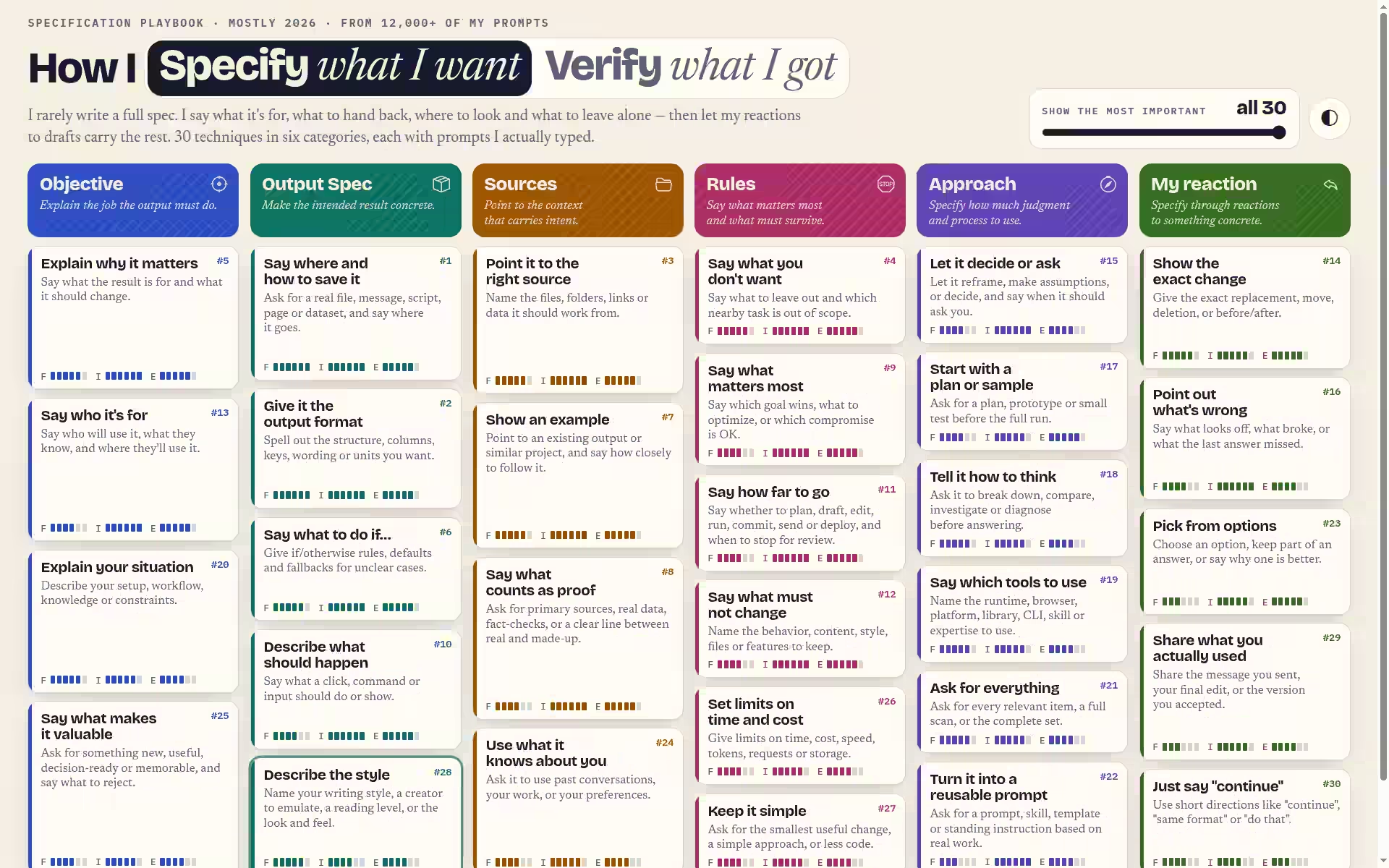
This page features the 30 prompting approaches I’ve used and the 22 verification approaches I’ve used, prioritized based on frequency, impact, and effectiveness.
For example, my top prompting techniques are:
- Say where and how to save it: That way, I know where the result is and what to do with it next. Real example: “Create a Word doc which has images of 73 plants, each with a heading with the plant’s name (common name in English or Hindi). Save it on @LocalMCP as ~/Downloads/plant-images.docx.”
- Give it the output format. That way, it knows what to create. Real example: “I have uploaded a market report, from last week. Create exactly the same report in exactly the same format, but for today.”
- Point it to the right source. That way, it reads the material I meant, not something similar. Real example: “Using Local MCP, read prompts/gwslog.md and give me the feature list I would want from gwslog.py based on the features I’ve requested for recent scripts and how I’ve used them (see prompts/*.md, actual scripts, tmp.fish-history)”
You probably already do these. Here are some from the end of my list - and they’re more interesting. Like:
- Describe the style. Real example: “Write like Malcolm Gladwell.” Or “Podcast style, no formatting.” Very helpful in making the output easier for you to read.
- Share what you really did. Real example: “FYI - no response required. I sent this with almost no changes after reviewing. It’s a reasonable approach.” At the end of a chat, I tell the agent what I actually did or changed. It helps when I continue the chat later - and gives me useful data for future analysis.
- Just say “Continue”. I ask the agent to plan, then execute the next step when I say “Continue”. This lets me review the plan before it acts, and break big tasks into smaller steps.
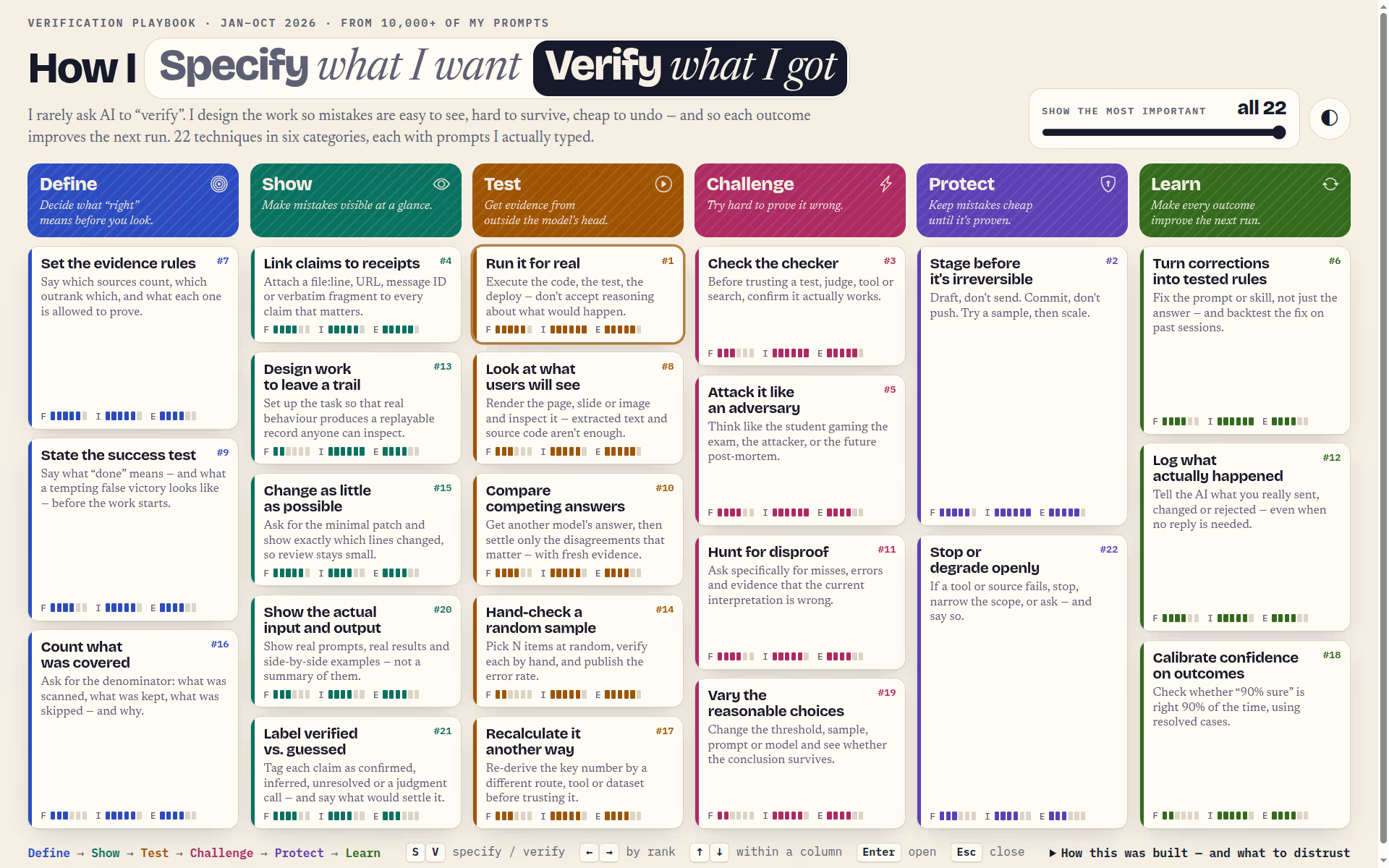
My top verification techniques are:
- Run it for real. Tell it to run realistic test cases and show the results. Code that looks right may still fail. Real example: “You can’t write to it directly, but create a copy, run and test, verify that it’s working as intended in every way, revise as required, and let me download the file.”
- Stage before it’s irreversible. Let it test or prepare a change before applying it for real. Real example: “Draft only. NEVER send or modify email.” Or, “OK, proceed with this, deploy to exam-dev and test it.”
- Check the checker. Is your test case correct in the first place? Are you checking the right behaviors? Real example: “Before fixing, make sure the test is correct and the code is what needs fixing. then fix.”
Again, most people do at least #1 and #2. #3 was initially a surprise to me - but checking the verifier has quite a high ROI. Otherwise, the agent might actually break correct code.
But as before, the ones near the end are more interesting. Like:
- Test with alternatives. Make sure the result doesn’t change when you change the inputs a little bit. Real example: “Try a few more prompt variations on a sample and see if any are promising and add the most promising variation to the result set.”
- Show actual text. You can spot errors instantly with text you recognize or verify. Real example: “Show key snippets of actual prompts & results verbatim in code blocks.”
- Flag the guesses. That way, I know what to check. Real example: “Propose a resolution with evidence, or mark #UNRESOLVED and state what evidence would settle it.”
- Fail loudly. Real example: “Work through @LocalMCP. First check that it works; stop if unavailable.” That makes sure it doesn’t silently assume something or try alternatives.
These are based on actual usage (over 10,000 prompts) and real data, so I guess that counts for something.
A good way to use this might be: start at the end and skim through. If you spot something, test it out. If it works for you, share it with others.
Better yet, paste this in your agent (if it can read past conversations):
Based on my past conversations, what techniques in https://files.s-anand.net/pages/verification-techniques/ (if any) are relevant to me AND necessary, e.g. because you tend to miss it?
List them, prioritized. Tell me how I can reuse those - without my having to tell you each time.