Recently, I’ve started using my browser both as the primary workspace (slightly more than VS Code) as well as my TODO list. That’s mainly due to better tab management and better tools.
Tab Management
The first big shift was turning on Vertical Tabs on Edge. Now, I can see and manage far more tabs. Typically, I have 80-200 tabs open now.
The next big shift was using tab groups. With vertical tabs, this makes tabs like a folder.
Since I was accumulating too many tabs, I needed a management system. I decided to apply the same principle as my TODO lists:
- All current work goes into a “WIP” tab, or task-specific category like Read, Lego, TDS, etc.
- All previous week’s WIP tabs are renamed “WIP YYYY-MM-DD” for that week.
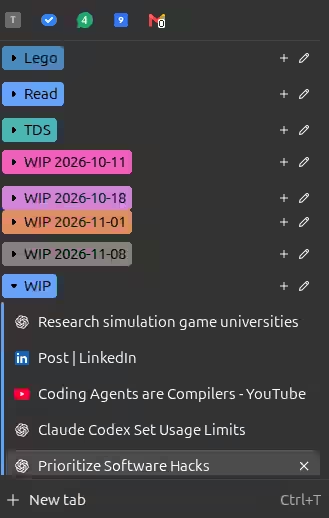
I also created a “Tab Notes” extension to help me make notes on each tab, e.g. what I should do next, when I opened it, etc.

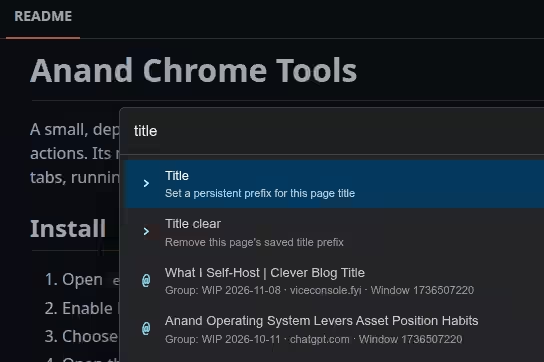
… and updated my “Anand Chrome Tools” extension that lets me change the title of a tab, telling me what I should do next.
Over time, I didn’t really need the extensions - the tab groups work well enough.
I also use an edge CLI that lets me export / import all my tabs. I run this daily to backup my open tabs. So, even if I close several tabs accidentally, I can restore most of them from yesterday.
Of course, a big unlock is that I use browser tabs as slides almost exclusively these days.
Tools
I find four capabilities really effective when extending browser capabilities.
- Bookmarklets let me change any site in almost any way.
- Extensions let me do more - even changing the browser itself.
- Chrome Devtools Protocol (CDP) lets me write external scripts that control the browser.
- Browser profile data lets me write programs to access browser history, cookies, etc. even without controlling the browser.
Bookmarklets are a big part of how I extend my browser. I have a pretty extensive list of bookmarklets.
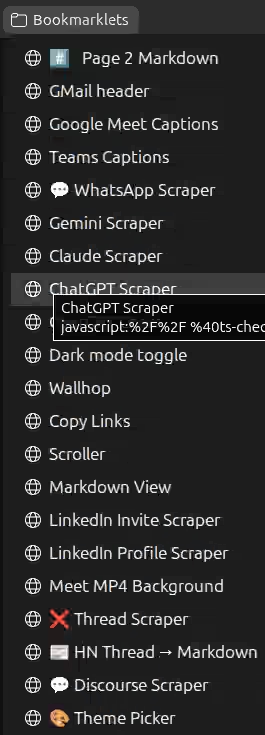
Some of the most used ones are:
- AI Scrapers - where I copy ChatGPT, Claude, or Gemini chats / prompts to save or pass to another agent.
- WhatsApp Scraper lets me copy an entire WhatsApp thread as Markdown or JSON.
- Meet Captions lets me save captions from Google Meet or Microsoft Teams. I can then ask AI “What should I say next?” and pass it the WIP file as context.
- GMail header lets me copy the mail header to pass to an agent, e.g. “Reply to this email…”
- Dark Mode enables dark mode for GMial and Hacker News, which don’t have this natively and I use a lot.
To make it easier to access these bookmarklets, I set up “Anand Chrome Tools” extension so that Ctrl + Shift + Space acts like the command palette in VS Code. I can pick a bookmarklet to run, a tab to switch to, or a custom command (like setting titles).
I also summarize what I browsed each data as part of my activities update - which gives agents a bit more context about when and why I browsed a tab.
It feels like I’m just scratching the surface of what’s possible, actually. Now that agents can write most code I can imagine, imagination may be all we need.