2011 1

Eating more for less

A couple of years ago, I managed to lose a fair bit of weight. At the start of 2010, I started putting it back on, and the trajectory continues. I’m at the stage where I seriously need to lose weight. I subscribe to The Hacker’s Diet principle – that you lose weight by eating less, not exercising. An hour of jogging is worth about one Cheese Whopper. Now, are you going to really spend an hour on the road every day just to burn off that extra burger? You don’t exercise to lose weight (although it certainly helps). You exercise because you’ll live longer and you’ll feel better. I’m afraid I’ll live too long anyway, so I won’t bother exercising just yet. It’s down to eating less. ...
2009 3

Open source in corporates

Last month, my first application went live. I’ve been writing code for 20 years. Not one line of my code has been officially deployed in a corporate. (Loser…) It’s a happy feeling. Someone defined happiness as the intersection of pleasure and meaning. Writing code is pleasurable. Others using it is meaningful. But this post isn’t quite about that. It’s about the hoops I’ve had to jump through to make this happen. ...

Client side scraping

“Scraping” is extracting content from a website. It’s often used to build something on top of the existing content. For example, I’ve built a site that tracks movies on the IMDb 250 by scraping content. There are libraries that simplify scraping in most languages: Perl: WWW::Mechanize Python: BeautifulSoup Ruby: HPricot PHP: XPath (built-in) Javascript: jQuery on env.js on Rhino But all of these are on the server side. That is, the program scrapes from your machine. Can you write a web page where the viewer’s machine does the scraping? ...

Infyblogs dashboard

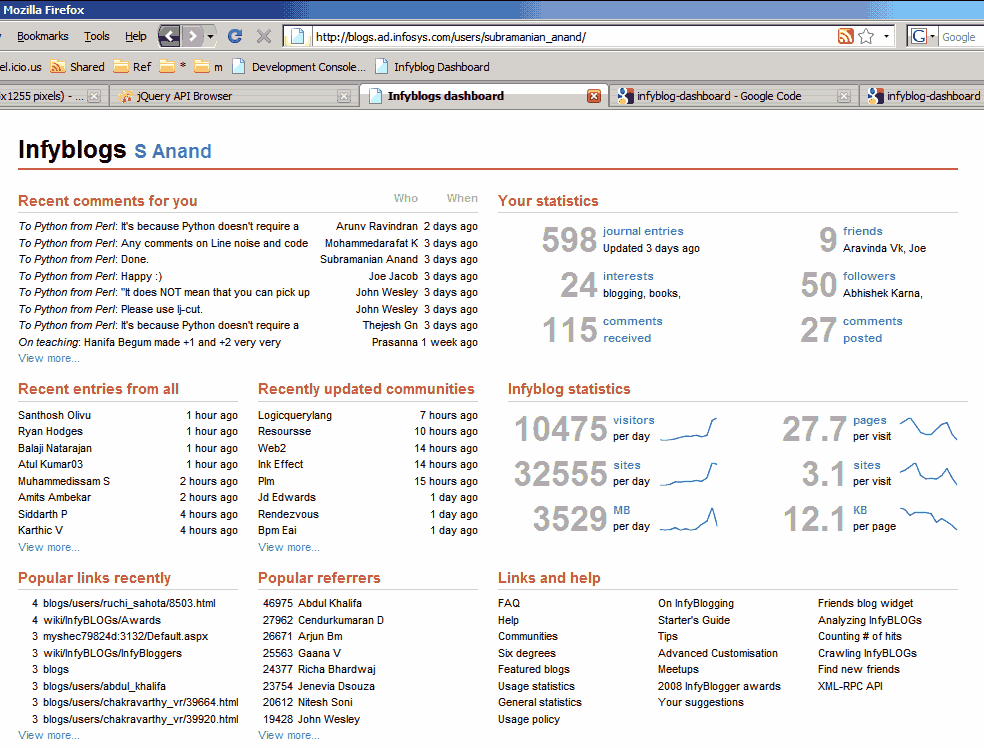
I just finished Stephen Few’s book on Information Dashboard Design. It talks about what’s wrong with the dashboards most Business Intelligence vendors (Business Objects, Oracle, Informatica, Cognos, Hyperion, etc.), and brings Tuftian principles of chart design to dashboards. So I took a shot at designing a dashboard based on those principles, and made this dashboard for InfyBLOGS. You can try for yourself. Go to http://www.s-anand.net/reco/ Note: This only works within the Infosys intranet. Right click on the “Infyblog Dashboard” link and click “Add to Favourites…” (Non-IE users – drag and drop it to your links bar) If you get a security alert, say “Yes” to continue Return to InfyBLOGS, make sure you’re logged in (that’s important) and click on the “Infyblog Dashboard” bookmark You’ll see a dashboard for your account, with comments and statistics The rest of this article discusses design principles and the technology behind the implementation. (It’s long. Skim by reading just the bold headlines.) ...

2008 2

Automating Internet Explorer with jQuery

Most of my screen-scraping so far has been through Perl (typically WWW::Mechanize). The big problem is that it doesn't support Javascript, which can often be an issue: The content may be Javascript-based. For example, Amazon.com shows the bestseller book list only if you have Javascript enabled. So if you're scraping the Amazon main page for the books bestseller list, you won't get it from the static HTML. The navigation may require Javascript. Instead of links or buttons in forms, you might have Javascript functions. Many pages use these, and not all of them degrade gracefully into HTML. (Try using Google Video without Javascript.) The login page uses Javascript. It creates some crazy session ID, and you need Javascript to reproduce what it does. You might be testing a Javascript-based web-page. This was my main problem: how do I automate testing my pages, given that I make a lot of mistakes? There are many approaches to overcoming this. The easiest is to use Win32::IE::Mechanize, which uses Internet Explorer in the background to actually load the page and do the scraping. It's a bit slower than scraping just the HTML, but it'll get the job done. ...

Chaining functions in Javascript

One of the coolest features of jQuery is the ability to chain functions. The output of a function is the calling object. So instead of writing: var a = $("<div></div>"); a.appendTo($("#id")); a.hide(); … I can instead write: $("<div></div>").appendTo($("#id")).hide(); A reasonable number of predefined Javascript functions can be used this way. I make extensive use of it with the String.replace function. But where this feature is not available, you an create it in a fairly unobstrusive way. Just add this code to your script: ...