2026 3

About Updates

For the week ending Saturday ------ midnight (SGT), share updates to `~/Dropbox/notes/about/*.md` reading from @LocalMCP (without modifying files): - `~/Dropbox/notes/transcripts/**/*.md` - `~/Documents/data/[email protected]/{mail,calendar,chat}.jsonl` - `~/Documents/data/[email protected]/{mail,calendar}.jsonl` - `~/Documents/data/whatsapp/*.jsonl` Inspect `~/Dropbox/notes/about/` files. Try to match each person to an existing file based on name, affiliation, and context. If no matching file exists: create only if there are 3+ meaningful interactions across days/channels, or 1 exceptionally important interaction likely to guide future dealings, or a there's repeated meaningful interaction outside the week. Name the file based on the Person Name and Affiliation (where guessable, else skip). For example: Khushi Kapoor BPB. Add one `## YYYY-MM-DD - short topic` section for the week, newest near the top after stable profile notes, picking latest date in case of multiple conversations. Include: substantial interactions that change how I should understand, work with, follow up with, or remember the person. Strong signals are: decisions, advice, critique, preferences, commitments, asks, opportunities, investments/startups, intros, conflict, personal context relevant to future interaction, repeated collaboration, or a person's distinctive operating style. Exclude: logistics, "running late", calendar coordination, meeting/schedule changes, tactical travel/logistics, receipts/alerts/GitHub notifications, broadcasts, tiny group comments, generic FYIs, one-off detailed emails from students/strangers unless they become repeated interaction, and facts already captured unless the new item changes them. For group transcripts, update a person only if they made a meaningful contribution, owned a decision/action, revealed a useful preference, or materially changed the direction. Do not credit everyone in the meeting. For each proposed note, write concise 1-line bullets. Each bullet should be useful later to Anand or an AI agent advising Anand. Use the right number of bullets as the relationship signal warrants, not a fixed count. 5-8 is fine when there's very rich information. Use more when the conversation materially changes how I should understand, work with, or follow up with the person. Approach: - Use a retrieval ladder: candidate table first from transcript frontmatter/filenames, existing `about/*.md`, and `transcripts/description.md`; deep-read only candidates that pass triage or are borderline. - Do not use raw mention counts to create files. Prior transcript index/title hits and meaningful cross-channel evidence matter more than full-body `rg` hits. - Use null-delimited file handling (`fd -0`, `xargs -0`, etc.) for all file loops because paths contain spaces. Capture: - what happened / what they asked / what was decided; - what this says about the person's priorities, constraints, or working style; phrase it tentatively unless it's repeated or strongly signaled; - open loops and follow-ups; - reusable future guidance: "When working with X, do Y." Avoid transcript summaries that belong in project notes. Person notes are for relationship memory and future interaction guidance. <OUTPUT-FORMAT> # Person Name Affiliation ## YYYY-MM-DD - Topic - ... (include compact source path(s) as evidence, e.g. `~/Dropbox/notes/transcripts/....md`) - ... # Person Name Affiliation ## ... # Review - Person Name: reason they may / may not be worth noting but need my judgment - mentioning other-period evidence if relevant. # Skipped - ... (compact list of high-volume false positives and why: logistics, notifications, minor group comments, etc.) # Checklist - [ ] Did not modify files. - [ ] Checked whether a matching person file already exists, including aliases/spelling variants. - [ ] `# H1` matches existing (or to-be) `~/Dropbox/notes/about/H1.md` - [ ] Did not create files for one-off weak interactions. - [ ] Did not summarize projects into every attendee's person note. - [ ] Kept bullets concise and future-useful. - [ ] Included source paths for every suggested edit. </OUTPUT-FORMAT>

Google Meet captions as a local transcript recorder

I’m a man of simple needs. All I want is: when I’m on Google Meet, I turn on captions. I wanted to click a bookmarklet and save those captions into a local Markdown file. (So that an AI agent can guide me from it.) Hence, Google Meet Captions. The code is in gmeetcaptions/. Drag the button to your bookmarks bar. Join a Meet. Turn on captions. Click it. You get a tiny panel with two buttons: Copy and Start Recording. ...

Migrating my blog from WordPress to Hugo

In 2009, I migrated from a self-made Perl static site generator to WordPress because it was slow, WordPress was dynamic and rapidly growing in features, and I wanted to write rather than code. (Also, I had plenty of time in 2009 for such things!) Over the years, problems crept in. Hosting costs ($200/year) for a slow server. No local writing - Windows Live Writer was dead. I wasn’t using most WordPress features. So it was time to migrate back to a static site generator. (Also, I now have plenty of time for such things!) ...

2025 8

Add derived slides from a transcript

Add appendices to (Marp) slide decks from transcripts to improve quality and learning. Write content for these 4 slide appendices based on the transcript, in the same style as the slides: - Quiz. List ≤5 non-trivial quiz questions based on the content, each ≤25 words. - Errata. Search only and fact-check every bullet points and list any corrections. Cite sources. - Counterpoints. Research and append alternative views to bullets. Cite sources. - Feedback. List ≤5 ways the speaker could improve clarity, engagement, or informativeness. Format the new slides as follows: - Begin each section with an H2 heading (≤7 words). - Each section lists ≤5 bullet points, each ≤25 words. - Write bullets as complete sentences. - Highlight in **bold** the top 1-3 phrases that address the section heading directly, if applicable. <SLIDES> ... </SLIDES> <TRANSCRIPT> ... </TRANSCRIPT>

Create an FAQ-style slide deck from a transcript

Annotate transcripts with section summaries, creating FAQ-style slides from talks / AMAs. Annotate this talk transcript by inserting slides (in Markdown) at logical breaks. Write in a fluid, natural style. - Use simple language as if explaining the concept to a student. - Write as if the slides were written BEFORE the talk. Don't refer to participants. - Don't condense into telegraphic fragments using semicolons (;), em-dash (—), arrow (→), etc. Example: Not "Improve setup—choose right tool; repeat" but "Improve set up by choosing the right tool and repeat the process.". - Prefer concrete subjects and active verbs over abstract nouns and linking verbs. Example: Not "Edge cases justify synthetic data" but "Synthetic data lets you test rare edge cases". Instructions - Divide the transcript into logical transcript sections covering one slide worth of content. Preserve the transcript order. - Prefix each transcript section with a Markdown slide. - Begin the slide with an H1 heading (≤10 words) that makes a declarative assertion. - Write as a complete sentence stating a finding, insight, or claim. - Use the Pyramid Principle: each title should answer "So what?" with a clear point of view (preferably with reason) - Use plain, conversational language: "makes it easy" not "reduces friction", "lets you" not "enables". - You may use "we" or "you" sparingly if it makes the title more direct and natural. - Write headings as an outline. **Verify**. See if it forms a complete, cohesive story covering the entire transcript. - Begin the slide with an H1 heading (≤10 words) that captures the core insight or action. - Write each slide, add 3-6 supporting paragraphs based on the transcript, each ≤30 words. - Highlight in **bold** the top 1-3 phrases that most closely support the slide heading, if applicable. - Try to explain the reason, impact, and/or implication ("what / why / so what") of the heading. - Incorporate content references / links if provided below. - Add a `<transcript>` tag with the first 10 words of transcript for this slide to mark the position. Append these slides: - Quiz. List ≤5 non-trivial quiz questions based on the content, each ≤25 words. - Errata. Fact-check every supporting statement and list all corrections (≤5 per slide, ≤30 words each). Cite sources. - Counterpoints. Research and append alternative views to the content (≤5 per slide, ≤30 words each). Cite sources. - Feedback. List ≤5 ways the speaker could improve clarity, engagement, or informativeness. <OUTPUT-FORMAT> # Outline - (Summary of first slide) - (Summary of second slide) - ... # (Summary of first slide) - (Supporting statement) - ... <transcript> (first 10 words of the transcript for the first slide) </transcript> --- # (Summary of second slide) - (Supporting statement) - ... <transcript> (first 10 words of the transcript for the second slide) </transcript> ... </OUTPUT-FORMAT> --- <CONTENT-REFERENCES> <!-- PLACEHOLDER: include content references if any --> </CONTENT-REFERENCES> --- # Transcript <!-- PLACEHOLDER: include transcript here -->

Transcribe talk

Transcribe talk recordings with Q&A. Transcribe this talk. DO NOT MISS ANY PART OF THE TALK. Drop verbal tics and fillers (um, uh, etc). Correct spelling and grammar but otherwise don't modify the original words. Add English translations to any non-English parts. Mark inaudible or unclear segments as "[inaudible]". Mark uncertain words with like "[word?]" or ambiguous possibilities like "[word1? word2?]". Break it into LOGICAL paragraphs beginning with timestamps, e.g. "[00:13] When did ..." For audience questions, prefix with "**Question**: ..." and answers with "**Answer**: ..." **Make key points / takeaways / memorable statements bold**. <!-- #TODO List details of talk or share slides, for context --> If video is provided, add this line: ...

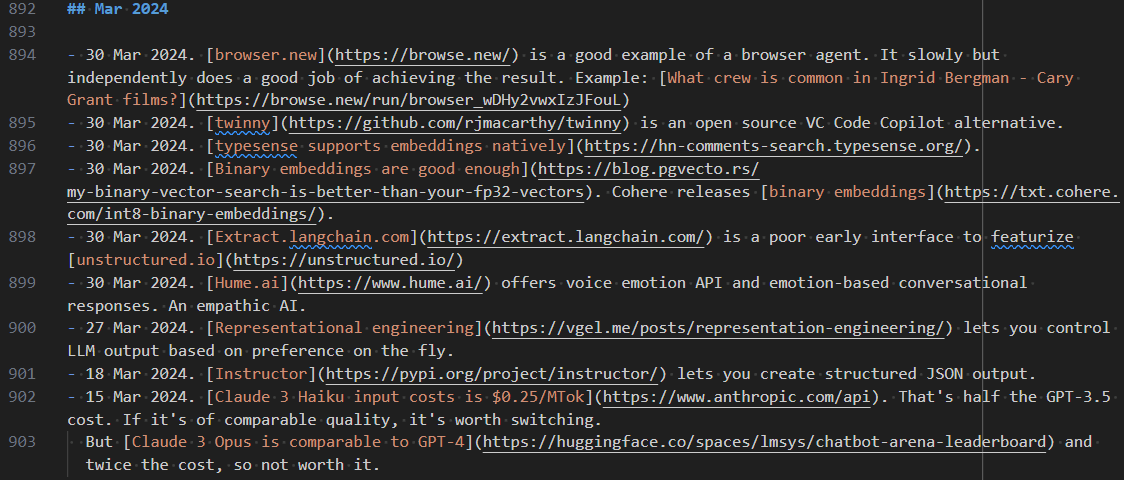
Things I Learned - 10 Aug 2025

This week, I learned: OpenAI supports a tool "type": "custom" that lets it write code as an argument to a tool call. Great for code / SQL generation. Even more powerfully, you can generate output following specific grammars, e.g. STL files, PostgreSQL dialect, Mermaid/PlantUML diagrams, OpenAPI specs, Vega-Lite JSONs, Cron expressions, GraphQL SDLs, Dockerfiles, Terraform HCLs, or any DSL! # #ai-coding The OpenAI playground has a GPT-5 Prompt Optimizer that can migrate prompts to GPT-5. Docsify 4.13.1 is 2 years old and uses [email protected] which is 5 years old. Newer plugins like marked-directive don’t work with it. Though docsify v5.0.0-rc1 is in development, it may be the better option for modern Markdown plugins. Here’s sample code. CommonMark has a powerful directive syntax proposal that lets you add classes, attributes, and arbitrary plugins to Markdown. For example, :abbr[MD]{#id .class title="Markdown"} for inline directives. Plugins exist for marked, markdown-it and remark. biomejs and dprint are gaining traction as prettier alternatives. I’m yet to try them but keen to explore. Skip biomejs for now. It uses tabs (not spaces) and does not respect .gitignore by default. Handling these is too much work. ⭐ Code generation is more flexible than tool calling. LLMs can’t write a tool-call loop, for example, but they can write code to run an API in a loop. So, I like telling the LLM to “write code using these APIs” than giving it APIs to tool-call. #ai-coding npx -y ccusage is an easy way of summarizing your Claude Code usage and cost. My cost so far (since 21 July) is about $10. The median session cost is ~50 cents. Most of it ($7) was from a single temporary coding chat that I kept continuing for way too long, building up the context window. # defuddle can be used in the browser to get the main content from web pages. A replacement for Mozilla Readability. # Modern Node.js Patterns for 2025 include these 5 features I’m excited by: Single-executable bundling. node --experimental-sea-config sea-config.json builds standalone binaries. ES Modules. Use node: prefix for built-in imports. import { createServer } from 'node:http'; Watch mode. Use node --watch file.js auto-reloads when file.js or dependencies change. Env file. Use node --env-file=.env loads .env as environment variables. node:test is a full-featured test framework with --watch and coverage. Concise explanations speed up decisions because they’re faster to read and understand (obvious). They’re also easier to combine with other ideas (less obvious). # I’ve been uncertain about htmx for some time now. This tutorial, HTMX is hard, so let’s get it right, convinced me that it’s too far from my mental model, so I’m unlikely to ever use it. ⭐ Slow, effortful practice (spaced recall, interleaving topics, self-testing) builds lasting knowledge but looks inefficient and doesn’t help with exams. # #beliefs GitDoc VS Code extension auto-commits and syncs notes. I dropped gitwatch in favor of this. It’s interesting that Gemini Deep Research cannot access Google Drive while Gemini can. On the other hand, ChatGPT Deep Research can access Google Drive but ChatGPT cannot. A trend that AI coding will only accelerate: “It is now possible for tiny teams to make principled software that millions of people use, unburdened by investors. … you need far less money and far fewer employees to reach far more customers. That wave is only just beginning.” # #ai-coding Typed languages are better suited for vibe coding. This will likely lead to the growth of typed languages (TypeScript, Rust, Go) but also of typing in untyped languages (e.g. Python) # #ai-coding Instead of Celery, Redis, Kafka, etc. as task queues, we could the file system as a message queue. For example, pending/task-01.json moves to wip/task-01.json to done/task-01.json. Folders for state/tags, files for task details. Foam is a note-taking VS Code extension. The WikiLinks, tags and backlinking features align naturally with Markdown note-taking. Via Steph Ango who uses Obsidian which nudged me to search for WikiLink-ing features in VS Code. I’m an open data hawk. But here are things I should remind myself of. # Privacy incubates creativity. People self-censor when watched. Privacy shields fragile ideas. Power assymetry. Big players can leverage openness more, e.g. Cambridge Analytics + Facebook data. Context matters. What’s harmless in one setting can be toxic in another. One-way door. Data can’t be unshared. Don’t scrap brakes dreaming of perfect roads. Anticipate tyrannical regimes / cultures. Not your call. You don’t share your neighbour’s medical records. One Punch Man is available as manga. I watched the anime first and assumed that came first. Apparently not. ⭐ In “kind” environments (stable rules, rapid and accurate feedback), specialize. In “wicked” environments (rules shift, feedback is noisy/late), generalize. ChatGPT Models’ ability to orchestrate longer workflows will improve. Factor that into your application design. Claude Code can already handle over 70 tasks in a workflow What happens when LLMs play Chinese Whispers / the Telephone Game? Here are learnings. ChatGPT Drift increases faster than linear with hops. Bigger models do better, but constrained prompts (“Copy the text exactly; change nothing.”) have a bigger impact. Low temperature improves copying fidelity. But even after “forgetting”, LLMs reproduce rare content if they’re trained on it. “In fact, React Native looks set to become the most engine-agnostic JavaScript runtime around”. The Many, Many, Many, JavaScript Runtimes of the Last Decade OMDb (simple) and TMDb (comprehensive) are API-friendly alternatives to the IMDb. copyparty seems one of the most feature-rich file servers out there. Single Python file, runs on any OS, works with any client, and optimized for speed. Video Quotes I enjoyed from Linus Torvalds’ TED interview I want to not have external stimulation. You can kind of see, on the walls are this light green. I’m told that at mental institutions they use that on the walls. It’s like a calming color. … the main thing I worry about in my computer is – it really has to be completely silent. If the cat comes up, it sits in my lap. And I want to hear the cat purring. I did not start Linux as a collaborative project. I started it as one in a series of many projects I had done at the time for myself, partly because I needed the end result, but even more because I just enjoyed programming. I’m actually not a people person. But I do love other people who comment and get involved in my project. The big point for me was not being alone and having 10, maybe 100 people being involved. Going from 100 people to a million people is not a big deal – to me. Well, I mean, maybe it is if you want to sell your result then it’s a huge deal. But if you’re interested in the technology and you’re interested in the project, the big part was getting the community. So Git is my second big project, which was only created for me to maintain my first big project. And this is literally how I work. Well, I do code for fun – but I want to code for something meaningful so every single project I’ve ever done has been something I needed. Apparently, my sister said that my biggest exceptional quality was that I would not let go. I can’t do UI to save my life. Good taste is about really seeing the big patterns and kind of instinctively knowing what’s the right way to do things. Companies like Google and many others have made, arguably, like, billions of dollars out of your software. Does that piss you off? No. No, it doesn’t piss me off for several reasons. And one of them is, I’m doing fine. But the other reason is – I mean, without doing the whole open source and really letting go thing, Linux would never have been what it is. I think one reason open source works so well in code (is that …) Code either works or it doesn’t. The Uses This site has interviewed professionals for decades. From their repo I scraped the top developer apps post 2020: CloudFlare has an Iceberg data catalog in R2 Data Catalog. Iceberg is like Parquet but supports metadata, time-travel, and schema edits. But I’m yet to find a single publicly accessible Iceberg catalog. Its open-data adoption is not as high as Parquet’s. Apache Iceberg vs Parquet Observable Notebook 2 is the new notebook format from Mike Bostock. It is vanilla JS and embeddable into other pages. THis would have been a big deal 2 years ago, but with the LLM ecosystem today, I’m not sure if it matters as much. To add CORS support to CloudFlare pages protected by Zero Trust, add a _headers file to your repo. (This is different from the Zero Trust CORS which allows automated logins.) Sample _headers that lets logged-in users fetch pages via fetch("...", { credentials: "include" }): /* Access-Control-Allow-Credentials: true Access-Control-Allow-Origin: https://your-site.example.com Access-Control-Allow-Methods: GET, HEAD Access-Control-Allow-Methods: * As corporates restrict the use of LLMs, I see employees purchasing personal laptops to use LLMs on. An interesting trend! openai-python has a CLI. You can run uvx openai api chat.completions.create --stream -m gpt-4.1-nano -g developer 'Translate to Chinese' -g user "Hello" for example Anthropic has an OpenAI compatible API at https://api.anthropic.com/v1/. Claude Code tips from Things that didn’t work by Armin Rocher #ai-coding Speech-to-text. Cannot stress this enough but talking to the machine means you’re more likely to share more about what you want it to do. I maintain some basic prompts and context for copy-pasting at the end or the beginning of what I entered. I ended up preloading executables on the PATH that override the default ones, steering Claude toward the right tools, e.g. running python asks it to use uv. I use the task tool frequently for basic parallelization and context isolation. Simply taking time to talk to the machine and give clear instructions outperforms elaborate pre-written prompts. Forcing myself to evaluate the automation has another benefit: I’m less likely to just blindly assume it helps me. Research indicates that we don’t know in advance which prompts will help. Evals beat prompt engineering. Ethan Mollick

Tools

Results of my software tool evaluations. 🟢 is my current choice and 🟡 is worth evaluating. Online tools Squoosh compresses images Edit PDF edits PDFs Photopea edits images | Pixlr WordCount counts words in text, as well as reading time I Love PDF compresses PDFs WebsocketKing tests websockets Paste HTML/Rich text as Markdown Markdown to HTML: Dillinger.io | (https://markdowntohtml.com/) Vert for audio/video/document conversations Archive: ...

How to publish an eBook in 60 minutes

I published an eBook on Amazon. It takes an hour if you have the content ready. STEP 1 (10 min): Set up a Kindle Direct Publishing account with your address, bank details, and tax info. STEP 2 (15 min): Export my London 2000 blog archive and convert to Markdown. STEP 3 (10 min): Reformat the Markdown by writing a script in Cursor. Here’s the prompt: Write a Python script that reads *.md including the YAML frontmatter, adds the YAML title as H1, date (yyyy-mm-dd) like Sun, 01 Jan 2000 in a new para after the frontmatter and before the content. ...

Voice Chat to Slides: My New AI-Powered Workflow

Here’s my new workflow for creating slide decks: ChatGPT interviews me and creates Markdown slides. I use Marp to convert Markdown to slides. LLMs create supporting images. I deploy on GitHub Pages. … and here are 2 decks created this way. Visualizing LLM Hallucinations LLMs in Education Let’s look at how I built the second example, step by step. ChatGPT interviews me and creates Markdown slides While walking 75 minutes from home to IIT Madras to deliver this talk, I had ChatGPT interview me in standard voice mode. ...

A challenge of blog questions

Thejesh tagged me with these questions. Why did you start blogging in the first place? I started my website in 1997 on Geocities at https://www.geocities.com/root_node/, mostly talking about me. (A cousin once told me, “Anand’s site is like TN Seshan - talking only about himself.” 🙂) (As an aside, I didn’t know that searching for Geocities on Google renders the results in Comic Sans!) I wanted a place to share the interesting links I found. Robot Wisdom by John Barger and Scripting News by Dave Winer were great examples: collection of interesting links updated daily. ...

2024 1

My learnings as week notes

One of my goals for 2024 is to “Compound long-term goals, daily.” Learning is one of those. Some people publish their learnings as weekly notes, like Simon Willison, Thejesh GN, Anil Radhakrishna, and Julia Evans. I follow their notes. I started doing the same, quietly, to see if I could sustain it. It’s been a year and it has sustained. I’m finally publishing them. My week notes are at til.s-anand.net. Here’s the source code. ...

2023 1

Book notes

I take notes as I read or listen to books. Here are the notes. They’re mostly in Markdown. They’re meant for me. They may not be as clear to you. They’re often written on a mobile while I walk. They may have spelling mistakes.

2022 1

Time Management

The question people ask me most often is, “How do you manage your time?”. Everyone has the same 24 hours in a day. Time management is about feeling we’ve achieved more with that time. There are 3 parts to this: Accepting limits. I’m grateful I’m not bored, learn from the struggle, and calm myself with acceptance. Creating capacity. I’ve tried with sleep, exercise, eating well, meditation, focus time, and family support. I plan to try delegation Executing effectively. I’ve tried idea-lists, mood management, calendaring, commitments, intentionality, journaling. Accepting limits Be grateful. Until I was 12, I was bored to death with nothing to do. Someday, I’ll spend retirement fighting boredom (like my father). But right now, I have more to do, that I want to do than I can handle. I’m grateful. ...

2021 1

How to extend Markdown with custom blocks

One problem I’ve had in Markdown is rendering a content in columns. On Bootstrap, the markup would look like this: <div class="row"> <div class="col">...</div> <div class="col">...</div> </div> How do we get that into Markdown without writing HTML? On Python, the attribute lists extension lets you add a class. For example: This is some content {: .row} … renders <p class="row">This is some content</p>. But I can’t do that to multiple paragraphs. Nor can I next content, i.e. add a .col inside the .row. ...

2020 1

Micro-notes

I maintain my (extensive) notes in text files. I’ve explored Evernote, Onenote, Google Keep, Apple Notes, and many other platforms. But text files work. I store them as Markdown and sync them on DropBox. They used to be relatively large files (50-100KB) each, on broad topics. For example: todo.txt was a consolidated list of things I had to do people.txt was a list of everything I knew about people (addresses, birthdays, etc) towrite.txt was a list of everything I wanted to write about notes.txt was where I tracked notes about any topics … and more This led to a couple of problems. ...

2011 1

Markdress

This year, I’ve converted the bulk of my content into Markdown – a simple way of formatting text files in a way that can be rendered into HTML. Not out of choice, really. It was the only solution if I wanted to: Edit files on my iPad / iPhone (I’ve started doing that a lot more recently) Allow the contents to be viewable as HTML as well as text, and Allow non techies to edit the file As a bonus, it’s already the format Github and Bitbucket use for markup. ...