2026 10

Oh Shit moments with Gen AI

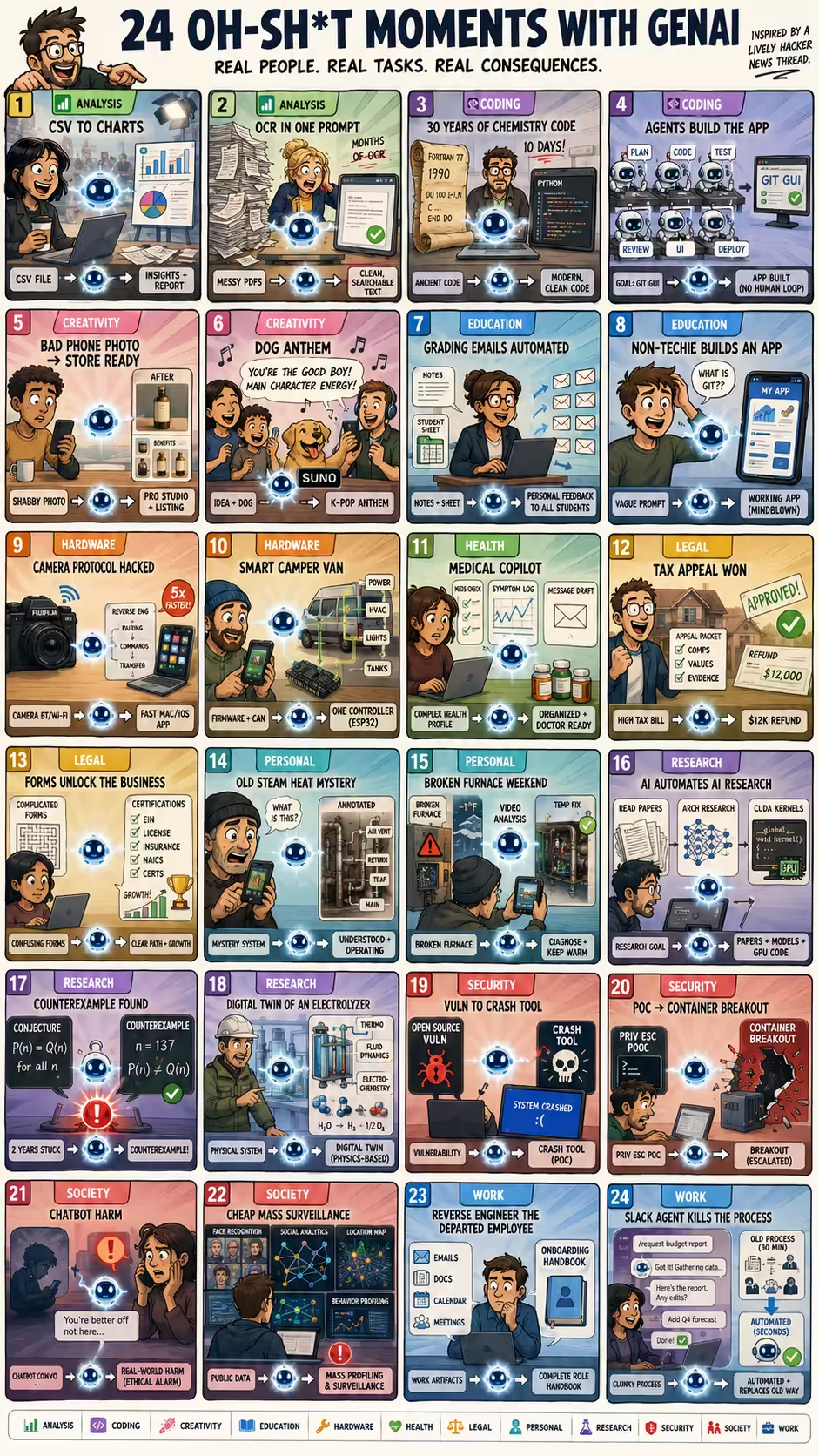
Hacker News has a lively thread asking What was your “oh shit” moment with GenAI?. Here are two dozen that gives a sense of what real people find impressive (or worrying) about AI capabilities. Analysis simonw used ChatGPT Code Interpreter to upload a CSV, analyze it, create charts, automating everything a software for journalists would do. Analysis Sobrino saw that a months-long OCR project to read and clean-up PDFs is now just a prompt on ChatGPT. Coding plumefar used Claude and Gemini to modernize 20-30 years of chemistry code in 10 days. Coding veidr used a multi-agent fleet managing coordination, testing, UI feedback loops, etc. with no-human-in-loop coding to build a useful git-submodule GUI. Creativity idopmstuff used Nano Banana Pro to turn a poor iPhone product photo into usable e-commerce product photography and Amazon-style infographics, replacing a photographer/designer workflow. Creativity koreth1 used Suno to generate a K-pop-style anthem about their family dog with a catchy melody and lyrics funny enough to make the family laugh. Education plagasul saw a teacher automate grading feedback emails based on notes and the student list spreadsheet. Education aniviacat watched a non-technical brother build a complex working app with Codex using vague, shallow wording despite not knowing code, git, or technical details. Hardware ivanvanderbyl used Claude to reverse engineer a FujiFilm camera’s Bluetooth/Wi-Fi transfer protocol and build a much faster native Mac/iOS transfer app. Hardware shreddude had Claude decompile camper van firmware, document CAN interfaces, and program an ESP32 to control power, HVAC, lighting, and tanks. Health TylerE used Claude as a health adjunct to organize a complex medical profile, screen for drug interactions, log symptoms, and draft portal messages to doctors. Legal bsiverly used AI to prepare a San Francisco property-tax appeal with valuation research, and the city agreed, sending a $12k refund. Legal grumblepeet used AI to fill out complex government-framework enrollment forms and identify the certification steps needed, transforming their business. Personal acosmism used ChatGPT screenshots to understand and operate a 100-year-old home’s steam heating system in winter despite knowing nothing about it. Personal andrewthornton used Gemini videos to diagnose a broken furnace during a cold holiday weekend and keep it running until HVAC service arrived. Research angusturner found that Opus does reads papers, does architecture research and creates CUDA kernels… It is AI automating AI research. Research chaoxu used ChatGPT to find a counterexample to a theoretical computer science conjecture they’d been trying for 2 years. Research rochansinha built a physics-based digital twin for an electrolyzer system, covering thermodynamics, fluid dynamics, and electrochemical reactions at a level usually needing expensive specialist software. Security kstrauser used a coding agent to test an open source vulnerability, and in a few minutes, had a tool that could crash any system using this software. Security raesene9 gave an LLM a Linux privilege-escalation PoC and asked whether it could become a container breakout; it generated a working container breakout in one prompt. Society laboring1 read that a character.ai chatbot encouraged a child to commit suicide, making the “oh shit” moment about real-world harm, not capability. Society ozgung realized AI makes large-scale profiling, surveillance, and social-media analysis cheap, fast, and accurate enough to change privacy and power dynamics. Work binarysolo used Gemini to reverse engineer a departed employees’ work from their emails/docs/calendar/meetings and create an onboarding document. Work eqmvii built a Slack agent that took over a 30-minute internal business process, handled ambiguity and edits, and eventually killed the old process. ...

Agent-consumable content

I’m making more and more of my content agent-consumable, i.e. easier for ChatGPT, Claude Code, etc. to read, in three ways. One, I export content in an agent-friendly way. Google email, calendar, chat. I use gws to back up into scannable one-line entries. Meet recordings. I back up transcripts and videos (with a compact audio copy). WhatsApp chats that I back up into similar one-liners. Browsing history by exporting my Edge history SQLite database. Daily activities by integrating the above with my command line and commit history. AI conversations by exporting them manually or via bookmarklets. Social media records like LinkedIn invites/conversations, Twitter, Hacker News, Discourse, etc via bookmarklets or scripts. Financial records like bank statements, receipts, payslips, tax filings, utility payments, rentals, property records, investments, insurance, pensions, invoices, credit scores, etc. by exporting them manually. Medical records like tests, prescriptions, doctor visits, etc. by exporting them manually. Personal records like certificates, educational records, CV, passport / visa applications, etc. by exporting them manually. Two, I log / generate more content. For example: ...

People skills with AI

I advise people that people skills are important in the AI era. Now, I’m using AI to help me with people skills. This morning, I wrote a script to export my WhatsApp conversations this year. That makes it easy to feed it into AI models. Then I used my Local MCP connector and asked Claude: Who are people in my life that most deserve an unreasonable gesture of thanks and what would that be? ...

Meeting Preparation

You are a brilliant, brutally honest Chief of Staff. You have full access via Local MCP bash tool to: - Calendar search, e.g. `gws calendar events list --params '{"calendarId":"[email protected]","timeMin":"...","timeMax":"...","singleEvents":true,"orderBy":"startTime"}` - Past transcripts, e.g. `ug -s -r --heading -n -i -E --iglob '*PERSON*.md' -B2 -A12 '(^|[^a-z])(actions?:|action items?|next steps?|todo|follow[- .]?up)|owner|due' /home/sanand/Dropbox/notes/transcripts/` - Past emails, calendars, chats: `/home/sanand/Documents/data/[email protected]/`, `/home/sanand/Documents/data/whatsapp/`, `gws gmail users messages list --params '{"userId":"me", "q": "from:..."}'`, read attachments if needed. Produce a BRIEFING CARD for each meeting today. Skip meetings I declined, purely personal or logistical blocks (sleep, travel, lunch, spillover) or meetings only with [email protected] + [email protected] (unless the title / description indicates I'm meeting someone). For each meeting, output this structure: --- ## [HH:MM] Meeting Title — Relationship Type (e.g. client / internal leader / new contact) > **⚡ [One sentence, ≤25 words: what this meeting is really about, what you & the audience really need to take away, and therefore what you need to do]** - **What happened**: [Story so far, recent meetings, what's pending, ...] - **What to do**: [My top priorities, point of view, what framing the audience needs; what I'll learn, build, or test; what decision they need to unblock; ...] - **What to remember**: [OPTIONAL: Pending actions, things I should not miss] - **Questions**: [OPTIONAL: If you're particularly unclear about this meeting, ask me 1-2 questions that most narrow the direction] --- Rules: - Dig deep to discover the REAL agenda, not just the stated one from the calendar. Search in: - Transcripts: always search full-text, not just file name, for company AND person - Web search for people/company context - Chats (Google Chat, WhatsApp) and emails (sent, too): ALWAYS check for latest context - Re-scan for action items, decisions, or open threads, on the people + topic and report the latest status. - Prioritize most recent interactions. Older than 1 week is likely stale. Search across chat/email/transcript for latest interactions/context. - Encode how I tend to behave with the person, and how the person tends to behave, based on past interactions. - Each card must be readable in 60 seconds. - Use VERY simple language.

AI Experiments

A collection of little AI experiments that unlock ideas. VOICE Speak to ChatGPT in a language other than English VISION Upload your palm’s photo and ask for a palmistry reading Upload a screenshot of a contacts list and ask for a Google Contacts CSV import MUSIC On Gemini select “Create music” (Lyria). Then prompt: “Create a vote of thanks for the following people. [People]” “Create a 30s loopable introduction jingle for [Speaker] who’s speaking about [Topic]” IMAGE On Gemini select “Create image” (Nano Banana Pro) and prompt: “Draw this as a visually rich, intricately detailed, colorful, and funny, sketchnote. [Content]” AUTOMATIION On Google Workspace Studio, prompt: “Add an URGENT label to emails that need immediate action by me.” On Claude Code Desktop, prompt: “Send a test email to myself.” ANALYSIS On ChatGPT, prompt: “Research and compare the AI policies across universities as a table.” RESEARCH On Claude Code / Codex, prompt: “Write a data story analyzing movie lengths over time.” It will search, download, write code, analyze, and visualize.

Hack of the Day on Times of India

Last Friday, 20 Mar 2026, this “Hack of the Day” was published by The Times of India. My agents generated it entirely automatically. Here’s how that happened. On 12 Feb 2026, I met Rohit Saran, Managing Editor at The Times of India. “Our biggest challenge is the starting challenge. What story to do?” he said. “We waste a lot of time and we starve stories because of this.” What if AI could help with that? We talked for nearly two hours - and left asking: “Should we do just a daily visual newspaper?” ...

Coding agents ARE the new software

Increasingly, I use coding agents instead of writing software. For example, I built a Blog UMAP. Then, I built Calvin UMAP. And more. But instead of building re-usable software, I just ran Claude with prior context. Increasingly, I use coding agents to run software. For example, I use Codex to classify my expense receipts. It writes re-usable code, but I run it using Codex, and it updates the code with new/edge cases. ...

AnalAIzing Cloud Costs

I have a GitHub Education since I teach at IITM. But if I switch back to a free account, how much would I need to pay? I asked Codex (5.3, xhigh): My GITHUB_TOKEN is in .env. Go through my GitHub billing. Ignore the $100 sponsorships I make. Other than that, my current metered usage is $6.71 for Feb 2026 (which is included in my billing plan). $0.35 comes from sanand0/exam and $0.34 from sanand0/blog and so on. That’s coming mostly from “Actions Linux”, occasionally “Actions Storage”. Pick a few of the top repos and tell me what I should do to make the cost zero - or reduce the cost as much as possible. See if there’s a pattern across repos. ...

Using AI for work news

This week, Namit and I met a Straive team that operates from a client office. One team member asked: I believe that we are doing wonders out here, but we are closed from what is happening in the rest our organization. I want team members to interact with others to see what interesting things they have delivered and where we can implement that solution. Could we have sessions, maybe a monthly newsletter, showing what innovations we’re working on? This would really keep us engaged with the tech that is going outside of the work that we do. ...

Where

Here’s my travel schedule. Fri 13 Mar 2026: Hyderabad Mon 26 Jan 2026: Singapore Fri 23 Jan 2026: Chennai Mon 19 Jan 2026: Hyderabad Mon 12 Jan 2026: Chennai Sun 14 Dec 2025: Singapore Thu 11 Dec 2025: Delhi Mon 08 Dec 2025: Chennai Thu 04 Dec 2025: Hyderabad Mon 01 Dec 2025: Chennai Mon 10 Nov 2025: Singapore Sat 01 Nov 2025: Chennai Thu 30 Oct 2025: Hyderabad Mon 27 Oct 2025: Chennai Mon 29 Sep 2025: Singapore Wed 17 Sep 2025: Chennai Fri 12 Sep 2025: Bangalore Sun 31 Aug 2025: Singapore Wed 27 Aug 2025: Hanoi Sat 23 Aug 2025: Ho Chi Minh City Wed 20 Aug 2025: Bangalore Sat 16 Aug 2025: Chennai Wed 16 Jul 2025: Singapore Sun 29 Jun 2025: Chennai Wed 25 Jun 2025: Bangalore Mon 23 Jun 2025: Pune Sat 21 Jun 2025: Chennai Tue 13 May 2025: Singapore Fri 09 May 2025: Chennai Tue 06 May 2025: Hyderabad Tue 29 Apr 2025: Chennai Fri 28 Mar 2025: Singapore Sat 22 Mar 2025: Chennai Thu 20 Mar 2025: Hyderabad Sat 15 Mar 2025: Chennai Wed 12 Mar 2025: Bangkok Tue 25 Feb 2025: Singapore Fri 21 Feb 2025: Hyderabad Thu 20 Feb 2025: Mumbai Mon 17 Feb 2025: US-Newark Thu 13 Feb 2025: US-San Francisco Sun 09 Feb 2025: US-Newark Thu 30 Jan 2025: Chennai Mon 16 Dec 2024: Singapore Wed 04 Dec 2024: Chennai Sat 23 Nov 2024: Singapore Sat 16 Nov 2024: Chennai Tue 12 Nov 2024: Mumbai Tue 01 Oct 2024: Seoul Mon 30 Sep 2024: Singapore Tue 24 Sep 2024: Chennai Sun 22 Sep 2024: Mumbai Thu 19 Sep 2024: Bangalore Sun 15 Sep 2024: Hyderabad Tue 20 Aug 2024: Singapore Fri 16 Aug 2024: Chennai Thu 15 Aug 2024: Bangalore Mon 12 Aug 2024: Hyderabad Sat 10 Aug 2024: Chennai Fri 09 Aug 2024: Delhi Wed 07 Aug 2024: Bangalore Mon 15 Jul 2024: Singapore Fri 05 Jul 2024: Chennai Wed 03 Jul 2024: Hyderabad Wed 26 Jun 2024: Bangalore Mon 24 Jun 2024: Bangalore Tue 18 Jun 2024: Chennai Sun 16 Jun 2024: Hyderabad Fri 14 Jun 2024: Singapore Mon 03 Jun 2024: Tokyo Thu 18 Apr 2024: Singapore Thu 04 Apr 2024: Chennai Tue 02 Apr 2024: Hyderabad Thu 28 Mar 2024: Chennai Mon 26 Feb 2024: Singapore Sat 24 Feb 2024: Chennai Thu 22 Feb 2024: Hyderabad Fri 16 Feb 2024: Chennai Thu 15 Feb 2024: Pune Wed 14 Feb 2024: Pune Sun 11 Feb 2024: Chennai Sat 27 Jan 2024: Singapore Sat 20 Jan 2024: Chennai Thu 18 Jan 2024: Bangalore Wed 10 Jan 2024: Bangalore Sun 31 Dec 2023: Chennai Fri 29 Dec 2023: Kuala Lumpur Thu 28 Dec 2023: Kuala Lumpur Sat 11 Nov 2023: Singapore Sun 29 Oct 2023: Hyderabad Sat 14 Oct 2023: Singapore Sun 01 Oct 2023: Chennai Fri 29 Sep 2023: Hyderabad Tue 26 Sep 2023: Bangalore Wed 30 Aug 2023: Singapore Fri 25 Aug 2023: Chennai Thu 24 Aug 2023: Hyderabad Wed 23 Aug 2023: Hyderabad Wed 09 Aug 2023: Singapore Sat 29 Jul 2023: Chennai Mon 24 Jul 2023: Hyderabad Fri 21 Jul 2023: Chennai Wed 19 Jul 2023: Mumbai Sat 15 Jul 2023: US-San Francisco Thu 06 Jul 2023: US-Newark Mon 29 May 2023: Singapore Sat 27 May 2023: Chennai Wed 24 May 2023: Bangalore Fri 19 May 2023: Chennai Wed 17 May 2023: Delhi Thu 04 May 2023: Chennai Mon 01 May 2023: Bangalore Sun 23 Apr 2023: Chennai Thu 20 Apr 2023: Hyderabad Sun 26 Feb 2023: Singapore Mon 20 Feb 2023: Hyderabad Sat 04 Feb 2023: Chennai Wed 25 Jan 2023: Hyderabad Mon 23 Jan 2023: Chennai Thu 05 Jan 2023: Bangalore

2025 6

Is all AI content slop?

Is all AI content slop? I asked Claude to: Analyze this thread. Then explain it like a Malcolm Gladwell New Yorker article. https://news.ycombinator.com/item?id=45820872 It gave me a beautiful, engaging and insightful essay about a 300+ message debate about AI vs humans on routine tasks. https://claude.ai/share/60c5810f-5c81-4970-8026-a24bf89c3392 Is this slop? One phrase stood out: There’s an irony here that the commenter doesn’t quite state but implies beautifully: we’ve spent so long celebrating automation because humans are imperfect that we’ve forgotten we also value humans because they’re imperfect. ...

When to choose AI over humans

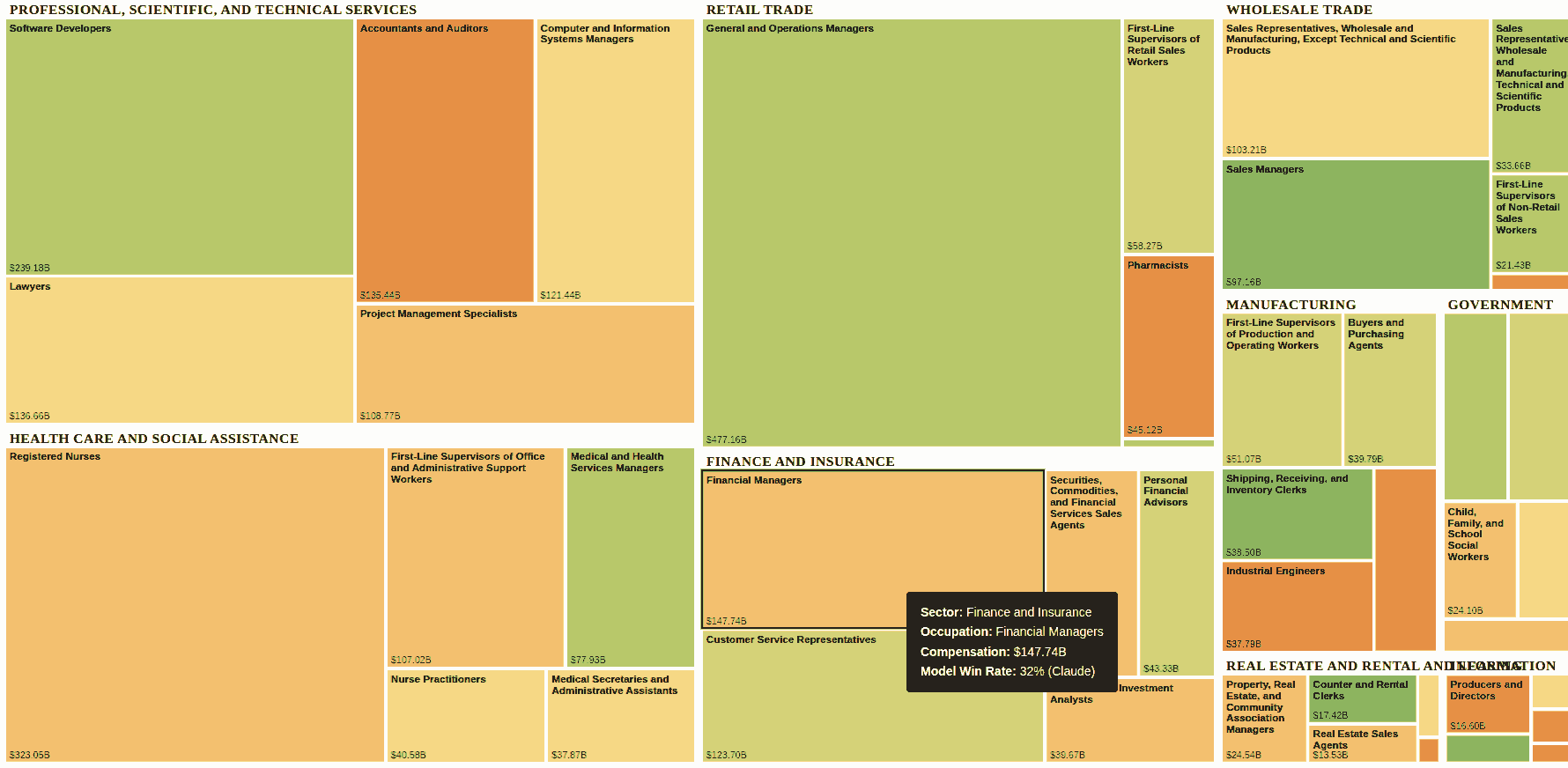
I charted the OpenAI GDPVal paper with industry compensation as the size and AI augmentation as color. Big green areas are we’re paying people where AI does better. Click here to see the interactive visualization. Clicking to see some actual tasks compared. I use this to check whom to ask advice: AI or professional. AI beats Personal Financial Advisors ~64% of the time. So I invested half my money using ChatGPT’s recommendation. (UTI Nifty 50, if you’re curious.) ...

Vibe-Scraping: Write outcomes, not scrapers

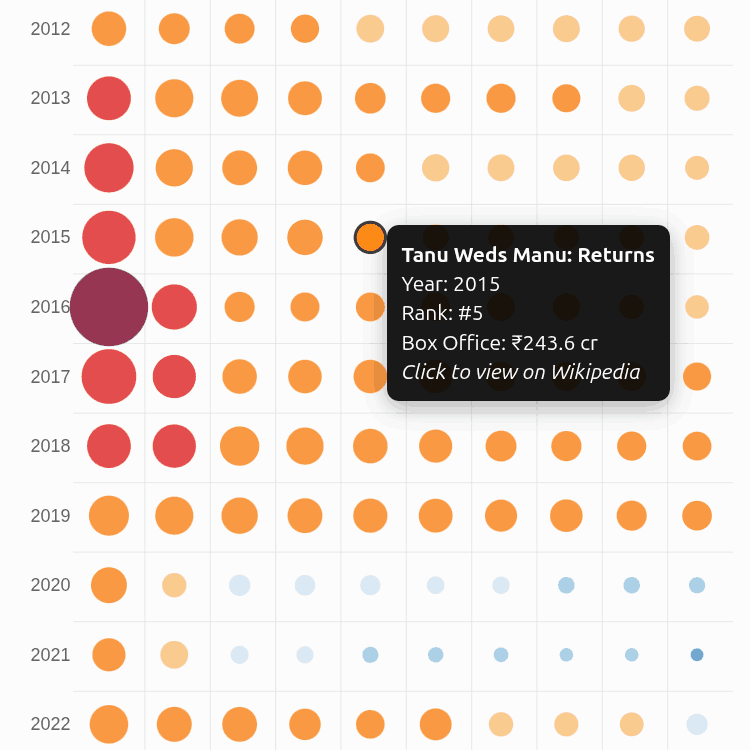
There hasn’t been a box-office explosion like Dangal in the history of Bollywood. CPI inflation-adjusted to 2024, it is the only film in the ₹3,000 Cr club. 3 Idiots (2009) is the first member of the ₹1,000 Cr club (2024-inflation-adjusted). The hot streak was 2013-2017: each year, a film crossed that bar: Dhoom 3, PK, Bajrangi Bhaijaan, Dangal, Secret Superstar. Since then, we never saw such a release except in 2023 (Jawan, Pathan). ...

The 10 sites I visit most often

Here are the 10 most frequent sites I use (based on Microsoft Edge’s home bar): ChatGPT. It replaced Google as my default knowledge source. I prefer it over Gemini, Claude, etc. because the app has good features (memory from past conversations, code interpreter, strong voice mode, remote MCP on web app, etc.) The OpenAI models have pros and cons, but the app features are ahead of competition. Gmail. It’s my work inbox. Interestingly, I check it more (and respond faster) than social channels (e.g. WhatsApp, Google Chat, LinkedIn). It also doubles up as my task queue. Prime Video. I mainly watch The Mentalist. Totally love Patrick Jane! Google AI Studio. Mostly for transcription. It’s better than Gemini on UI, ability to handle uploads, file-formats, etc. It’s also free (though the data is used for training.) My Talks page. I give 1-1.5 talks a week, mostly on AI/ML topics. I use Marp to render Markdown slides and publish it here. Google Chat. It’s Straive’s social channel. I can’t use it from my phone, so I log in only if I need to check if I missed something. LinkedIn. It’s where I post by default. I don’t use it for networking and only connect with people I’ve met and know well. YouTube. Mostly for movie clips over dinner. I occasionally watch educational content. Playground. LLM Foundry is Straive’s internal gateway to multiple model APIs (I built it). I use it to experiment with models, grab API keys, and demo LLMs to clients. Squoosh. I compress every image, every time. Mostly into WebP (hands-down the best format today), typically lossless with an 8-color palette, or lossy at ~0-10% quality for photos. That’s my current home row. It will change. But the reasons probably won’t: fast, simple, automatable, and practical (for me).

Pipes May Be All You Need

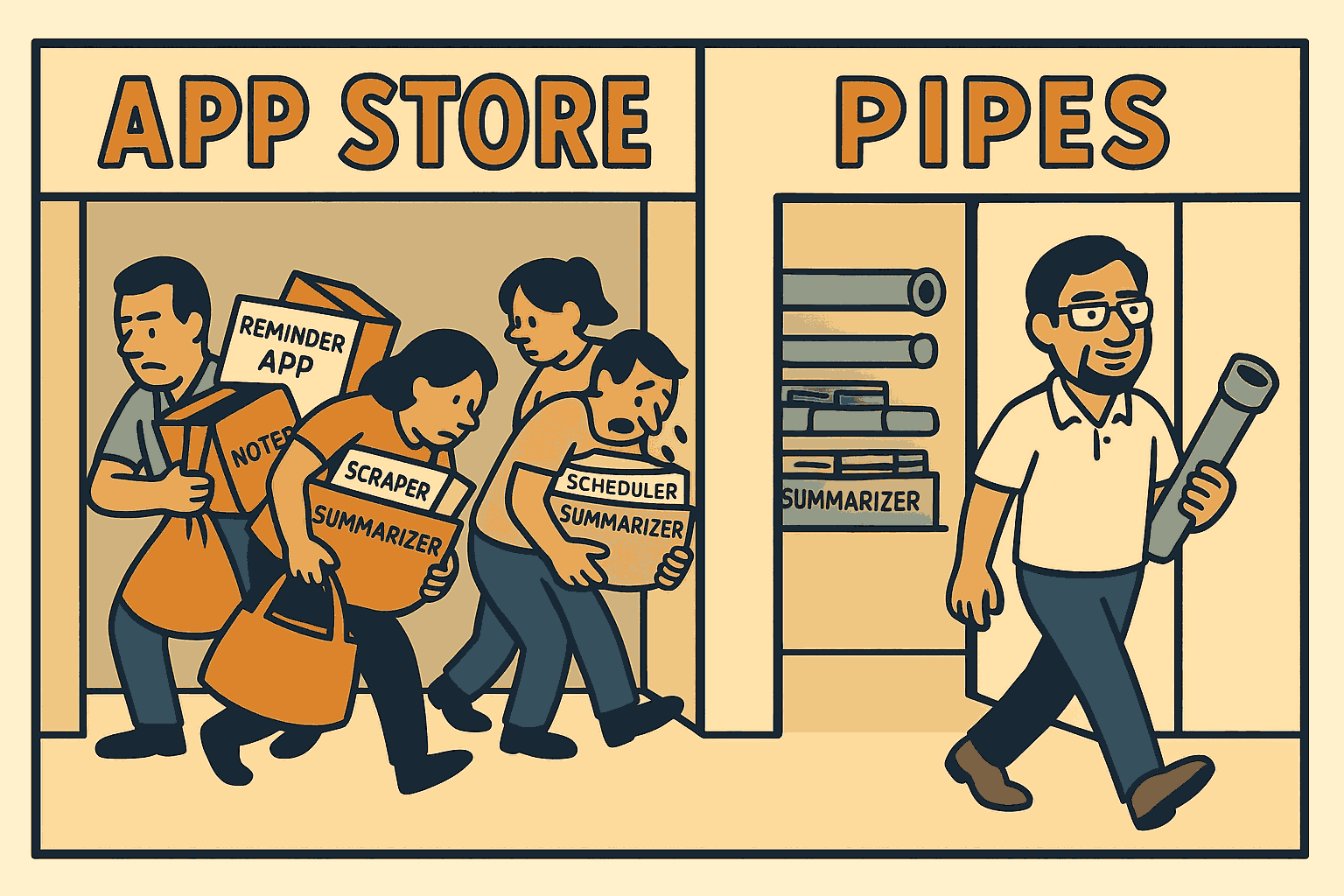
Switching to a Linux machine has advantages. My thinking’s moving from apps to pipes. I wanted a spaced repetition app to remind me quotes from my notes. I began by writing a prompt for Claude Code: Write a program that I can run like uv run recall.py --files 10 --lines 200 --model gpt-4.1-mini [PATHS...] that suggests points from my notes to recall. It should --files 10: Pick the 10 latest files from the PATHs (defaulting to ~/Dropbox/notes) --lines 200: Take the top 200 lines (which usually have the latest information) --model gpt-4.1-mini: Pass it to this model and ask it to summarize points to recall ...

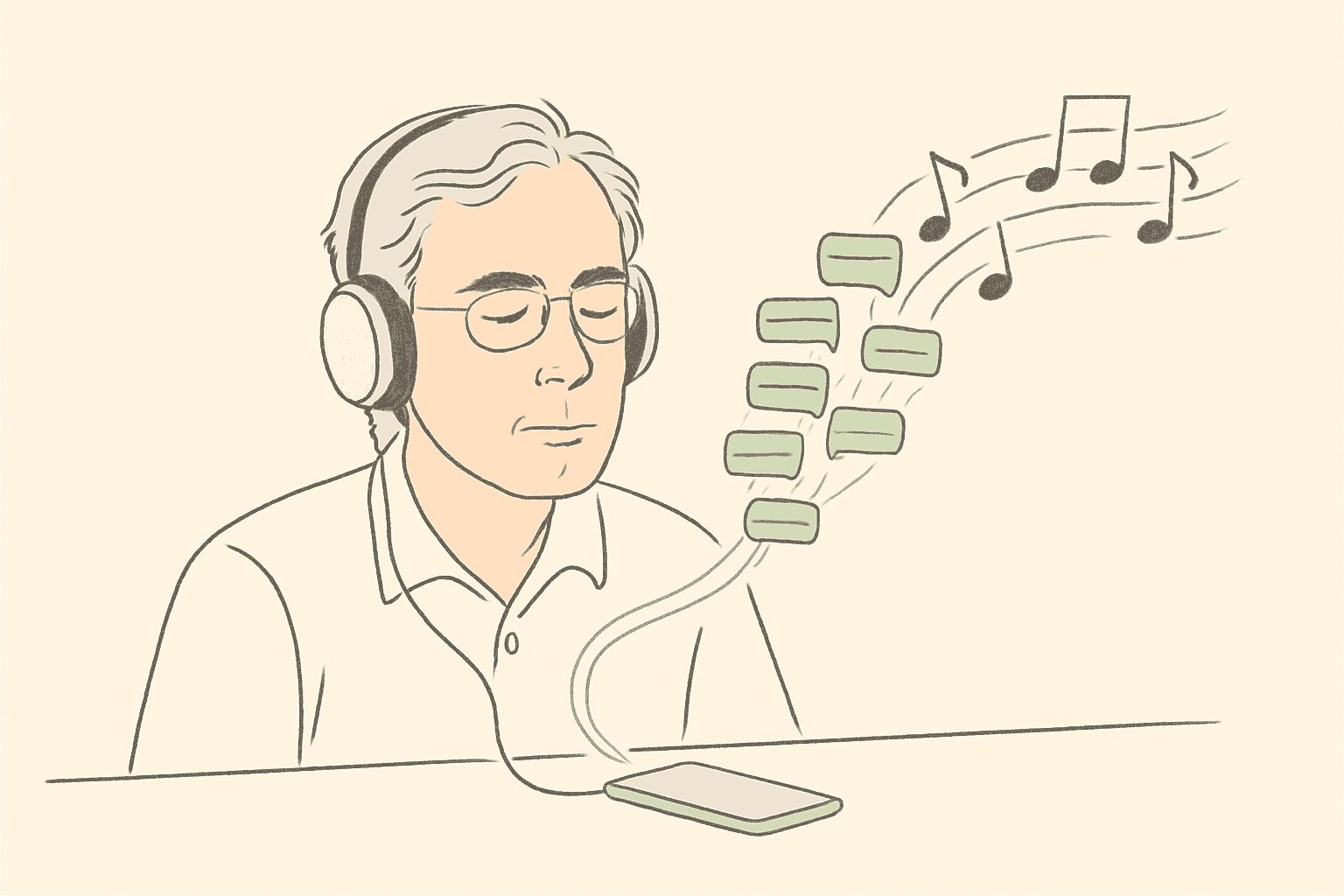
I catch up on long WhatsApp group discussions as podcasts. The quick way is to scroll on WhatsApp Web, select all, paste into NotebookLM, and create the podcast. Mine is a bit more complicated. Here’s an example: Use a bookmarklet to scrape the messages https://tools.s-anand.net/whatsappscraper/ Generate a 2-person script https://github.com/sanand0/generative-ai-group/blob/main/config.toml Have gpt-4o-mini-tts convert each line using a different voice https://www.openai.fm/ Combine using ffmpeg https://ffmpeg.org/ Publish on GitHub Releases https://github.com/sanand0/generative-ai-group/releases/tag/main I run this every week. So far, it’s proved quite enlightening. ...

2024 1

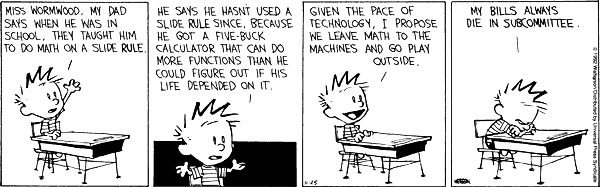
A friend told me today that using #ChatGPT will make humanity dumber. “Probably. Like always, #Calvin has the best response I know to that. “I propose we leave math to the machines and go play outside.” 🙂 LinkedIn

2010 1

Command line alarm

When I’m in front of my laptop, I usually forget the world around. Sadly, the world around has important things that need to get done on time. Like eating medicines, turning off the washing machine or the hob, etc. The one thing I’ve been lacking on my machine was a simple alarm system. I’d like to set an alarm to remind me to do something in 5 minutes, for example. And it should be dead simple to set up. ...

2009 1

Automating PowerPoint with Python

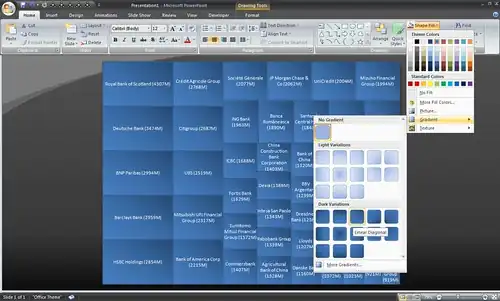
Writing a program to draw or change slides is sometimes easier than doing it manually. To change all fonts on a presentation to Arial, for example, you’d write this Visual Basic macro: Sub Arial() For Each Slide In ActivePresentation.Slides For Each Shape In Slide.Shapes Shape.TextFrame.TextRange.Font.Name = "Arial" Next Next End Sub If you didn’t like Visual Basic, though, you could write the same thing in Python: import win32com.client, sys Application = win32com.client.Dispatch("PowerPoint.Application") Application.Visible = True Presentation = Application.Presentations.Open(sys.argv[1]) for Slide in Presentation.Slides: for Shape in Slide.Shapes: Shape.TextFrame.TextRange.Font.Name = "Arial" Presentation.Save() Application.Quit() Save this as arial.py and type “arial.py some.ppt” to convert some.ppt into Arial. ...

2008 1

Lazy bargain hunting

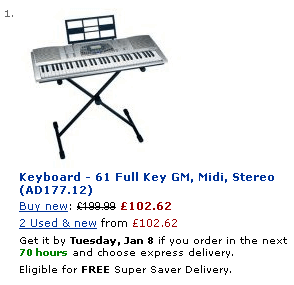
I’m thinking of buying a digital keyboard with touch sensitive keys and MIDI support. (The one other thing that I thought off – a pitch bend – puts the keyboards out of my budget.) I’d like a good deal. (Who doesn’t?) But I don’t like to spend time searching for one. (Who does?) So here’s the plan. Firstly, I’ll restrict my search to Amazon.co.uk. For electronics items, I haven’t found anyone consistently cheaper. Tesco has some pretty low prices, but not the range. eBuyer is pretty good, but not often enough. Google Products is the only other one that gets me consistent lower prices, but I’ve had my credit card identity stolen once before while shopping online, so I’d rather not pick any random seller listed on Google. ...

2007 2

Managing feed overload

I have only two problems with Google Reader. The first is that it doesn’t support authenticated feeds. Ideally, I’d have liked to have a single reading list that combines my e-mail with newsfeeds. GMail offers RSS feeds of your e-mail. But the feeds require authentication (obviously) and Google Reader doesn’t support that right now. (So I usually don’t read e-mail :-) The second is that it’s tough to manage large feeds. It’s a personal quirk, really. I like to read all entries. If there are 100, I read all 100. If there are 1000, I struggle but read all 1000. I’m too scared to “Mark all read” because there are some sources that I don’t want to miss. ...

RSS feeds in Excel

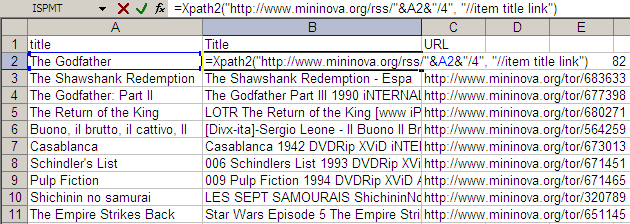
The technique of Web lookups in Excel I described yesterday is very versatile. I will be running through some of the practical uses it can be put to over the next few days TO generalise things beyond just getting the Amazon price, I created a user-defined function called XPATH. It takes two parameters: URL of the XML feed to read Search XPath list string (separated by spaces) This function can be used to extract information out of any XML file on the Web and get it out as a table. For example, if you wanted to watch the Top 10 movies on the IMDb Top 250, and were looking for torrents, an RSS feed is available from mininova. The URL http://www.mininova.org/rss/movie_name/4 gives you an RSS file matching all movies with “movie_name”. From this, we need to extract the and <item><link> elements. That’s represented by “//item title link” on my search string. ...

2006 3

Wishlist for movies

I watch a lot of movies. Over the last year, I’ve watched over 250 movies (and read 50 books, but that’s another story). Other than making time to watch movies, my biggest problem is figuring out what to watch next. The IMDb top 250 is a good guideline, and I’m running my way down the list. Twofifty.org has been useful to track what I’ve seen as well. But I have interests outside of the IMDb Top 250, and I need a way of tracking these. ...

Kinetic sculptures

Wooden sculptures that move with the wind. These look more like huge insects than scuptures, really. Catch the videos of Theo Jansen’s kinetic sculptures on YouTube.

Boot up Windows before you log in

Boot up Windows before you log in.

2005 3

Excel - Avoid manual labour

Rule #3: Avoid manual labour. Use Excel to automate the task. I use Excel’s formulas to speed up repetitous tasks. These techniques are powerful, meaning, you can do a lot with a little, but can have unforeseen consequences. Excel can find and replace formulas. If you had hardcoded formulas and wanted to change =B1*3.14 to =B1*3.1416 across all rows, just find “*3.14” and replace it with “*3.1416”. Find and replace works in formulas. This is very powerful. You can use it to change the source (e.g. change the source from column B to C by finding “=B” and replacing with “=C”) or even the formula (find and replace “SUM(” with “SUBTOTAL(9,”). ...

Autoblog

I have an automated (and lazy) way of finding interesting sites. This is what I do every day. I get the del.icio.us tags of every URL I blog about. (It’s available at http://del.icio.us/rss/url/ followed by the MD5 hex version of the URL). I pick the most popular tags (at least 50 links must have this tag), and use them as my “preferred tags” I scan the most popular sites on del.icio.us, and get each site’s tags If a site has my preferred tags, I give it points (the number of points is equal to the number of times I’ve blogged that tag) I pick the top 5 sites based on my points, and read them. There are two problems I have now. Firstly, I will find sites similar to those I have blogged about – not discover anything new. That’s fine to start with – I can search for those manually. The bigger problem is, this is restricted to del.icio.us. There are two ways I can extend this (lazily). ...

Good programmers

Why good programmers are lazy and dumb. Comments Prasenjeet 26 Aug 2005 3:01 pm: Like the chap who created some-language-or-the-other

2004 1

Self writing blogs and blog automation

iamlearn and rrobot are self-writing blogs. Written by programs, that is. They’re quite readable, though somewhat meaningless. (Why not write a useful self-writing blog… like Google News?)

2002 2

Cats

Amazing, what some people try and do with cats. And image recognition.

Serious lego

Serious lego. The Rubik’s cube solver by Brown is so incredible that I can’t even believe it! Some day, I’d like to do stuff like this.

2001 2

Important innovation by Guinness

An important innovation by Guinness (the beer, not the book of records)

PhD theses

My friends, Dr. Jani and Dr. Jigs, have written theses on “Local Intelligent Control In Biological Systems And Industrial Processes” and Modified Microporous Aluminosilicates As Novel Solid Acid Catalysts.