2013 1

Geocoding in Excel

It’s easy to convert addresses into latitudes and longitudes into addresses in Excel. Here’s the Github project with a downloadable Excel file. This is via Visual Basic code for a GoogleGeocode function that geocodes addresses. Function GoogleGeocode(address As String) As String Dim xDoc As New MSXML2.DOMDocument xDoc.async = False xDoc.Load ("http://maps.googleapis.com/maps/api/geocode/" + _ "xml?address=" + address + "&sensor=false") If xDoc.parseError.ErrorCode <> 0 Then GoogleGeocode = xDoc.parseError.reason Else xDoc.setProperty "SelectionLanguage", "XPath" lat = xDoc.SelectSingleNode("//lat").Text lng = xDoc.SelectSingleNode("//lng").Text GoogleGeocode = lat & "," & lng End If End Function Comments Ryan 8 Jun 2015 9:28 pm: I find this isn’t working and says, Compile Error; User defined type not defined xDoc As New MSXML2.DOMDocument what do I change to fix it? Thank you Richie Lionell 27 Jul 2016 6:40 am: Ryan, Inside the VBE, Go to Tools -> References, then Select Microsoft XML, v6.0 . If that doesn’t work unselect that and select Microsoft XML, v3.0
2009 2

Client side scraping for contacts

By curious coincidence, just a day after my post on client side scraping, I had a chance to demo this to a client. They were making a contacts database. Now, there are two big problems with managing contacts. Getting complete information Keeping it up to date Now, people happy to fill out information about themselves in great detail. If you look at the public profiles on LinkedIn, you’ll find enough and more details about most people. ...

Client side scraping

“Scraping” is extracting content from a website. It’s often used to build something on top of the existing content. For example, I’ve built a site that tracks movies on the IMDb 250 by scraping content. There are libraries that simplify scraping in most languages: Perl: WWW::Mechanize Python: BeautifulSoup Ruby: HPricot PHP: XPath (built-in) Javascript: jQuery on env.js on Rhino But all of these are on the server side. That is, the program scrapes from your machine. Can you write a web page where the viewer’s machine does the scraping? ...

2008 2

JPath - XPath for Javascript

XPath is a neat way of navigating deep XML structures. It's like using a directory structure. /table//td gets all the TDs somewhere below TABLE. Usually, you don't need this sort of a thing for data structures, particularly in JavaScript. Something like table.td would already work. But sometimes, it does help to have something like XPath even for data structures, so I built a simple XPath-like processor for Javascript called JPath. Here are some examples of how it would work: ...

Lazy bargain hunting

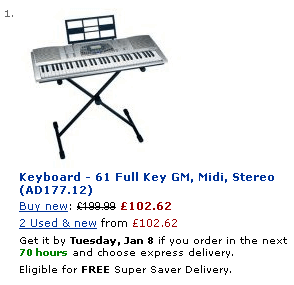
I’m thinking of buying a digital keyboard with touch sensitive keys and MIDI support. (The one other thing that I thought off – a pitch bend – puts the keyboards out of my budget.) I’d like a good deal. (Who doesn’t?) But I don’t like to spend time searching for one. (Who does?) So here’s the plan. Firstly, I’ll restrict my search to Amazon.co.uk. For electronics items, I haven’t found anyone consistently cheaper. Tesco has some pretty low prices, but not the range. eBuyer is pretty good, but not often enough. Google Products is the only other one that gets me consistent lower prices, but I’ve had my credit card identity stolen once before while shopping online, so I’d rather not pick any random seller listed on Google. ...

2007 4

Web lookup using Google Spreadsheets

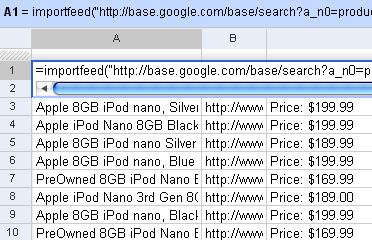
I’d written earlier about Web lookup in Excel. I showed an example how you could create a movie wishlist that showed the links to the torrents from Mininova. You can do that even easier on Google Spreadsheets. It has 4 functions that let you import external data: =importData(“URL of CSV or TSV file”). Imports a comma-separated or tab-separated file. =importFeed(URL).vLets you import any Atom or RSS feed. =importHtml(URL, “list” | “table”, index). Imports a table or list from any web page. =importXML(“URL”,“query”). Imports anything from any web page using XPath. Firstly, you can see straight off why it’s easy to view RSS feeds in Google Spreadsheets. Just use the importFeed function straight away. So, for example, if I wanted to track all 8GB iPods on Google Base, I can import its feed in Google Spreadsheets. ...

Scraping RSS feeds using XPath

If a site doesn't have an RSS feed, your simplest option is to use Page2Rss, which gives a feed of what's changed on a page. My needs, sometimes, are a bit more specific. For example, I want to track new movies on the IMDb Top 250. They don't offer a feed. I don't want to track all the other junk on that page. Just the top 250. There's a standard called XPath. It can be used to search in an HTML document in a pretty straightforward way. Here are some examples: ...

RSS feeds in Excel

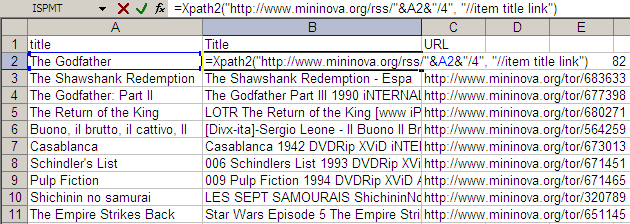
The technique of Web lookups in Excel I described yesterday is very versatile. I will be running through some of the practical uses it can be put to over the next few days TO generalise things beyond just getting the Amazon price, I created a user-defined function called XPATH. It takes two parameters: URL of the XML feed to read Search XPath list string (separated by spaces) This function can be used to extract information out of any XML file on the Web and get it out as a table. For example, if you wanted to watch the Top 10 movies on the IMDb Top 250, and were looking for torrents, an RSS feed is available from mininova. The URL http://www.mininova.org/rss/movie_name/4 gives you an RSS file matching all movies with “movie_name”. From this, we need to extract the and <item><link> elements. That’s represented by “//item title link” on my search string. ...

Web lookup using Excel

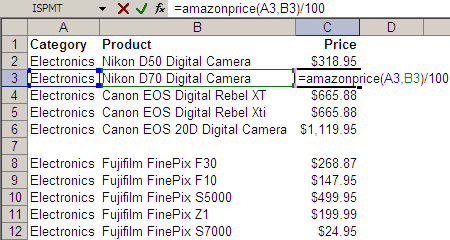
Take a look at the Excel screenshot below. Yes, that’s right. I have a user-defined function called AMAZONPRICE. And it returns these cameras’ prices directly from Amazon.com. (Given the category and some keywords, it returns the price of the bestselling item on Amazon.com.) Here’s the code behind the function. Function AmazonPrice(index As String, keywords As String) As String Dim xDoc As MSXML2.DOMDocument30 Set xDoc = New MSXML2.DOMDocument30 xDoc.async = False If xDoc.Load("http://ecs.amazonaws.com/onca/xml?Service=AWSECommerceService" _ "&Version=2005-03-23&Operation=ItemSearch&SubscriptionId=03SDGQDFEB455W53SB82" _ "&AssociateTag=sanand-20&MinimumPrice=10000&ResponseGroup=OfferSummary,Small" _ "&Sort=salesrank&SearchIndex=" & index & "&Keywords=" & keywords) Then xDoc.setProperty "SelectionLanguage", "XPath" xDoc.setProperty "SelectionNamespaces", _ "xmlns:a=""http://webservices.amazon.com/AWSECommerceService/2005-03-23""" AmazonPrice = xDoc.selectSingleNode("/a:ItemSearchResponse//a:Amount").Text End If End Function This is how it all started… ...