From Calvin & Hobbes to Photo Tagging: Excel's Unexpected Image Capability


In Excel, using Visual Basic, you can change an image as you scroll. This makes it easy to look at each image and annotate it. This is how I transcribed every Calvin & Hobbes. I used this technique first when typing out the strips during my train rides from Bandra to Churchgate. I had an opportunity to re-apply it recently when we needed to tag hundreds of photographs based on a set of criteria. ...
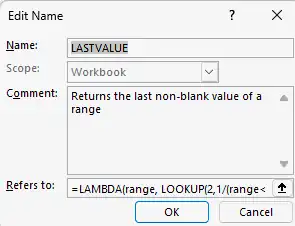
My first LAMBDA in Excel

Ever since Excel introduced the LAMBDA function, I've been itching to use it in real life. I got my first chance today. We track the skill index of our different teams (consulting, analytics, technology, etc.) like this: TeamSkill IndexApr-23May-23Jun-23Jul-23Consulting0%0%Analytics33%33%Technology72%72%etc. The "Skill Index" column should pick the LAST value. If Apr-23 is filled, use that. But if May-23 is also filled, use that. ...

Formatting tables

Formatting tables in Excel is a fairly common task, but there are a number of ways to improve on the way it's done most of the time. Here are a few tips. Fairly basic stuff, but hopefully useful. Comments Neela 18 Aug 2011 6:16 pm: Thanks a lot for the tips! I think there might be a small error in the video posted above, since the last part about conditional formatting is repeated twice. Very useful nonetheless! Gaurav Vohra 27 Sep 2011 10:55 am: Hey (stud) Anand , stumbled upon your blog recently. It is a great read. Lou Reed said “between thought and expression, lies a lifetime”. I think you bridge that gap really well. You can add me to your list of avid followers now. :) I would especially recommend your blog to anyone who wants to get into the field of business analytics (all my students :) )

Motion charts in Excel

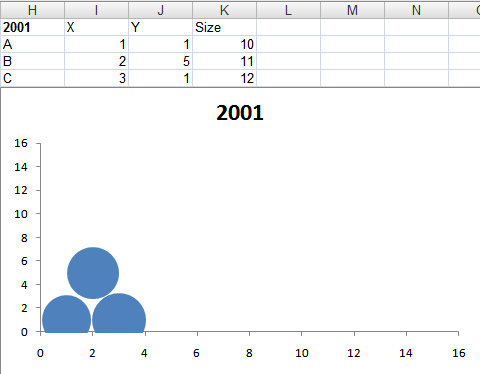
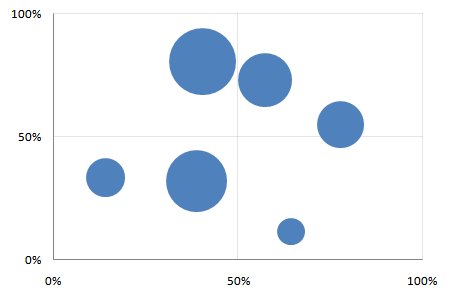
Creating motion charts in Excel is a simple four-step process. Get the data in a tabular format with the columns [date, item, x, y, size] Make a “today” cell, and create a lookup table for “today” Make a bubble chart with that lookup table Add a scroll bar and a play button linked to the “today” cell For the impatient, here’s a motion chart spreadsheet that you can tailor to your needs. For the patient and the puzzled, here’s a quick introduction to bubble and motion charts. ...

Split text

This is a series on what Google Spreadsheets can do that Excel can’t. SPLIT(string, delimiter) splits a string using a delimiter. So if you have “one,two,three,four” in cell A1, you could split that into 4 cells using =SPLIT(A1,",") That’s similar to Data > Text to Columns, except that if the original data changed, Text to Columns does not revise the output. SPLIT can give you dynamic text-to-columns. This is pretty useful when processing text data, in three ways: ...

Dynamically sort data

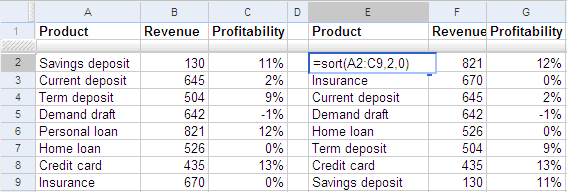
This is a series on what Google Spreadsheets can do that Excel can’t. To sort data, use the SORT function. For example, if you have a list of products, their revenues and profits in A2:C9. Type SORT(A2:C9, 2, FALSE) in cell E2 to get the products sorted by the second column, revenues. This is a dynamic list. If you change the revenues, the products are reordered automatically. The first parameter to the SORT function is the data range you want to sort. The remaining parameters are optional. The second parameter is the column to sort by. By default, the data is sorted by the first column, in ascending order. In this example, we sorted by the 2nd column. The third parameter is FALSE for descending order, and TRUE for ascending order. ...

Dynamically eliminate duplicates

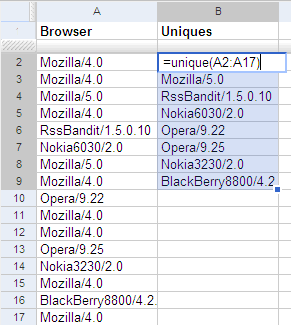
This is a series on what Google Spreadsheets can do that Excel can’t To get a list of unique values from a list, use the UNIQUE function on Google Spreadsheets. For example, if you have a list of browsers in column A, type =UNIQUE(A1:A17) at cell B1 to get a unique list of browsers. This is a dynamic list. If you change the list of browsers, the unique list gets updated automatically. ...

Animated charts in Excel

Watch Hans Rosling's TED Talks on debunking third world myths and new insights on poverty and ask yourself: could I do this with my own data? Yes. Google has a gadget called MotionChart that lets you do this. Now, you could put this up on your web page, but that's not quite useful when presenting to a client. (It is shocking, but there are many practical problems getting an Internet connection at a client site. The room doesn't have a connection. The cable isn't long enough. You can't access the LAN. Their proxy requires authentication. The connection is too slow. Whatever.) ...

Web lookup using Google Spreadsheets

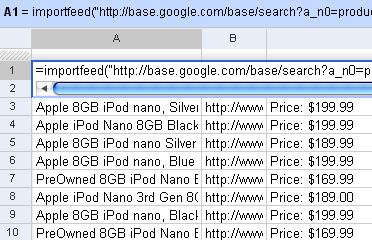
I’d written earlier about Web lookup in Excel. I showed an example how you could create a movie wishlist that showed the links to the torrents from Mininova. You can do that even easier on Google Spreadsheets. It has 4 functions that let you import external data: =importData(“URL of CSV or TSV file”). Imports a comma-separated or tab-separated file. =importFeed(URL).vLets you import any Atom or RSS feed. =importHtml(URL, “list” | “table”, index). Imports a table or list from any web page. =importXML(“URL”,“query”). Imports anything from any web page using XPath. Firstly, you can see straight off why it’s easy to view RSS feeds in Google Spreadsheets. Just use the importFeed function straight away. So, for example, if I wanted to track all 8GB iPods on Google Base, I can import its feed in Google Spreadsheets. ...

RSS feeds in Excel

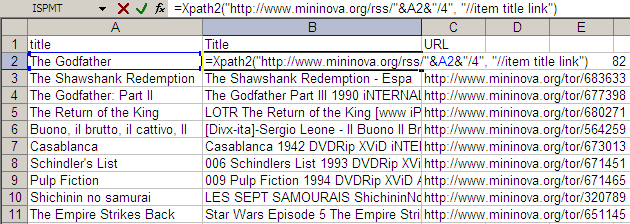
The technique of Web lookups in Excel I described yesterday is very versatile. I will be running through some of the practical uses it can be put to over the next few days TO generalise things beyond just getting the Amazon price, I created a user-defined function called XPATH. It takes two parameters: URL of the XML feed to read Search XPath list string (separated by spaces) This function can be used to extract information out of any XML file on the Web and get it out as a table. For example, if you wanted to watch the Top 10 movies on the IMDb Top 250, and were looking for torrents, an RSS feed is available from mininova. The URL http://www.mininova.org/rss/movie_name/4 gives you an RSS file matching all movies with “movie_name”. From this, we need to extract the and <item><link> elements. That’s represented by “//item title link” on my search string. ...

Web lookup using Excel

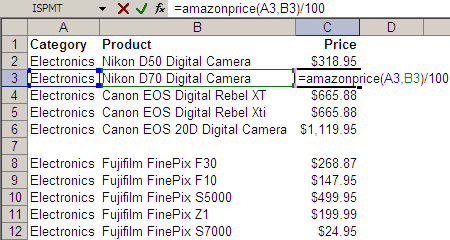
Take a look at the Excel screenshot below. Yes, that’s right. I have a user-defined function called AMAZONPRICE. And it returns these cameras’ prices directly from Amazon.com. (Given the category and some keywords, it returns the price of the bestselling item on Amazon.com.) Here’s the code behind the function. Function AmazonPrice(index As String, keywords As String) As String Dim xDoc As MSXML2.DOMDocument30 Set xDoc = New MSXML2.DOMDocument30 xDoc.async = False If xDoc.Load("http://ecs.amazonaws.com/onca/xml?Service=AWSECommerceService" _ "&Version=2005-03-23&Operation=ItemSearch&SubscriptionId=03SDGQDFEB455W53SB82" _ "&AssociateTag=sanand-20&MinimumPrice=10000&ResponseGroup=OfferSummary,Small" _ "&Sort=salesrank&SearchIndex=" & index & "&Keywords=" & keywords) Then xDoc.setProperty "SelectionLanguage", "XPath" xDoc.setProperty "SelectionNamespaces", _ "xmlns:a=""http://webservices.amazon.com/AWSECommerceService/2005-03-23""" AmazonPrice = xDoc.selectSingleNode("/a:ItemSearchResponse//a:Amount").Text End If End Function This is how it all started… ...

User defined array functions in Excel

Many languages have functions to process lists (array). These functions usually return a list, so you can pass that to another list function. This chaining of functions is really powerful. UNIX provides this sort of chaining capability. If I had a cities (with some repetitions) and I wanted to find out how many started with the letter ‘A’, I’d just type: cat cities | sort | uniq | grep "^A" | wc cat: types the cities. sort: sorts the cities alphabetically. uniq: finds unique cities (works only if sorted - that's why we had to sort the list). grep: filters the cities. Only allows cities beginning with A. wc: word count To do this on Excel, the only way is to ...

How to discover new functions in Excel

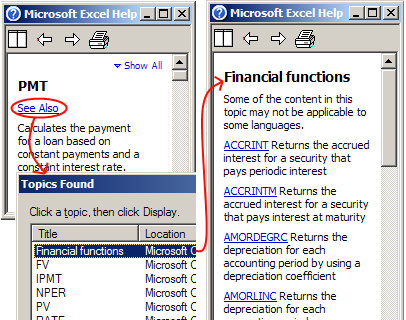
Firstly, believe that Excel can do anything. It’s true. Excel is a functional programming language. Not with the same power as some programming languages, maybe. But power is just a way of making a little go a long way (power = succinctness, according to Paul Graham). And Fred Brooks, in No Silver Bullet, argues: I believe the single most powerful software-productivity strategy for many organizations today is to equip the computer-naive intellectual workers who are on the firing line with personal computers and good generalized writing, drawing, file, and spreadsheet programs and then to turn them loose. ...

Creating variwide charts in Excel

I mentioned that it’s possible to create variwides using X-Y scatter plots. The video below shows how. Comments sathya 22 Sep 2006 4:08 pm: I can see the video. I use BSNL broadband. Howver Ihave th problm that i cant hear th audio. this is the case even with youtube. looks like BSNL does not allow streaming audio. S Anand 22 Sep 2006 4:40 pm: That’s a pity. Well, at least the video’s OK, and good that I’ve enabled captions. (Hope you can see those?) Ashwin 6 Jan 2007 1:50 pm: Yes Really useful sumesh 6 Apr 2007 10:42 am: i cant see the video

User-defined functions to get cell formatting

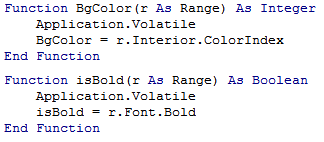
Sometimes you want to check the colour of a cell, or whether a cell is bold. This can be easily done with user-defined functions (UDFs). (To create a UDF, press Alt-F11, Alt-I-M, and type the code below.) You can use ISBOLD(cell) to check if a cell is bold, and BGCOLOR(cell) to get the background colour of the cell. This lets you selectively process bold or shaded cells. The two examples below show how you can add only the cells in bold, or only the shaded cells. ...

User-defined functions in Excel

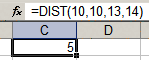
Excel lets you create your own functions. If you wanted to create a function that returned the distance between two points (x1,y1) and (x2,y2), you can create a function DIST that takes these 4 parameters, and use it as shown below. To create such a function, press Alt-F11 to open the Visual Basic Editor insert a new module (Alt-I-M) type the following code: ...

In-cell Excel charts

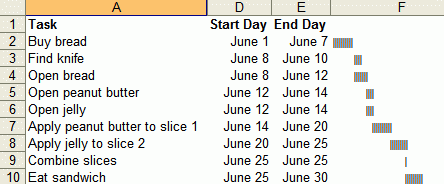
Juice analytics has some Excel graphing tips. You can make charts like below without using charts, using just text. These are useful because the charts are aligned with the data. I once used a similar technique to display people’s staffing position. The sheet below lists people, projects they’re on and how long they’ll be on. The coloured cells to the right are a calendar display of the same stuff. Makes it easy to read. ...

Excel - Make your model visually obvious


Rule #4: Make your model visually obvious. After years of creating Excel models with lots of inputs and lots of outputs, I’ve learnt two things. Usually, only ONE input parameter matters. Think of this as being the constraint in the Theory of Constraints, or the principal component in factor analysis. You want your model to communicate the impact of the ONE parameter, and get a decision based on that. Keep the rest at their best default value. ...

Excel - Avoid manual labour 4

Debugging in Excel is another time consuming task. 80% of the trouble is identifying the problem (Error? What error? Where?) as opposed to fixing it (Why’s THAT cell showing THAT?). Most of my time is spent chasing three kinds of errors: wrong reference (leading to a #N/A or #REF!), wrong data input, or wrong formula. Wrong references are easy to spot. You’ll see a #N/A or a #REF! sticking out. But on large sheets, even that’s tough to spot. I always have a SUM (or some kind of total) function that covers EVERY cell in EVERY table, even if I don’t need that information. If ther SUM shows a #N/A or #REF!, I can use Trace Error (Alt-T-U-E) to see where the problem is coming from. ...

Excel - Avoid manual labour 5

A few tips, without getting into the details. Array formulas let you perform any calculation on an entire list, and get the result in a single formula. Database functions like DSUM can manipulate tables of data very flexibly. Using these and Pivot tables, you can do anything with any tabular data. Comments Ananth 22 Dec 2005 6:32 am: I needed your feedback on www.doondo.org. Give it a spin let me know. I wanted to avoid positng here but never got any replies for the mails sent at root_node at yahoo.com Ananth 22 Dec 2005 6:33 am: www.doondo.org is a hobby project I’ve been working on. The beta is just out. Ananth 22 Dec 2005 6:35 am: Looking forward for your views and feedback ritzkini 22 Dec 2005 10:01 am: great concept ananth..shld be a hit considering the great response to a similar funda used in IIM-I’s Klueless S Anand 22 Dec 2005 12:31 pm: I liked the concept and interface, Ananth. Will mail you in detail. Quick question… how do I find out what the right keywords are? ritzkini 23 Dec 2005 2:19 am: hehehe…hey anand,saw the visitor stats thing for the first time today ! awesomely cool ,kudos! u did it yourself ?? Dhar 23 Dec 2005 3:26 am: Ananth, does your game support advanced Google operators? Ananth 23 Dec 2005 4:11 am: Thanks for feedback folks. doondo needs additional features, like game summary with right keywords. Right now only basic operators are supported. Even such a simple concept requires complex coding skills! I would love if you can post the suggestion at [email protected]. Great if you can join the group. Anand wouldn’t like spamming his comments section with doondo. S Anand 24 Dec 2005 1:42 am: Yeah ritzkini, spent a week coding the visitor stats. What else do you think would be useful to see? ritzkini 26 Dec 2005 7:22 am: :) i dont think it could have been any more comprehensive than it already is ! :) harish 11 Jan 2006 3:50 am: great work mate…