RSS feeds in Excel
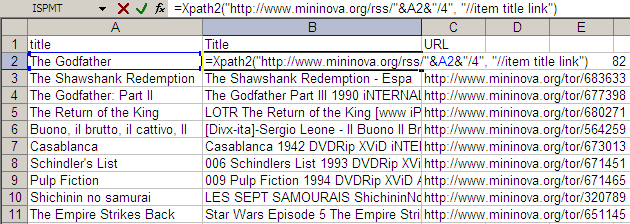
The technique of Web lookups in Excel I described yesterday is very versatile. I will be running through some of the practical uses it can be put to over the next few days TO generalise things beyond just getting the Amazon price, I created a user-defined function called XPATH. It takes two parameters: URL of the XML feed to read Search XPath list string (separated by spaces) This function can be used to extract information out of any XML file on the Web and get it out as a table. For example, if you wanted to watch the Top 10 movies on the IMDb Top 250, and were looking for torrents, an RSS feed is available from mininova. The URL http://www.mininova.org/rss/movie_name/4 gives you an RSS file matching all movies with “movie_name”. From this, we need to extract the and <item><link> elements. That’s represented by “//item title link” on my search string. ...