2012 1

Windows XP virtual machine

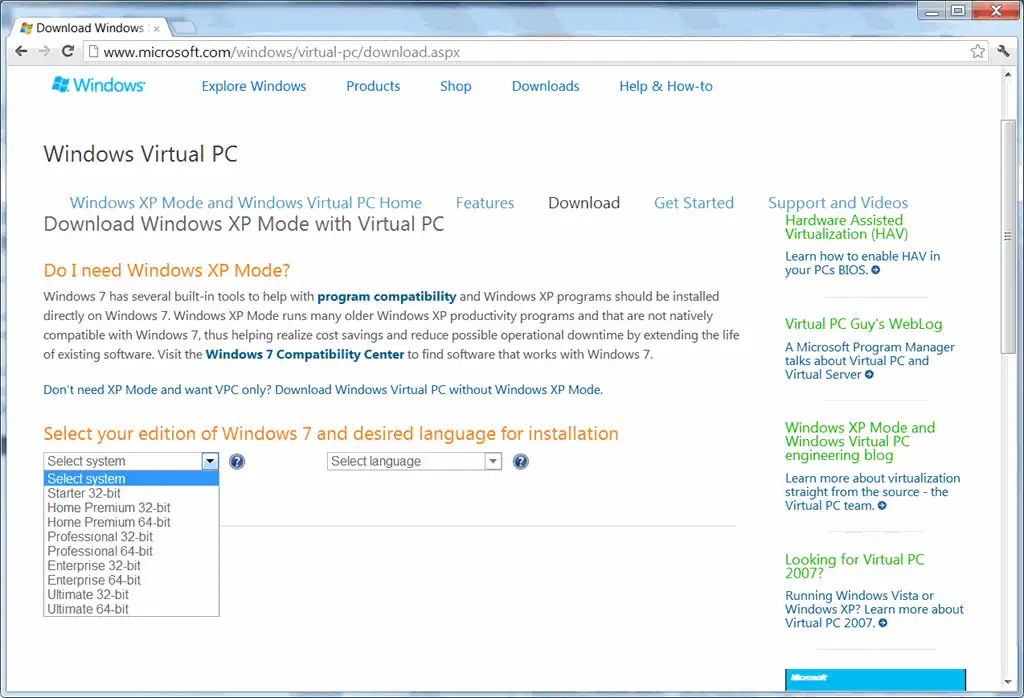
Here’s the easiest way to set up a Windows XP virtual machine that I could find. (This is useful if you want to try out programs without installing it on your main machine; test your code on a new machine; or test your website on IE6 / IE7 / IE8.) Go to the Virtual PC download site. (I tried VirtualBox and VMWare Player. Virtual PC is better if you’re running Windows on Windows.) If you have Windows 7 Starter or Home, select “Don’t need XP Mode and want VPC only? Download Windows Virtual PC without Windows XP Mode.” If you have Windows Vista or Windows 7, select “Looking for Virtual PC 2007?” Download it. (You may have to jump through a few hoops like activation.) Download Windows XP and run it to extract the files. (It’s a 400MB download.) Open the “Windows XP.vmc” file – just double-clicking ought to work. At this point, you have a working Windows XP version. (The Administrator password is “Password1”.) Under Tools – Settings – Networking – Adapter 1, select “Shared Networking (NAT)” That’s pretty much it. You’ve got a Windows XP machine running inside your other Windows machine. ...

2009 1

Transparent laptops

I had changed over the years, and had a sober reputation at BCG. I also had a reputation for giving solid advice about computers. Recently, our laptops had been upgraded to Windows XP. This was also the time the “transparent laptop” craze was rampant. Feeling fairly sure no one at BCG would be aware of this, I sent out a mail, towards the end of the day, on Friday 1st April 2005. (That should’ve given it away, but it didn’t.) ...

2006 5

If you forgot your Windows password

If you’ve forgotten your Windows password, but you’re still logged in as an administrator, you can change your Windows password without confirmation of the old password. If you’re forgotten your Windows password, and not logged in, you can still access your system using a little known hole in Windows XP. Check Vic Ferri’s article on I Forgot My Administrator Password. Comments windows 7 Mar 2009 2:51 am: Forgot Your Windows Password? A lot of people think that after having lost their Windows admin password, they absolutely have to reinstall their OS. Let me tell you something: They are wrong! Here I’m posting a few methods / utilities which can be used to recover Windows password: 1st Method: The first thing which you check if you forget login password. When we install Windows, it automatically creates an account “Administrator” and sets its password to blank. So if you have forget your user account password then try this: Start system and when you see Windows Welcome screen / Login screen, press + and Del keys twice and it’ll show Classic Login box. Now type “Administrator” (without quotes) in Username and leave Password field blank. Now press Enter and you should be able to log in Windows. Now you can reset your account password from “Control Panel -> User Accounts”. Same thing can be done using Safe Mode. In Safe Mode Windows will show this in-built Administrator account in Login screen. 2th Method: There are many 3rd party utilities which claim to recover forgotten Windows password: Windows Password Recovery Tool Service: windowspasswordsrecovery.com Windows Password Recovery Tool is a program that works instantly to remove any lost or forgotten password. Simply boot your PC from the supplied Boot CD, and get access to forgotten Windows and administrator passwords in just seconds. Their method is so much faster/easier, and works great! http://windowspasswordsrecovery.com zhuismile 13 Jun 2010 8:36 am: Can’t remember your windows xp admin password?Windows password key 8.0 has a neat trick that will get you back in.This method is easy for everyone to follow. Download the utility from http://sn.im/xd5sa and install it then burn the software to a CD/USB drive,then insert the newly created CD/USB drive to your locked pc and reboot your computer,then press “F2” to enter your BIOS setup,following the instruction to reset your lost windows password.

Top 10 Windows XP tips of all time

Top 10 Windows XP tips of all time. Comments Ashwin 3 Sep 2006 10:43 pm: hey….nice set of links u have here…btw…the xp link is down i think…and i’m gonna try the torrents thing… the calvin search is awesome except for the fact that u can’t read the stip immediately….but its real good….thanks… S Anand 4 Sep 2006 6:59 am: Thanks, Ashwin! I’ve fixed the Windows XP tips link.

Speed up your torrents

Speed up your torrents. Particularly, get rid of the Event ID 4226 problem.

Windows XP commands

Windows XP commands for the command prompt. Comments sathish 11 Apr 2006 11:18 am: this is a cool link

Faster XP

How to make XP run faster. Advice ranges from the very practical to the very advanced. Comments Sai 4 Feb 2006 6:29 pm: First impressions, i like the old look better. Maybe it’s just because i’m used to it! Anonymous 4 Feb 2006 11:46 pm: looks cool!; feels like a windows next version…looks like a win 98 –> win xp makeover Chitra 6 Feb 2006 4:19 am: Hey Anand…good post. Jagjit 31 Oct 2006 10:46 am: good post Chitra :)

2005 1

Permanent paging file in Windows XP

Create a permanent paging file in Windows XP. It speeds up the system when you have lots of applications running. Comments S Anand 30 Mar 2005 9:28 am: More tweaks here Samba 28 Mar 2005 12:00 pm: Want to know more about Paging!!!

2002 3

Windows XP simulation

Omar Zabir’s portal. Let’s you use Windows XP without having Windows XP. Well, actually, it’s just a tour of Windows XP features, but you pretty much get to “use” XP. Quite a piece of programming! via MetaFilter Comments desi yazzie 6 Sep 2006 3:48 am: Good, wonderful, and would like to use it to troubleshoot S Anand 6 Sep 2006 4:05 pm: I wonder if it has any deep XP functionality, though…

Office 11 needs Windows 2000 or XP

Sorry. You have to buy Windows 2000 or XP to use Office 11. Microsoft’s next strategy to sell their operating systems. via Google News

Microsoft true story is false

Microsoft’s ’true story’ of a Mac-to-PC convert isn’t true. The “convert” works in a Public relations firm hired by Microsoft. And probably didn’t switch in the first place. (The original ad)

2001 4

XP copyright protection hacked

In the meantime, Microsoft XP’s copyright protection has been hacked. Their digital rights management scheme: hacked. Passport: hacked.

Windows XP good at fixing itself

Windows XP is good at fixing itself. (But don’t upgrade yet!)

Internet Explorer 6 sneak preview

A sneak preview of MS IE6. What is worrying is that Microsoft may not release IE6 as a standalone application. They’re planning to bundle it with their next OS: Whister.