2010 1

ImportHtml doesn’t auto-refresh

A cool thing about Google Spreadsheets is that you can scrape websites using external data functions like importHtml. It’s really easy to use. The formula: =importHtml("http://www.imdb.com/chart/top", "table", 1) imports the Internet Movie Database top 250 table on to Google Spreadsheets. Since you can publish these as RSS feeds, it ought to, in theory, be a great way of generating RSS feeds out of arbitrary content. There’s just one problem: it doesn’t auto update. There are claims that it does every hour. Maybe it does when the sheet is open. I don’t know. But it definitely does not when the sheet is closed. I wrote a simple script that logs the time at which the script was accessed, and prints the log every time it is accessed. ...

2008 2

Split text

This is a series on what Google Spreadsheets can do that Excel can’t. SPLIT(string, delimiter) splits a string using a delimiter. So if you have “one,two,three,four” in cell A1, you could split that into 4 cells using =SPLIT(A1,",") That’s similar to Data > Text to Columns, except that if the original data changed, Text to Columns does not revise the output. SPLIT can give you dynamic text-to-columns. This is pretty useful when processing text data, in three ways: ...

Dynamically eliminate duplicates

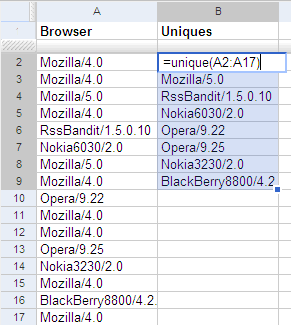
This is a series on what Google Spreadsheets can do that Excel can’t To get a list of unique values from a list, use the UNIQUE function on Google Spreadsheets. For example, if you have a list of browsers in column A, type =UNIQUE(A1:A17) at cell B1 to get a unique list of browsers. This is a dynamic list. If you change the list of browsers, the unique list gets updated automatically. ...

2007 1

Web lookup using Google Spreadsheets

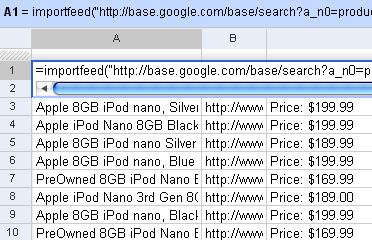
I’d written earlier about Web lookup in Excel. I showed an example how you could create a movie wishlist that showed the links to the torrents from Mininova. You can do that even easier on Google Spreadsheets. It has 4 functions that let you import external data: =importData(“URL of CSV or TSV file”). Imports a comma-separated or tab-separated file. =importFeed(URL).vLets you import any Atom or RSS feed. =importHtml(URL, “list” | “table”, index). Imports a table or list from any web page. =importXML(“URL”,“query”). Imports anything from any web page using XPath. Firstly, you can see straight off why it’s easy to view RSS feeds in Google Spreadsheets. Just use the importFeed function straight away. So, for example, if I wanted to track all 8GB iPods on Google Base, I can import its feed in Google Spreadsheets. ...

2006 4

Most popular movies on IMDb

Here are the top 1000 most popular movies on the Internet Movie database, along with their ratings and number of votes. I've also marked whether I've seen them or not, as of today. This list, incidentally, is part of my source for the post on popular lousy movies. Here is the Excel list of Top 1000 movies on IMDb. Comments Arch 1 Dec 2006 10:14 am: Your site is too good.I browse thru so many blogs every other day, but hav found nothing as entertaining and as informative as this one. U must be really gifted fella…Y dont u post some pics of ur kid … err 1 Dec 2006 10:04 pm: is to do. S Anand 1 Dec 2006 10:35 pm: Thanks, Arch. I haven’t gotten around to posting any family stuff. No specific reason. Maybe I will… Michelle 5 Dec 2006 12:36 pm: You have been writing movies, do you have top 10 books? DeuceLee 11 Dec 2009 2:37 am: Hi, I really love your imdb top 1000. Seriously it’s great info. Can you get an updated version from imdb and swivel? Looks like it’s been a while (2006). :-) Andreas Beer 20 Oct 2010 4:38 pm: Dude, you seriously should watch Yojimbo! Masterpiece! :D

GTalk is more than a messenger

Google Talk, Not Just An Instant Messenger. It’s used in Gmail, Google Desktop and Google Spreadsheets already. Google plans to use it in more of its services.

How I use Google Spreadsheets

I work across multiple computers (my office laptop, home laptop, client desktop) on a daily basis. I used to transfer data across these by e-mailing them before I travelled. (I often forgot to do so.) Mostly, these are notes – like telephone numbers, things to buy, places to visit, etc. Google Notebook solves the problem. But not entirely. I store a lot of my notes on spreadsheets, as lists. For example: ...

Google Spreadsheets

I got an invite for Google Spreadsheets. Very impressive AJAX interface. Comments Dhar 9 Jun 2006 11:36 am: Tried Google Spreadsheets. Love the concept, but I seem to be missing the Grand Picture. How is Google going to integrate things like Calendar, Spreadsheets, Notebook, Browser Sync to give us an “Aha” moment? The glue that should hold these applications together seems to be missing. Quite a few of them are very average and scratch the itch for a small section of web population. Nothing earthshaking like Gmail or search. :( S Anand 9 Jun 2006 2:31 pm: Funnily, the very apps you mentioned (Calendar, Notebook, Spreadsheets and Browser Sync) are the ones I use the most – as much as GMail and search! You’re right, there isn’t much integration, except perhaps between Calendar and GMail. Maybe it’s coming. But even as standalone apps, I’m surprised at how much I use them. I’ll write about how I’m using these sometime… Madhu 12 Jun 2006 7:03 pm: Its more when than how i think