Web lookup using Google Spreadsheets

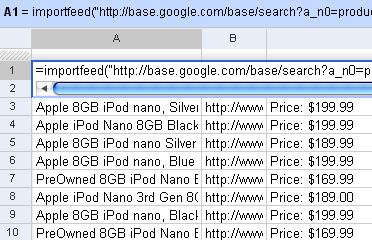
I’d written earlier about Web lookup in Excel. I showed an example how you could create a movie wishlist that showed the links to the torrents from Mininova. You can do that even easier on Google Spreadsheets. It has 4 functions that let you import external data: =importData(“URL of CSV or TSV file”). Imports a comma-separated or tab-separated file. =importFeed(URL).vLets you import any Atom or RSS feed. =importHtml(URL, “list” | “table”, index). Imports a table or list from any web page. =importXML(“URL”,“query”). Imports anything from any web page using XPath. Firstly, you can see straight off why it’s easy to view RSS feeds in Google Spreadsheets. Just use the importFeed function straight away. So, for example, if I wanted to track all 8GB iPods on Google Base, I can import its feed in Google Spreadsheets. ...

Taare Zameen Par and Calvin

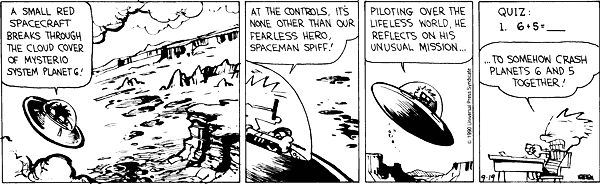
Watch this segment of Taare Zameen Par. Then check these Calvin & Hobbes strips. ...

Tamil songs quiz - Enchanting first interludes

Some background scores just stay in your mind. Here is a tribute to 20 wonderful first interludes, dating from the 1980s to the 2000s. Can you guess which movies they are from? (My intention here is not to make this tough, but rather to let you enjoy the music. So hope to see most of you score 20/20) Don't worry about the spelling. Just spell it like it sounds, and the box will turn green. ...

Javascript error logging

If something goes wrong with my site, I like to know of it. My top three problems are: The site is down A page is missing Javascript isn’t working This is the last of 3 articles on these topics. I am a bad programmer I am not a professional developer. In fact, I’m not a developer at all. I’m a management consultant. (Usually, it’s myself I’m trying to convince.) Since no one pays me for what little code I write, no one shouts at me for getting it wrong. So I have a happy and sloppy coding style. I write what I feel like, and publish it. I don’t test it. Worse, sometimes, I don’t even run it once. I’ve sent little scripts off to people which wouldn’t even compile. I make changes to this site at midnight, upload it, and go off to sleep without checking if the change has crashed the site or not. But no one tells me so At work, that’s usually OK. On the few occasions where I’ve written Perl scripts or VB Macros that don’t work, people call me back within a few hours, very worried that THEY’d done something wrong. (Sometimes, I don’t contradict them.) It can be quite a stressful experience but good thing you can learn more here on how to cope up with it. On my site, I don’t always get that kind of feedback. People just click the back button and go elsewhere. Recently, I’ve been doing more Javascript work on my site than writing stuff. Usually, the code works for me. (I write it for myself in the first place.) But I end up optimising for Firefox rather than IE, and for the plugins I have, etc. When I try the same app a few months later on my media PC, it doesn’t work, and shockingly enough, no one’s bothered telling me about it all these months. They’d just click, nothing happens, they’d vanish. But their browsers can tell me The good part about writing code in Javascript is that I can catch exceptions. Any Javascript error can be trapped. So since the end of last year, I’ve started wrapping almost every Javascript function I write in a try {} catch() {} block. In the catch block, I send a log message reporting the error. The code looks something like this: ...
Monitoring site downtime

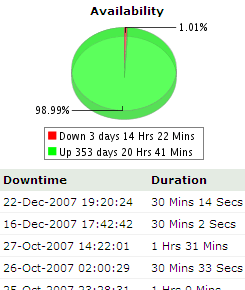
If something goes wrong with my site, I like to know of it. My top three problems are: The site is down A page is missing Javascript isn’t working I’ll talk about how I manage these over 3 articles. My site used to go down a lot. Initially that was because I kept playing around with mod_rewrite and other Apache modules without quite understanding them. I’d make a change and upload it without testing. (I’m like that.) And then I’d go to sleep. ...

Handling missing pages

If something goes wrong with my site, I like to know of it. My top three problems are: The site is down A page is missing Javascript isn’t working This article covers the second topic. One thing I’m curious about is hits to non-existent pages (404s) on my site. I usually get 404s because: I renamed the page Someone typed a wrong URL Someone followed a wrong link Find the 404 ...

Managing feed overload

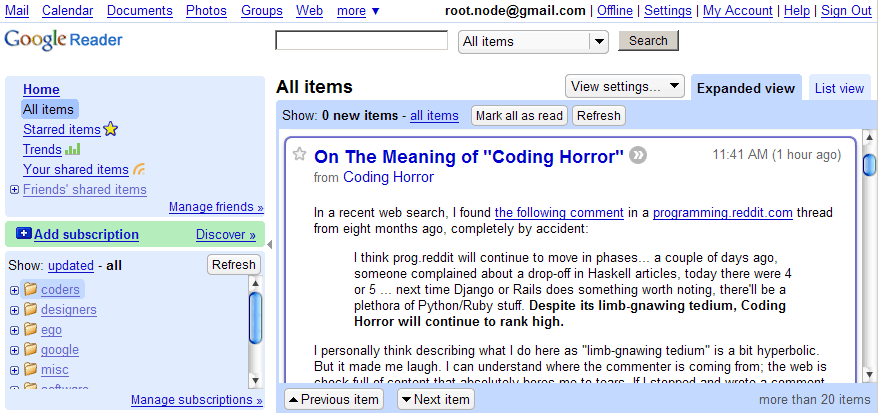
I have only two problems with Google Reader. The first is that it doesn’t support authenticated feeds. Ideally, I’d have liked to have a single reading list that combines my e-mail with newsfeeds. GMail offers RSS feeds of your e-mail. But the feeds require authentication (obviously) and Google Reader doesn’t support that right now. (So I usually don’t read e-mail :-) The second is that it’s tough to manage large feeds. It’s a personal quirk, really. I like to read all entries. If there are 100, I read all 100. If there are 1000, I struggle but read all 1000. I’m too scared to “Mark all read” because there are some sources that I don’t want to miss. ...

Scraping RSS feeds using XPath

If a site doesn't have an RSS feed, your simplest option is to use Page2Rss, which gives a feed of what's changed on a page. My needs, sometimes, are a bit more specific. For example, I want to track new movies on the IMDb Top 250. They don't offer a feed. I don't want to track all the other junk on that page. Just the top 250. There's a standard called XPath. It can be used to search in an HTML document in a pretty straightforward way. Here are some examples: ...

Advanced Google Reader

I’ve stopped visiting websites. No, really. There’s only one website I visit these days. Google Reader. Google Reader is a feed reader. If you want to just catch up on the new stuff on a site, you can add the site to Google Reader. Anything new that is published on the site appears in Google Reader. Right now, I’ve subscribed to over 50 feeds. There’s no way I can remember to visit 50 sites – so I’m actually able to read more and miss less. ...