2007 2

Web lookup using Excel

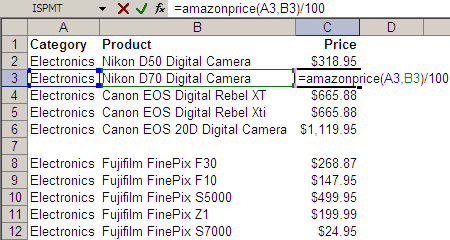
Take a look at the Excel screenshot below. Yes, that’s right. I have a user-defined function called AMAZONPRICE. And it returns these cameras’ prices directly from Amazon.com. (Given the category and some keywords, it returns the price of the bestselling item on Amazon.com.) Here’s the code behind the function. Function AmazonPrice(index As String, keywords As String) As String Dim xDoc As MSXML2.DOMDocument30 Set xDoc = New MSXML2.DOMDocument30 xDoc.async = False If xDoc.Load("http://ecs.amazonaws.com/onca/xml?Service=AWSECommerceService" _ "&Version=2005-03-23&Operation=ItemSearch&SubscriptionId=03SDGQDFEB455W53SB82" _ "&AssociateTag=sanand-20&MinimumPrice=10000&ResponseGroup=OfferSummary,Small" _ "&Sort=salesrank&SearchIndex=" & index & "&Keywords=" & keywords) Then xDoc.setProperty "SelectionLanguage", "XPath" xDoc.setProperty "SelectionNamespaces", _ "xmlns:a=""http://webservices.amazon.com/AWSECommerceService/2005-03-23""" AmazonPrice = xDoc.selectSingleNode("/a:ItemSearchResponse//a:Amount").Text End If End Function This is how it all started… ...
User defined array functions in Excel

Many languages have functions to process lists (array). These functions usually return a list, so you can pass that to another list function. This chaining of functions is really powerful. UNIX provides this sort of chaining capability. If I had a cities (with some repetitions) and I wanted to find out how many started with the letter ‘A’, I’d just type: cat cities | sort | uniq | grep "^A" | wc cat: types the cities. sort: sorts the cities alphabetically. uniq: finds unique cities (works only if sorted - that's why we had to sort the list). grep: filters the cities. Only allows cities beginning with A. wc: word count To do this on Excel, the only way is to ...

2006 1

User-defined functions in Excel

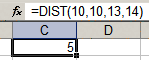
Excel lets you create your own functions. If you wanted to create a function that returned the distance between two points (x1,y1) and (x2,y2), you can create a function DIST that takes these 4 parameters, and use it as shown below. To create such a function, press Alt-F11 to open the Visual Basic Editor insert a new module (Alt-I-M) type the following code: ...