2010 3

Surviving in prison

As promised, here are some tips from the trenches on surviving in prison. (For those who don’t follow my blog, prison is where your Internet access is restricted.) There are two things you need to know better: software and people. I’ll try and cover the software in this post, and the more important topic in the next. Portable apps You’re often not in control of your laptops / PCs. You don’t have administrator access. You can’t install software. The solution is to install Portable Apps. Most popular applications have been converted into Portable Apps that you can install on to a USB stick. Just plug them into any machine and use them. I use Firefox and Skype quite extensively this way, but increasingly, I have a preference for Portable Apps for just about everything. It makes my bloated Start Menu a lot more manageable. Some of the other portable apps I have are: Audacity, Camstudio, GIMP, Inkscape and Notepad++. ...
SSH Tunneling via Rackspacecloud

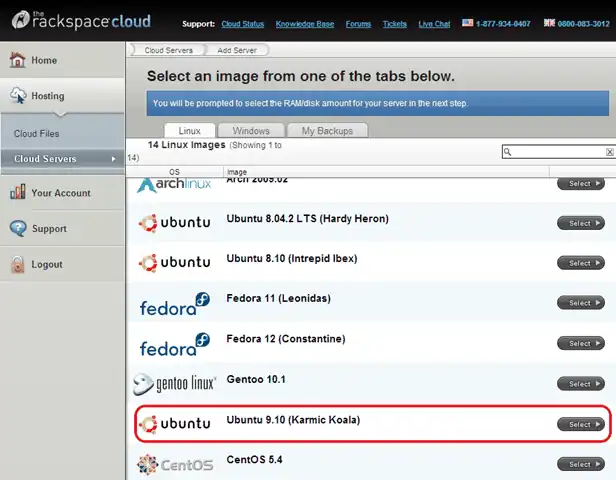
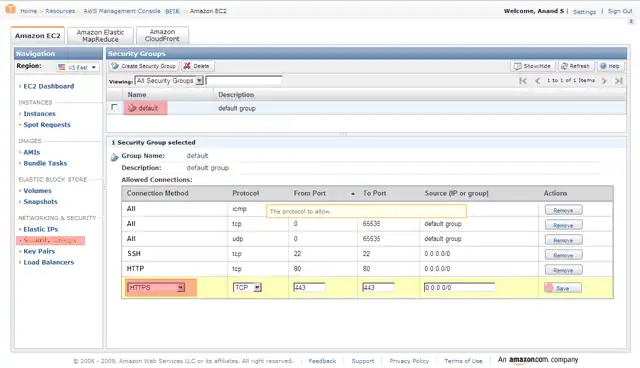
I wrote about SSH Tunneling through web filters using Amazon’s EC2 at 8 cents/hr. With Rackspacecloud, you can get that down to 1.5 cents/hr. This turns out to be a lot simpler than EC2 as well! Ingredients Rackspacecloud account (sign up for free – you won’t be charged until you use it) Putty (which may be available on your Intranet, if you’re lucky) Directions On the Rackspacecloud console, click on wordpress website hosting– Cloud Servers – Add Server and select Ubuntu 9.10 (Karmic Koala). Actually, you can pick any other instance. I’m going to talk through this using Ubuntu 9.10 as the example. Type any server name, pick a 256MB RAM instance, and click on Create Server. Once the server has started, you’ll get the screen below. Click on the Console to open a session. Your password would have been e-mailed to the account you registered with. Log in as root with that password. Now type the following: sed –i “s/^Port 22/Port 443/” /etc/ssh/sshd_config /etc/init.d/ssh restart ...

SSH Tunneling through web filters

You can defeat most web filters by spending around 8 cents/hr 0 cents/hr on Amazon EC2. (It’s usually worth the money. It’s a fraction of the cost a phone call or a sandwich. And I usually end up wasting that money anyway on calling someone or eating my way out of the misery of corporate proxies.) Most web filters and proxies block all ports except the HTTP port (80) and the HTTPS port (443). But it’s used to carry encrypted traffic, and, as Mark explains: ...