Markdress

This year, I’ve converted the bulk of my content into Markdown – a simple way of formatting text files in a way that can be rendered into HTML. Not out of choice, really. It was the only solution if I wanted to: Edit files on my iPad / iPhone (I’ve started doing that a lot more recently) Allow the contents to be viewable as HTML as well as text, and Allow non techies to edit the file As a bonus, it’s already the format Github and Bitbucket use for markup. ...

GarageBand in Phir Se Ud Chala

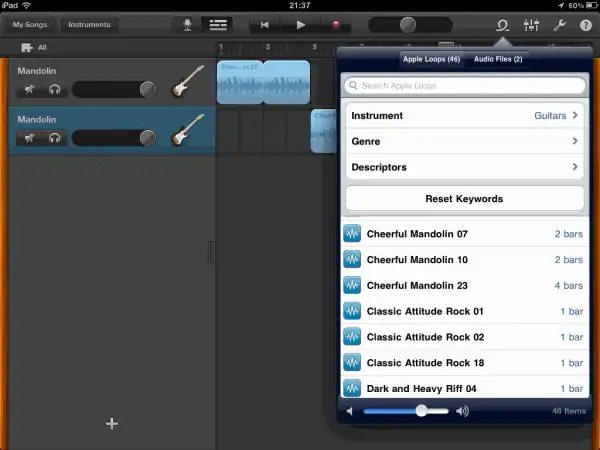
A month ago, I was at the theatre watching Ra.One. The movie was terrible, yet enjoyable. But I’m going to talk about something else – a song I heard that caught my imagination. The song is Phir Se Ud Chala from Rockstar. Around 14 seconds into the video, you’ll hear a guitar start off at the background. That’s what caught my ear first – because I’d heard it before. Listen to this piece below: ...

Protect static files on Apache with OpenID

I moved from static HTML pages to web applications and back to static HTML files. There’s a lot to be said for the simplicity and portability of a bunch of files. Static site generators like Jekyll are increasingly popular; I’ve built a simple publisher that I use extensively. Web apps give you something else, though, that are still useful on a static site. Access control. I’ve been resorting to htpasswd to protect static files, and it’s far from optimal. I don’t want to know or manage users’ passwords. I don’t want them to remember a new ID. I just want to allow specific people to log in via their Google Accounts. (OpenID is too confusing, and most people use Google anyway.) ...

Codecasting

The best way to explain code to a group of people is by walking through it. If they’re far away in space or time, then a video is the next best thing. You can recommend them to try out the best coding apps as well. The trouble with videos, though, is that they’re big. I can’t host them on my server – I’d need YouTube. Editing them is tough. You can’t copy & paste code from videos. And so on. One interesting alternative is to use presentations with audio. Slideshare, for instance, lets you share slides and sync it with audio. That almost works. But it’s still not good enough. I’d like code to be stored as code. What I really need is codecasting: a YouTube or Slideshare for code. The closest I’ve seen until day-before was etherpad or ttyrec – but neither support audio. Enter Popcorn. It’s a Javascript library from Mozilla that, among other things, can fire events when an audio/video element reaches a particular point. ...

Javascript arrays vs objects

Summary: Arrays are a lot smaller than objects, but only slightly faster on newer browsers. I’m writing an in-memory Javascript app that handles several thousand rows. Each row could be stored either as an array [1,2,3] or an object {"x":1,"y":2,"z":3}. Having read up on the performance of arrays vs objects, I thought I’d do a few tests on storing numbers from 0 to 1 million. The results for Chrome are below. (Firefox 7 was similar.) ...

Software for my new laptop 2

Time for a new laptop, and to replace software. Here’s my new list. A lot has changed in the last 5 years. Mainly, I use the browser, cygwin and Portable Apps a lot more. (The last is to escape jailers, not registry bloat.) Media Chrome [new]: For browsing and development. Fast, light, and stays out of the way. Firefox: I keep it just for printing. Chrome sucks at printing. Media Player Classic: Nothing against it, but I decided to stick to just one app, which is… VLC: Continues to be the best media player, IMHO. WinAmp: I just manage my playlists as M3U files, using Python programs. Audacity: Still the easiest way to record audio. Camstudio: The simplest free portable screen capture software I know. PicPick [new]: Lightweight, powerful screenshot grabber VirtualDub: Not the simplest, but still good for what I need: cropping and joining video. MediaCoder [new]: Good for video/audio conversions. Maybe I’ll install this later. Foxit Reader: The simples free portable PDF reader I know, better than… NitroPDF Reader [new]: … which is good for Printing PDFs – better than… Primo PDF: … which has trouble on rare occasions. Microsoft Reader: I have a lot of ebooks in .LIT. Kindle for PC [new]: I don’t own a Kindle, but I’ve bought a few ebooks. Paint.NET: Good enough for cropping and adjusting colours on images. Windows Live Writer [new]: The best way to write this blog WYSIWYG Inkscape [new]: I occasionally edit vector graphics. Google Earth. Google Maps is good enough. ImgBurn: I no longer use CDs/DVDs. Just flash drives and external hard disks. Picasa: I’ve stopped browsing pictures. No time. Sharing ...
Faster data crunching

I’ve been playing with big data lately. The good part is, it’s easy to get interesting results. The data is so unwieldy that even average value calculations provoke a “Amazing! I didn’t know that,” response (No exaggeration. I heard this from two separate ~ $1bn businesses this month.) The bad part is that calculating even that simple average is slow. For example, take this 40MB file (380MB unzipped) and extract the first column. ...

India district map

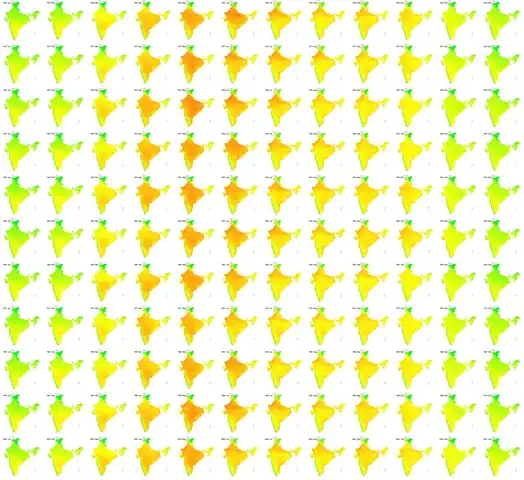
I put together a district map of India in SVG this weekend. So what? You can now plot data available at a district level on a map, like the temperature in India over the last century (via IndiaWaterPortal). The rows are years (1901, 1911, … 2001) and the columns are months (Jan, Feb, … Dec). Red is hot, green is cold. (Yeah, the west coast is a great place to live in, but I probably need to look into the rainfall.) ...

Formatting tables

Formatting tables in Excel is a fairly common task, but there are a number of ways to improve on the way it's done most of the time. Here are a few tips. Fairly basic stuff, but hopefully useful. Comments Neela 18 Aug 2011 6:16 pm: Thanks a lot for the tips! I think there might be a small error in the video posted above, since the last part about conditional formatting is repeated twice. Very useful nonetheless! Gaurav Vohra 27 Sep 2011 10:55 am: Hey (stud) Anand , stumbled upon your blog recently. It is a great read. Lou Reed said “between thought and expression, lies a lifetime”. I think you bridge that gap really well. You can add me to your list of avid followers now. :) I would especially recommend your blog to anyone who wants to get into the field of business analytics (all my students :) )

Eating more for less

A couple of years ago, I managed to lose a fair bit of weight. At the start of 2010, I started putting it back on, and the trajectory continues. I’m at the stage where I seriously need to lose weight. I subscribe to The Hacker’s Diet principle – that you lose weight by eating less, not exercising. An hour of jogging is worth about one Cheese Whopper. Now, are you going to really spend an hour on the road every day just to burn off that extra burger? You don’t exercise to lose weight (although it certainly helps). You exercise because you’ll live longer and you’ll feel better. I’m afraid I’ll live too long anyway, so I won’t bother exercising just yet. It’s down to eating less. ...

Birthday matters

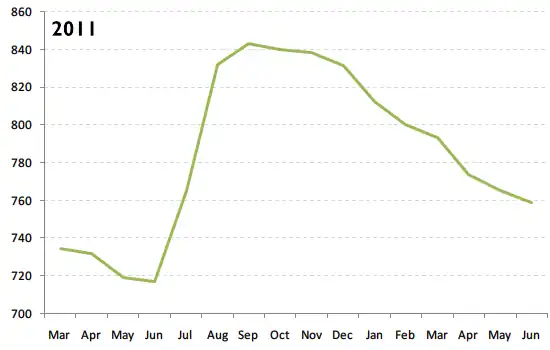
Does it matter which month you’re born in? Based on the results of the 20 lakh students taking the Class XII exams at Tamil Nadu over the last 3 years (via Reportbee), it appears that the month you were born in can make a difference of as much as 120 marks out of 1,200 – or 10%! Most students who took the Class XII exams in 2011 were born between March 1991 and June 1992. The average marks of each student (out of 1200) is shown in the graph below. ...

Visualising the IMDb

The IMDb Top 250, as a source of movies, dries out quickly. In my case, I’ve seen about 175/250. Not sure how much I want to see the rest. When chatting with Col Needham (who’s working his way through every movie with over 40,000 votes), I came up with this as a useful way of finding what movies to watch next. Each box is one or more movies. Darker boxes mean more movies. Those on the right have more votes. Those on top have a better rating. The ones I’ve seen are green, the rest are red. (I’ve seen more movies than that – just haven’t marked them green yet :-) ...

Random notes

The whole point of a blog is to be able to write what I want, isn’t it? Without the need to be coherent. Intelligent. Useful. I read somewhere, in a top 10 list of advice to programmers – to avoid constipation. It’s actually good advice. It gives you a headache for the rest of the day. That piece of code is really not worth it, trust me. But then, when you have a headache, there isn’t anything quite as beautiful and relaxing as code. Or good documentation. Like node.js docs, for example. ...

Moderating marks

Sometimes, school marks are moderated. That is, the actual marks are adjusted to better reflect students' performances. For example, if an exam is very easy compared to another, you may want to scale down the marks on the easy exam to make it comparable. I was testing out the impact of moderation. In this video, I'll try and walk through the impact, visually, of using a simple scaling formula. BTW, this set of videos is intended for a very specific audience. You are not expected to understand this. ...

Server speed benchmarks

Yesterday, I wrote about node.js being fast. Here are some numbers. I ran Apache Benchmark on the simplest Hello World program possible, testing 10,000 requests with 100 concurrent connections (ab -n 10000 -c 100). These are on my Dell E5400, with lots of application running, so take them with a pinch of salt. PHP5 on Apache 2.2.6 <?php echo “Hello world” ?> 1,550/sec Base case. But this isn’t too bad Tornado/Python See Tornadoweb example 1,900/sec Over 20% faster Static HTML on Apache 2.2.6 Hello world 2,250/sec Another 20% faster Static HTML on nginx 0.9.0 Hello world 2,400/sec 6% faster node.js 0.4.1 See nodejs.org example 2,500/sec Faster than a static file on nginx! I was definitely NOT expecting this result… but it looks like serving a static file with node.js could be faster than nginx. This might explain why Markup.io is exposing node.js directly, without an nginx or varnish proxy. ...

Why node.js

I’ve moved from Python to Javascript on the server side – specifically, Tornado to Node.js. Three years ago, I moved from Perl to Python because I got free hosting at AppEngine. Python’s a cleaner language, but that was not enough to make me move. Free hosting was. Initially, my apps were on AppEngine, but that wouldn’t work for corporate apps, so I tried Django. IMHO, Django’s too bulky, has too much “magic”, and templates are restrictive. Then I tried Tornado: small; independent modules; easy to learn. I used it for almost 2 years. ...

Mapping PIN codes

I haven’t found an open or reliable database providing the geo-location of Indian PIN codes. That’s a bother if you’re creating geographic mash-ups. The closest were commercial sources: a PIN code directory from the Postal Training Centre for Rs. 2,000, which probably just contains a list of PIN codes, and a PIN code map from MapMyIndia for Rs. 1,00,000, whose quality I’m not sure of. (I spoke to one of their sales representatives who mentioned that the data was gathered via companies such as Coca Cola, using their local distribution knowledge, perhaps GPSs.) Crowd-sourcing this might help. Here’s a site where you can map the location of any PIN code you know: ...

Software update

Time for the annual update on software I use. This time, I’ve got Wakoopa to help me with the relative usage as well. Here’s the top 100 software / web apps I’ve used recently, and how long I spent on them. Gmail 186361 seconds Notepad++ 130641 seconds Google Chrome 79879 seconds GitHub 43780 seconds Windows Command Prompt 40967 seconds Microsoft Excel 32578 seconds Microsoft Word 27067 seconds Microsoft PowerPoint 27059 seconds Windows Explorer 20902 seconds Google Docs 17989 seconds Foxit Reader 17001 seconds Microsoft Outlook 15855 seconds Internet Explorer 15830 seconds Google Search 15616 seconds Skype 14423 seconds Media Player Classic 14159 seconds Google Groups 7061 seconds Google Calendar 5531 seconds Wesabe 2814 seconds Google Analytics 2665 seconds TeamViewer 1985 seconds RGui 1875 seconds LinkedIn 1528 seconds YouTube 1400 seconds Stack Overflow 1167 seconds Acrobat Connect 964 seconds Kongregate 914 seconds HTML Help 871 seconds PicPick 790 seconds Zoundry Raven 684 seconds Mockingbird 657 seconds Twitter 655 seconds iStockphoto 590 seconds 7-Zip 584 seconds Buzznet 552 seconds Inkscape 516 seconds Bitbucket 499 seconds Microsoft Visio 496 seconds Paint.NET 474 seconds IrfanView 461 seconds Tableau Public 436 seconds µTorrent 435 seconds HandBrake 422 seconds Check Point Endpoint Security 411 seconds Windows Task Manager 385 seconds Microsoft Project 372 seconds IETester 347 seconds Google Maps 340 seconds eBay 310 seconds Spokn 270 seconds Firefox 269 seconds Google Calendar Sync 259 seconds Windows Calculator 247 seconds PayPal 246 seconds JsonView 220 seconds Windows Live Writer 184 seconds Junction Link Magic 152 seconds WinDirStat 142 seconds Kindle 139 seconds XAMPP 127 seconds Wakoopa 105 seconds Dropbox 100 seconds Office Help Viewer 99 seconds PrimoPDF 94 seconds PuTTY 84 seconds Python 80 seconds Flavors.me 75 seconds Google Sites 71 seconds Process Explorer 70 seconds Windows Volume Control 63 seconds Wikipedia 58 seconds Nitro PDF Reader 57 seconds Management Console 47 seconds PythonWin 45 seconds Windows Based Script Host 45 seconds WinDiff 45 seconds VLC Media Player 39 seconds ClipX 35 seconds Windows Installer 35 seconds The Internet Movie Database 32 seconds ImageShack 31 seconds WordPad 25 seconds TeraCopy 22 seconds Skype Portable 22 seconds Picasa Web Albums 20 seconds Syncplicity 17 seconds Google Reader 16 seconds Google Talk 15 seconds VirtualDub 12 seconds Adobe Manager 10 seconds FreeCall 10 seconds Notepad 8 seconds Codebase 5 seconds eTrust ITM 5 seconds Google Checkout 5 seconds GDI++ Tray Notifier 5 seconds ImgBurn 2 seconds Virtual Desktop Manager 2 seconds Tesseract201 2 seconds TortoiseHg 0 seconds Comments Somnath 1 Mar 2011 4:38 pm: More time on Gmail than browsers - how are you accessing Gmail then? S Anand 6 Mar 2011 8:51 pm: @Somnath, mostly breaking through proxies – see http://goo.gl/6wyg0 and http://goo.gl/DNtui. @Thej, no idea I’m afraid, but before I used Wakoopa, I was using https://gist.github.com/857652 which worked just fine, except that it wasn’t social and didn’t have the pretty charts. You might want to tweak that for Linux. Thejesh GN 5 Mar 2011 5:29 pm: It doesnt run on Linux (only PC n MAC). Anything for me? Shankar V 28 Feb 2011 3:10 am: hi Anand how do you generate this list? Wakoopa is blocked at Infy. So could not check that one out. Also, surprised to note that you are a Chrome user against FF. I have used both and my preference is still FF. S Anand 28 Feb 2011 6:38 am: I work out of client sites – so sites aren’t blocked. Plus, it includes software from my home laptop. I shifted to Chrome a while ago, even for development, mostly because it’s faster than FF. The only thing I miss is Firebug, really.

Recruiting smart people in practice

Find people. Search on github by location and skill. Anand’s blog comments Reach out to people. Have a standard set of template, and track the template’s success.

The Social Network

4:00pm. Just started watching The Social Network. I’m fairly sure I won’t like the film, mostly because I’ll be jealous of Mark. About 5 minutes into the movie. I find myself rewinding to catch the dialogues. They’re very fast. Very, very fast. 10 minutes. I like the code. I stopped on a screen to start checking if it’s real code. It’s in Perl. Stopped myself before I started dry-running the code. ...