
Keyword searches as a Web command line

Andre’s mentions dumping Google Chrome because of lack of extension support, especially Ubiquity, and lists 15 useful Ubiquity commands. If you haven’t seen Ubiquity, you should. It’s a great extension that transforms your browser into an Internet command prompt. It is modelled on the Enso Launcher, which is a great piece of work by itself. I wasn’t quite prepared to let go of Chrome that easily. On Task Manager, seeing 10 Chrome processes, the largest of which takes up 60MB, is a lot more comforting, psychologically, than 1 Firefox process taking up 300MB. (I rarely hit my 1GB RAM limit, so it shouldn’t matter either way. Yet, the spendthrift in me keeps watching.) ...
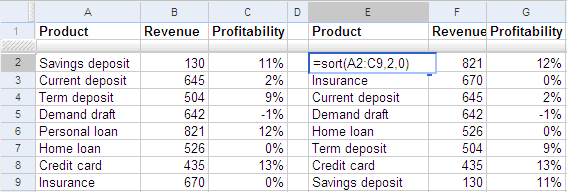
Dynamically sort data

This is a series on what Google Spreadsheets can do that Excel can’t. To sort data, use the SORT function. For example, if you have a list of products, their revenues and profits in A2:C9. Type SORT(A2:C9, 2, FALSE) in cell E2 to get the products sorted by the second column, revenues. This is a dynamic list. If you change the revenues, the products are reordered automatically. The first parameter to the SORT function is the data range you want to sort. The remaining parameters are optional. The second parameter is the column to sort by. By default, the data is sorted by the first column, in ascending order. In this example, we sorted by the 2nd column. The third parameter is FALSE for descending order, and TRUE for ascending order. ...