Yahoo buys del.icio.us
Yahoo buys del.icio.us.
Yahoo buys del.icio.us.
I don’t like hunting for new songs either. Too much effort. External recommendations like Raaga Top 10 help, but not much. I usually like only 1 of the top 10. I don’t really know the recent music directors. But many interesting songs I’ve heard recently (like Ondra Renda in Kakka Kakka, Vaseegara in Minnale, and Kaadhalikkum in Chellame) are by Harris Jayaraj. So maybe if I can find the music directors I like, other songs by them would be good recommendations. ...
I have a large MP3 collection (Tamil and Hindi films). I don’t like selecting songs to listen to. Too much effort. I rated all songs I had listened to (650 songs x 5-10 seconds = 1-2 hrs) and created 7 SmartViews. I just go to one of these and play them in order. Here are my views, in descending order of their use. Most played. Sorted by Play Count. Songs I play the most. Plays stuff I listen to usually. Not heard recently. Played Last before 3 months ago AND Rating >= 3. Plays good songs I haven’t heard recently. Not played much or recently. Played Last before 1 month ago AND Play Count <= 2 AND Rating >= 3. Plays good songs I haven’t heard often enough. Recent hits. Last updated after 3 months ago AND Play count >= 3. Plays songs recently added and liked. Recently played. Sorted by Last Updated. Often, I like to listen to songs I listened to yesterday. Top rated. Sorted by Rating. My best songs. (Suprisingly, I don’t use this view much.) Recently added. Sorted by Played Last. Plays songs I just downloaded. But WinAmp’s not good enough. For example, I can’t find out what songs I played at least thrice last month. How do I see what I’ve been listening to a lot recently? Fortunately, there are a few WinAmp history plugins. I installed Pepper, which produces a log file that can be analysed. I did this two weeks ago, and don’t have enough data. When I do, I’ll modify two views ...
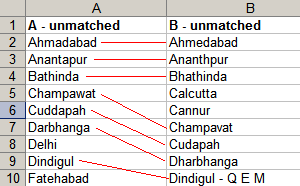
Rule #3: Avoid manual labour (continued) Reconciling data is where I spend most of my time on Excel. Say you have a list of branches by city from 2 banks. You want to know where both banks have branches. Excel doesn’t know that Kolkata is Calcutta. There are 500 cities, and you have 30 minutes. Use VLOOKUP for a start. If Bank A’s cities are in column A (say 2-500) and Bank B’s cities in column B (say 2-400), in C2 type VLOOKUP(A2, B$2:B$400, 1, 0) (read Excel help – all I’ll say is, don’t miss out the 0 at the end: otherwise you get approximate match, and that’s not good). Copy the formula to down to C500. Similarly, in D2 type VLOOKUP(B2, A$2:A$500, 1, 0). Copy the formula down to D400. ...