My last two presentations used browser tabs as slides.
For my talk last week titled Your Chotu Is Smarter Than You Think, I planned to show a series of examples. I loaded them all in a browser window as tabs like this:
- How I use AI to navigate toilets
- How I use AI for food recommendation
- How I use AI for book suggestions
- What else I can use AI for
- …
Once loaded, I can press Ctrl+PgDn to move to the next - just like I’d press the right arrow key in a slide deck. I can also use the mouse to click on the tab if I want to jump around.
But there’s one advantage I missed from slides. I can add title slides, section dividers, etc.
Since web pages are so versatile, I vibe-coded a slide tool by roughly saying:
- Give me a single page “slide” tool
- Let me edit the title, subtitle, fonts, colors, backgrounds, etc. via a (barely visible) button on the top right
- Store this in the URL so I can bookmark and share it
(Note: I had 5 min on 4% battery and my laptop couldn’t connect to the Internet. This was voice vibe-coded on the web and the PR accepted without review.)
That let me create a far richer presentation.
- 🟢 SLIDE I use AI like an intern
- Like a plumber, to navigate toilets
- Like a waiter, for food recommendation
- Like a secretary, for book suggestions
- 🟢 SLIDE Use Paid AI. ANY Paid AI is the best ROI you get
- You can hire AI for many services
- 🟢 SLIDE Under-using AI is more dangerous than over-using
- … and so on.

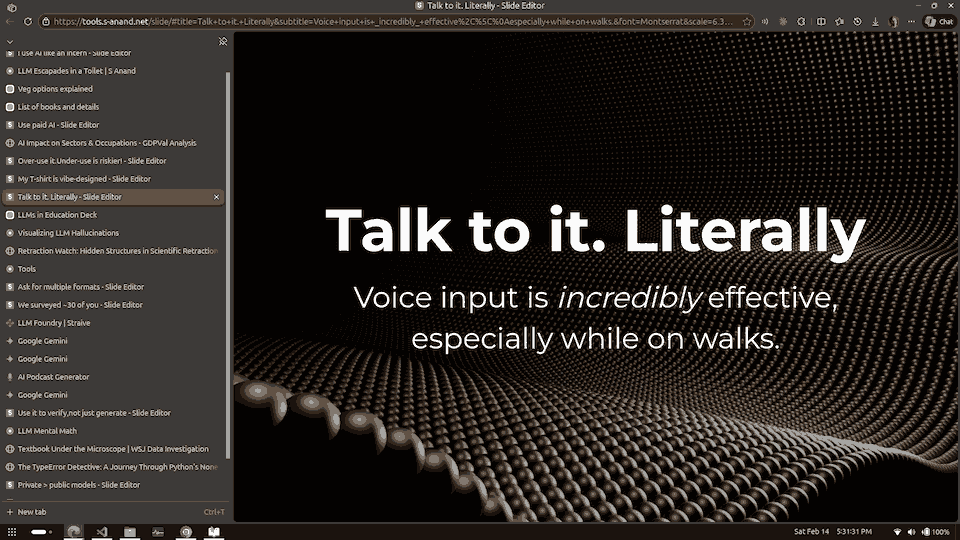
The “slides” allow me to add structure and remind the audience and me about the key points.
For all the bad press PowerPoint receives, I don’t think presentations are a bad format. But today, there are so many more ways of presenting that using slideshow software seems a bit outdated.