I have the habit of reading books on the screen. It’s something that started from the early 90s, when I got a copy of The MIT Guide to Lockpicking. Since I didn’t have access to a printer, I’d spent hours poring over the document on the screen. And then I discovered Project Gutenburg…
I’ve heard many people ask if I have a problem with this. Personally, no. I’ve been staring at screens from the age of 12, and I’m quite used to it. My job requires me to stare at a screen for most of the day anyway. (I’m not saying there’s no a strain on the eye. My eyes are red at the end of the day. I don’t know if they would be less red if I’d been staring at paper instead of a screen. But my glasses have remained roughly the same power over ~15 years, so it’s probably not ruining my eyesight much.) For those who are like me who reads all the time and spends a lot of more time facing their laptops, you might want to check this sd card, a very good quality card that can be handy in the future.
To me, the main advantage of a book is that a book is a lot easier to handle.
- You can fit a book into your bag, sometimes into your pocket.
- You can hold it in your hand comfortably – it’s easy to grip, and light.
- You can open it instantly (no need to boot up).
- You can bookmark it (or even just remember the last page number) and quickly flip to that
None of these is possible on a computer.
Or is it?
On a desktop, I agree – it’s impossible to read for long. Your back would kill you. I’ve done it for many years, and it’s not worth the pain. With a laptop, however, you can lie down on the bed or sofa and read. It’s a huge advantage. (For just this one reason alone, I’d suggest that everyone buy a laptop.)
As for carrying books, I carry my laptop to work every day, so there’s no incremental burden. But if you weren’t doing that, it’s probably not a great idea. When I travel on weekends, I’d much rather take a physical book than a laptop. This is probably the single biggest problem with a laptop – that it doesn’t travel as easy as a book.
That’s probably offset by the advantage that a laptop isn’t really a book – it’s a library. I don’t need to decide which book to read. I can bring them all along, pick what I like, and when I’m done, move on to the next. And I’m not restricted to books. I have a fairly good collection of movie scripts and comics. Depending on how long I have on the train, and my mood, I can pick between these.
One thing that makes a laptop a lot easier to use is to rotate it.
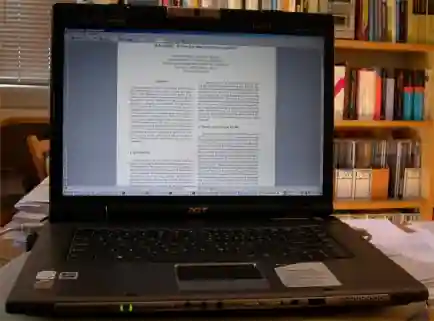
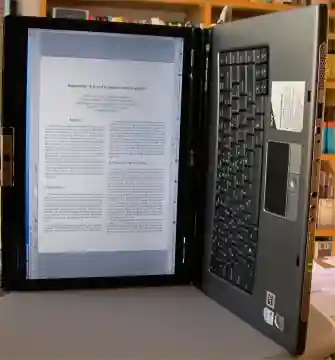
If you hold the laptop this way, it’s surprisingly easy to handle. I find that I can read this way even when standing on a crowded train — which is as much as I can expect from any book. (Strangely enough, it doesn’t seem to attract too much attention on the train either.)
If you have a decent graphics card, you can rotate your screen using the graphics properties. (I’m sure there are are hotkeys to do this. My two-year old daughter somehow knows them, and manages to turn the screen upside down in a fraction of a second, while I spend then next 5 minutes struggling to restore an upside-down screen.)
If not, you can just use a PDF reader (like FoxIt, which is better than Acrobat Reader) to rotate the page by 90°.
A laptop takes care of the problems of bookmarking and load time as well. I usually leave mine on hibernate, and it takes about 10 seconds to open up to where I left off. Sometimes I just leave the laptop on in the bag — for example if I’m changing trains.
The other solution, of course, is to try an ebook reader. Given my laptop, I haven’t tried one. But other than the ease of holding it, there’s no big I see.
The other question is, how do you find ebooks?. Other than buying them, I find that the easiest option is to search on Google. A surprisingly large number of them are indexed.
Here’s a custom search engine for ebooks.
Comments