I just got a digital wattmeter. Had no idea about these until Google PowerMeter, but now, they’re all the rage. Mine’s a pretty simple model and all I plan to do with it is play around with a few household gadgets.
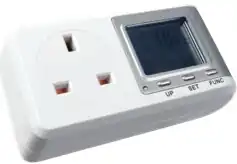
My first target, obviously, was my Dell Latitude E5400. The statistics are interesting:
| Power | … when… |
|---|---|
| 0.3W | Laptop is switched off. The adapter must be consuming the power |
| 1.3W | Laptop is on standby. |
| 12W | The lid is closed, and no applications are running. |
| 18.5W | The laptop is on, the lid is open, and no applications are running |
| 25W | The laptop is writing to the hard disk |
| 34W | One CPU is fully utilised |
| 41W | Both CPUs are fully utilised |
Looks like the display and hard disk each consume about 6.5 watts each, while the CPU consumes a whopping 15 + 7 = 22 watts.
One interesting observation is that the colour of the display doesn’t make much of a difference. From my CRT monitor days, I’d remembered that a black screen consumes less power, and is less likely to wear the screen off. So my desktop background has always been black, and most of my applications use a black theme. But it turns out that on LCDs, it makes absolutely no difference. A full white screen uses the same power as a full black screen. So I’ve really been wasting my time the last 9 years. (There is a good reason to have a black screen, sometimes – it’s much easier on the eyes when reading without lights.)
Another lesson was that turning off the wireless had no effect whatsoever. (It worked quite well for my Blackberry, though. Increased the battery life quite a bit. I thought the same might apply for laptops, but looks like it doesn’t.)
I’ll do an audit of some of my home appliances and post it out here. Wonder if there’s a repository of power usage for appliances…
Comments