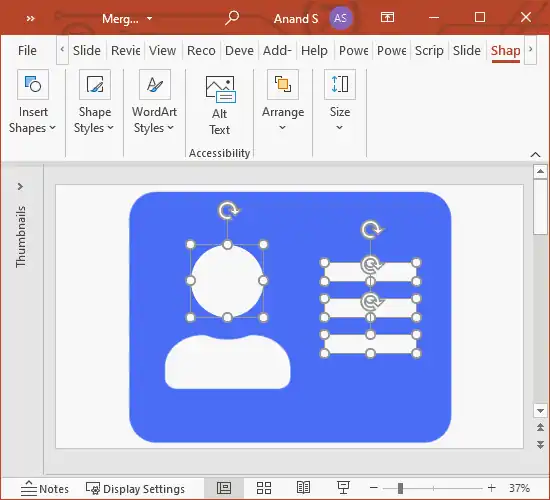
I’ve a theory. PowerPoint can do anything. (Excel too). Shape operations are especially powerful. In this tutorial, I create an address card icon and export it as SVG. I don’t need Sketch / Illustrator for this. They’re great. But no, thanks. I’m pretty good with PowerPoint 😄 Have you seen PowerPoint do anything that made you go “Wow! This is cool!”? Do share. I’d love to hear about it. http://www.s-anand.net/blog/designing-complex-shapes-in-powerpoint/ LinkedIn
April 2021
We are looking for a Chief Sales Officer. (For Princeton, New Jersey.) Do you ensure clients get value from what you sell? Do you have the energy to go after partners and logos relentlessly? Do you feel the thrill of using data to tell stories? Are you game to take a $10m data company to $50m? We would like to talk to you. Please visit 👇 https://gramener.com/job/?id=90554 LinkedIn
Designing Complex Shapes in PowerPoint
I use PowerPoint instead of Adobe Illustrator or Sketch. I’m familiar with it, and it does everything I need. One of the features I’m really excited by in PowerPoint is the ability to manipulate shapes. Let’s say you have a rectangle and a circle. You can select both of these shapes and in the Shape Format > Merge Shapes dropdown, you can: merge them with a union combine them (like an XOR operation in Boolean algebra) fragment them, which breaks them up into pieces intersect them subtract them This is so powerful that you can create any kind of shape. Let’s take an icon from Font Awesome at random – say an address card – and create it. ...
For 10 years, I’ve enjoyed building data visualizations by writing code. Today, we launched the Gramex IDE at https://gramex.gramener.com – and it aims to make me redundant. Everyone can do the same, but without code. I’ll miss the good old days, but looking forward to a brave new world of low code. LinkedIn