Illegally in Germany

In October 1997, Ram, my manager at IBM, strolled over to my desk and asked if I would like to visit the US. I’d never been there before. The impulse was to say “Yes”. But… I’d written the CAT exam once before. Didn’t get through. Applied once again. But thanks to my diligence, I’d given the wrong residence address, and never got my admission card, and didn’t bother following it up. This would be my third “attempt”. And I didn’t want to goof it up again. (I didn’t get through that one either, as it turned out.) ...

JPath - XPath for Javascript

XPath is a neat way of navigating deep XML structures. It's like using a directory structure. /table//td gets all the TDs somewhere below TABLE. Usually, you don't need this sort of a thing for data structures, particularly in JavaScript. Something like table.td would already work. But sometimes, it does help to have something like XPath even for data structures, so I built a simple XPath-like processor for Javascript called JPath. Here are some examples of how it would work: ...

In search of a good editor

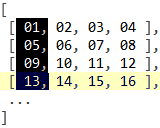

It's amazing how hard it is to get a good programming editor. I've played around with more editors/IDEs than I care to remember: e Notepad++ NoteTab SciTE Crimson Editor Komodo Eclipse Aptana ... There are four features that are critical to me. Syntax highlighting. Over time, I've found this to increase readability dramatically. Look at this piece of code with and without syntax highlighting: Doesn't the structure of the document just jump out with syntax highlighting? Anyway, I've gotten used to that. Column editing. I want to be able to do this: Being able to type across rows is incredibly useful. I use it both for programming as well as to complement data-processing on Excel. Unicode support. I often work with non-ASCII files, particularly in Tamil. Unicode support comes in handy when debugging pages for my songs site. Auto-completion. This is 10 times more productive than having to look up the manual for each function. (Oh, and it's got to be free too. Except for e Text Editor, all the others qualify.) ...

Automating Internet Explorer with jQuery

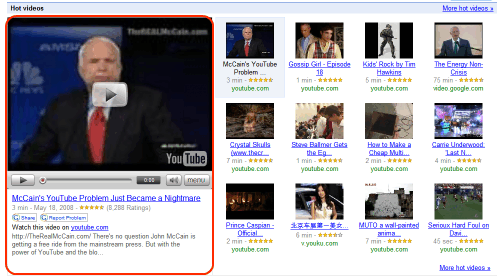
Most of my screen-scraping so far has been through Perl (typically WWW::Mechanize). The big problem is that it doesn't support Javascript, which can often be an issue: The content may be Javascript-based. For example, Amazon.com shows the bestseller book list only if you have Javascript enabled. So if you're scraping the Amazon main page for the books bestseller list, you won't get it from the static HTML. The navigation may require Javascript. Instead of links or buttons in forms, you might have Javascript functions. Many pages use these, and not all of them degrade gracefully into HTML. (Try using Google Video without Javascript.) The login page uses Javascript. It creates some crazy session ID, and you need Javascript to reproduce what it does. You might be testing a Javascript-based web-page. This was my main problem: how do I automate testing my pages, given that I make a lot of mistakes? There are many approaches to overcoming this. The easiest is to use Win32::IE::Mechanize, which uses Internet Explorer in the background to actually load the page and do the scraping. It's a bit slower than scraping just the HTML, but it'll get the job done. ...