Web lookup using Excel
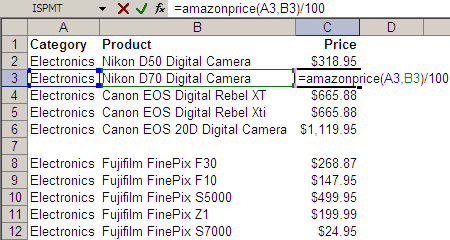
Take a look at the Excel screenshot below. Yes, that’s right. I have a user-defined function called AMAZONPRICE. And it returns these cameras’ prices directly from Amazon.com. (Given the category and some keywords, it returns the price of the bestselling item on Amazon.com.) Here’s the code behind the function. Function AmazonPrice(index As String, keywords As String) As String Dim xDoc As MSXML2.DOMDocument30 Set xDoc = New MSXML2.DOMDocument30 xDoc.async = False If xDoc.Load("http://ecs.amazonaws.com/onca/xml?Service=AWSECommerceService" _ "&Version=2005-03-23&Operation=ItemSearch&SubscriptionId=03SDGQDFEB455W53SB82" _ "&AssociateTag=sanand-20&MinimumPrice=10000&ResponseGroup=OfferSummary,Small" _ "&Sort=salesrank&SearchIndex=" & index & "&Keywords=" & keywords) Then xDoc.setProperty "SelectionLanguage", "XPath" xDoc.setProperty "SelectionNamespaces", _ "xmlns:a=""http://webservices.amazon.com/AWSECommerceService/2005-03-23""" AmazonPrice = xDoc.selectSingleNode("/a:ItemSearchResponse//a:Amount").Text End If End Function This is how it all started… ...