Making a Tamil transliterator

I've built a simple Tamil transliterator. You can type in words in English and it will spell them out in Tamil. You can copy-paste the Tamil above into Microsoft Word, etc. You may need to turn on tamil scripts to see the Tamil fonts above. If you have Windows 98, it may not work well. If you've visited this page recently, you will need to refresh this page as well (press F5). ...
Sanskrit transliterator

I’ve built a simple Sanskrit transliterator. You can type in words in English and it will spell them out in Sanskrit. You can copy-paste the Tamil above into Microsoft Word, etc. Browse through my Javascript to see how it works. Feel free to reuse. Comments ND 28 Aug 2006 12:00 pm: Real good and absolutely quick! Saurabh 28 Aug 2006 12:00 pm: Good work, wonder how many use Sanskrit these days though! One more thing, specific to Mac users, is that Indic support is still not mature for Firefox. Safari, the inbuilt browser does a decent job though. There was an extra “S” that was appearing after each letter in Safari. Madhu 28 Aug 2006 12:00 pm: Awesome, again what ur doing at Infy consulting, u shud be developing products at google:) KK 28 Aug 2006 12:00 pm: It is really awesome vikram 28 Aug 2006 12:00 pm: i cannot see any translation in firefox 1.5.0.12 version Animesh 28 Aug 2006 12:00 pm: Good tool, but the transliteration scheme should be replaced by more standard one. Ashwin (you know me!!) 28 Aug 2006 12:00 pm: nice one buddy!!although how would you deal with ambiguities like “om” ? Anand 28 Aug 2006 12:00 pm: Hmm, I wonder…can you please check if the small ‘‘i’’ maatra works fine? I gave the word ‘‘janani’’ and the ‘‘i’’ gave me the maatra AFTER the second ‘’na’’, while it should be BEFORE. The big ‘‘ii’’/‘‘I’’ works fine. Also words like ‘‘chithram’’ etc - basically wherever there is a small ‘‘i’’! Rama Krishna 28 Aug 2006 12:00 pm: Really Good. Keep up the good work mohana 28 Aug 2006 12:00 pm: try this swami neelkanth 28 Aug 2006 12:00 pm: thanks

Statistically improbable phrases

Calvin and Hobbes has some recurrent themes, like Hobbes pouncing, snow art, polls, letters to Santa, … Over the last 5 years, I’ve transcribed the Calvin and Hobbes comics, and tagged them manually by theme. But can I generate themes automatically? One way is to use Amazon’s statistically improbable phrases. It’s a list of words that occur a lot in a book, but rarely occur in others. It gives you a good feel of what topics the book is about. ...

How I use Google Spreadsheets

I work across multiple computers (my office laptop, home laptop, client desktop) on a daily basis. I used to transfer data across these by e-mailing them before I travelled. (I often forgot to do so.) Mostly, these are notes – like telephone numbers, things to buy, places to visit, etc. Google Notebook solves the problem. But not entirely. I store a lot of my notes on spreadsheets, as lists. For example: ...

Demographics prediction from online behaviour

Microsoft adCenter Labs has a demographics prediction engine. Based on a person's search queries and web sites visited, it can predict their gender and age. So I tried that on parts of the body, to see what men were interested in vs women. topicmalefemale hair25%75% eyes33%67% cheek33%67% hands33%67% lips36%64% ears39%61% fingers40%60% forehead42%58% nose43%57% neck46%54% beard55%45% moustache58%42% leg60%40% palm61%39% toe64%36% While I can understand men being more interested in beards and moustaches (perhaps even legs), why are they far more interested in toes than women? ...

Cut-and-paste is not understanding

Cut and paste has become easier. So we make less effort to understand. We don’t need to. Like when we pay less attention if we’re recording a lecture. Solution? I suggest the Tunnel in the Sky strategy. Rod Walker is going for survival training on an alien planet, and asks his sister, Captain Walker… “Uh, Sis, what sort of gun should I carry?” “Huh? Why the deuce do you want a gun?” ...

The Search

I was reading John Battelle’s The Search , and realised: We don’t sit down on the computer and say, “Let’s do a search”. True. We want to get something done. We know it’s out there somewhere. We search. So every search on a search engine is a commercial opportunity. Contrawise, every site must let people to do what they want to do on the site. Think… What do people want to do when they’re on YOUR site?

Search queries to my site

On a related note, 60% of the search queries that lead to my site this year were Calvin and Hobbes quotes. “i can’t help but wonder what kind of desperate straits would drive a man to invent this thing.” topped the list (Calvin referring to a yo-yo), with i always catch these trick questions following closely. People searching for Excel related stuff were next (20%): excel indirect(address(, row() excel offset address and the like. ...

IMDB Top 250 outliers

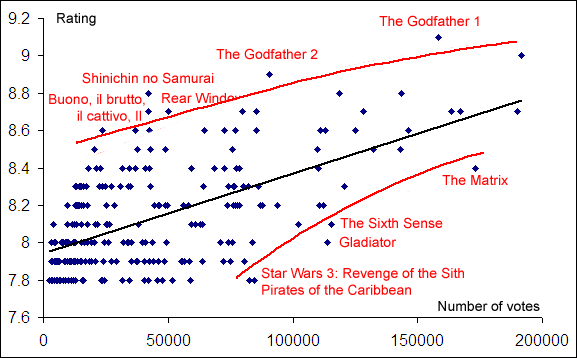
On the IMDb top 250, you normally see a correlation between the number of votes and the rating for a movie. Better rated movies are more watched. The outliers are interesting. The movies that are popular despite not having a high rating are: The Matrix The Sixth Sense Gladiator Star Wars 3: Revenge of the Sith Pirates of the Caribbean I can understand why The Sixth Sense, Pirates of the Caribbean and especially The Matrix are on this list – geeks would have watched these and voted on IMDb, though their voting need not have been high. But why are Gladiator and Sixth Sense on that list? ...

How I buy gadgets

I’m a cautious gadget freak. I love buying gadgets, but think a lot before buying them. Invariably, I use spreadsheets to help me decide. I try to buy only those gadgets that are right for me at the cheapest possible price, and I look at two things: features based on usage and breakeven. Usage-driven buying I pick the features I want based on my usage. For example, when I bought my first mobile, I listed the my most likely uses for the phone: ...

MP3 bitrates and sound quality

At what bitrate should you encode your MP3 files? Listening tests show that at 256kbps, you can’t tell the difference. But that’s with 2 amplifiers and big speakers. What about headphones? I tried an experiment with my cousin, who has the best ear for music that I know. We ripped a good audio CD of his at 128 kbps. He put on a pair of headphones (the kind that fit into your ear) connected to my laptop. I played the first half a minute of the original and the ripped version 10 times, in a random order, asking him to guess which was which. Result: 5 correct and 5 wrong. He couldn’t tell the difference. ...

Python vs Perl

Python vs Perl. Sums up my feelings perfectly: Python may be better for larger projects, but for my meddling, I’ll stick to Perl. It’s served me well for 10 years. Until 1999, I used Perl a fair bit, but no more than Java or C or anything else. My first “real-life” use of Perl was in 2000, when I was processing 600MB of IBES data. Access and SPSS couldn’t handle the load. Perl slurped all the data in a few seconds, though. A few years later, when processing bank data (3GB worth, this time), Perl again was the only saviour. In fact, between Excel and Perl (and CPAN), I think I have all the data analysis power I’ve ever needed. This blog, for instance, is written in an Excel spreadsheet, exported to XML, and converted into the blog format by Perl.

How I listen to music

I have a large MP3 collection (Tamil and Hindi films). I don’t like selecting songs to listen to. Too much effort. I rated all songs I had listened to (650 songs x 5-10 seconds = 1-2 hrs) and created 7 SmartViews. I just go to one of these and play them in order. Here are my views, in descending order of their use. Most played. Sorted by Play Count. Songs I play the most. Plays stuff I listen to usually. Not heard recently. Played Last before 3 months ago AND Rating >= 3. Plays good songs I haven’t heard recently. Not played much or recently. Played Last before 1 month ago AND Play Count <= 2 AND Rating >= 3. Plays good songs I haven’t heard often enough. Recent hits. Last updated after 3 months ago AND Play count >= 3. Plays songs recently added and liked. Recently played. Sorted by Last Updated. Often, I like to listen to songs I listened to yesterday. Top rated. Sorted by Rating. My best songs. (Suprisingly, I don’t use this view much.) Recently added. Sorted by Played Last. Plays songs I just downloaded. But WinAmp’s not good enough. For example, I can’t find out what songs I played at least thrice last month. How do I see what I’ve been listening to a lot recently? Fortunately, there are a few WinAmp history plugins. I installed Pepper, which produces a log file that can be analysed. I did this two weeks ago, and don’t have enough data. When I do, I’ll modify two views ...

Matching misspelt Tamil movie names

I don’t like hunting for new songs either. Too much effort. External recommendations like Raaga Top 10 help, but not much. I usually like only 1 of the top 10. I don’t really know the recent music directors. But many interesting songs I’ve heard recently (like Ondra Renda in Kakka Kakka, Vaseegara in Minnale, and Kaadhalikkum in Chellame) are by Harris Jayaraj. So maybe if I can find the music directors I like, other songs by them would be good recommendations. ...

Why Google Reader

I switched to Google Reader as my blog reader (I was using Mozilla so far). The reason was simple: speed. Thanks to the Google site’s speed and keyboard navigation, I can read blog entries 10 times faster. Now there’s a unique proposition for Google that a lot of people are missing: that their site loads a whole lot faster than others. It makes a huge difference to the whole browsing experience. ...

Autoblog

I have an automated (and lazy) way of finding interesting sites. This is what I do every day. I get the del.icio.us tags of every URL I blog about. (It’s available at http://del.icio.us/rss/url/ followed by the MD5 hex version of the URL). I pick the most popular tags (at least 50 links must have this tag), and use them as my “preferred tags” I scan the most popular sites on del.icio.us, and get each site’s tags If a site has my preferred tags, I give it points (the number of points is equal to the number of times I’ve blogged that tag) I pick the top 5 sites based on my points, and read them. There are two problems I have now. Firstly, I will find sites similar to those I have blogged about – not discover anything new. That’s fine to start with – I can search for those manually. The bigger problem is, this is restricted to del.icio.us. There are two ways I can extend this (lazily). ...