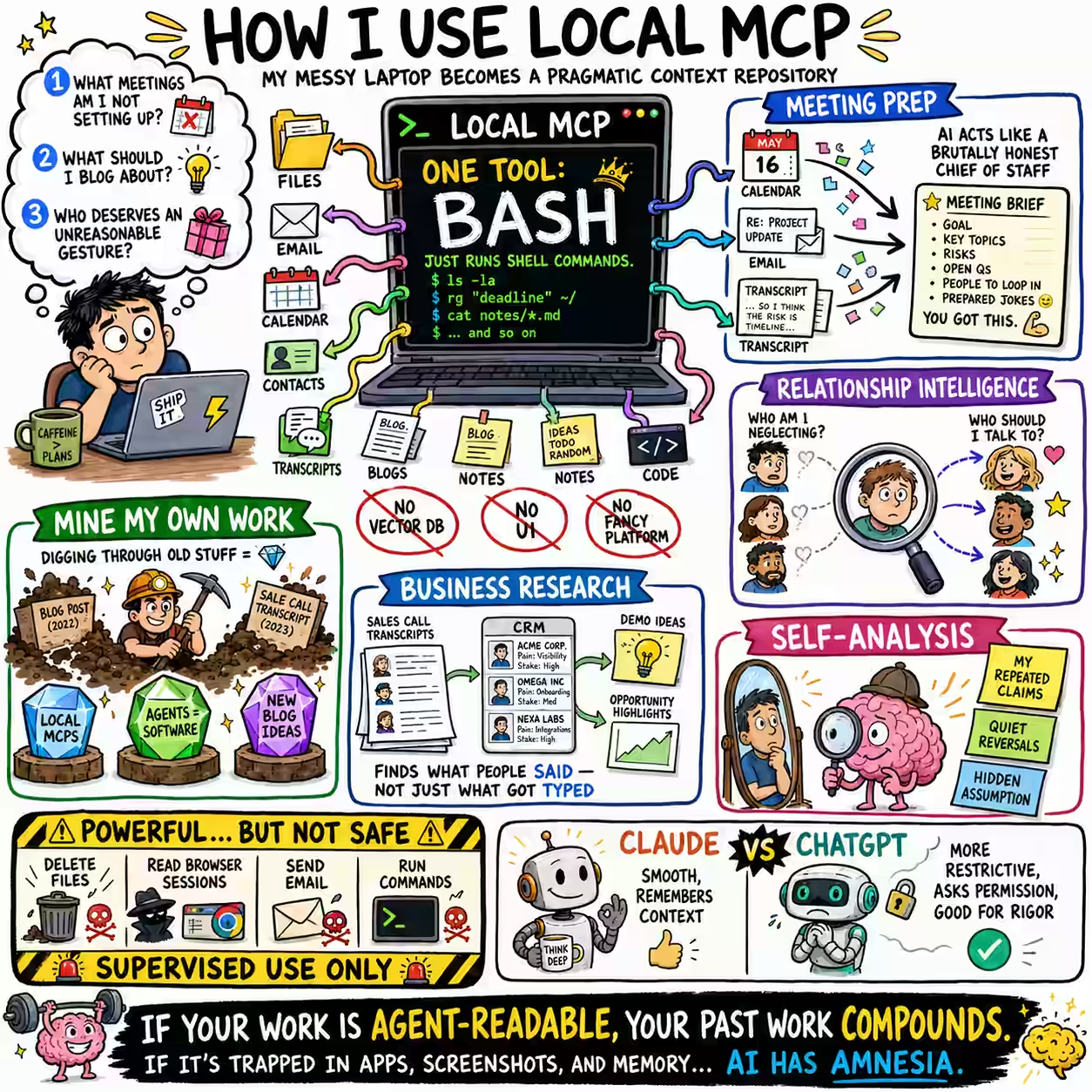
I’d love for Claude or ChatGPT to answer questions like:
What meetings am I not setting up that I really should be?
or:
Based on my activities since 9 May 2026, what should I blog about?
or:
Who in my professional life most deserves an unreasonable gesture?
From data. My files, emails, calendar, contacts, transcripts, blogs, notes, code, browsing history, logs, random Markdown files I forgot I wrote.
Hence, a Local MCP.
My Local MCP server exposes one tool: bash.
@mcp.tool()
async def bash(commands: str, ctx: Context) -> str:
    """Runs multiline bash script."""
    result = subprocess.run(commands, shell=True, executable="/bin/bash")
    return result.stdout + result.stderr
That’s it. No vector database. No UI. No custom connectors. No “AI knowledge platform.”
Just: run shell commands on my machine.
I run this locally, expose it online (which is slightly scary), and give Claude and ChatGPT this prompt fragment:
Local MCP runs bash and exposes:

- ~/code/talks/README.md - talk transcripts, slides
- ~/code/blog/description.md - 20K files, 5K posts. Search for "- llm" for AI-related posts.
... (etc.)

`gws` can access email, calendar, etc.
In one shot, this gives EVERYTHING I have to the agents.
A common use is meeting prep.
You are a brilliant, brutally honest Chief of Staff. You have full access via Local MCP bash tool to calendar, emails, and past transcripts. Produce a briefing card for each substantive external meeting today.
It checks the calendar via gws. It searches my transcripts. My notes. My AI advice. Then gives me a briefing card with everything I need.
I can’t do this by uploading files manually. The context is not one file: it’s scattered all over.
A human assistant could do this. But agents are faster, cheaper, and I trust them more.
Another common use is relationship intelligence.
What meetings am I not setting up that I really should be?
Claude scans transcripts, contacts, emails, and recent activity to find people I should speak.
This is where Local MCP is different from a file upload.
In a file upload, I can ask “Where is X?”.
Here, I’m asking “What am I missing?” and the answer depends on recency, relationship history, frequency, how conversations felt, unresolved actions, and so much more.
A third use is mining my own work.
I used Local MCP to ask what I should blog about. It scanned all my content and found themes I haven’t really thought about, like:
- Google Meet captions - a code commit I recently made. I wrote about it.
- Agents are the new software - a theme I’ve been talking a lot about. I wrote about it.
- Local MCPs - that’s this post
… and half a dozen topics I should be writing about soon.
A fourth use is business research.
I have transcripts from sales calls and client conversations. I don’t attend all of them. But Local MCP can.
I can ask:
Which client needs have we heard repeatedly but not converted into demos?
or:
Which solutions have we pitched to one client that another client has explicitly asked for?
This is beyond a CRM search. A HubSpot search finds what people typed in. This finds what people actually said.
Then an email search finds if they acted on it. Calendar search finds what we spent time on.
Across these, I find opportunities that no single system has.
BUT: this is not safe by default. A bash MCP server can delete my files, run commands, read my browser sessions, send emails gws, and all sorts of risky things.
So I monitor the commands like a hawk, and give it fairly controlled access, and only when I’m actually running one of these use-cases.
I tried OAuth but setting up Auth0, dynamic client registration, callback URLs, scopes, ChatGPT connector errors, … I gave up.
For now, supervised local usage gives me most of the value.
BUT #2: Claude and ChatGPT use Local MCP differently.
Claude uses it beautifully. Smooth. No mistakes. References memory.
ChatGPT is more restrictive. No chat memory accessed, nor saved. Keeps asking for permissions.
So I use ChatGPT less for Local MCP-heavy tasks. But ChatGPT is rigorous. When I want structured analysis, exhaustive lists, or better verification discipline, it is useful.
Local MCP is powerful because it lets AI use all systems I have access to:
- local files - across Dropbox, Google Drive, my notes, blog posts, transcripts, slides, …
- code - not just reading, but running, rewriting, and generatig
- email, calendar, contacts
- browser history
- shell tools - which can be used to access even more system
Local MCP invites Claude / ChatGPT as a real assistant into my laptop.
And into my 2,700-line TODO archive.
You probably shouldn’t expose a bash tool to an AI. But note the direction I’m going with this:
- If your work and transactions are agent-readable, your past work compounds.
- If they are trapped in apps, screenshots, and memory, your AI has amnesia.