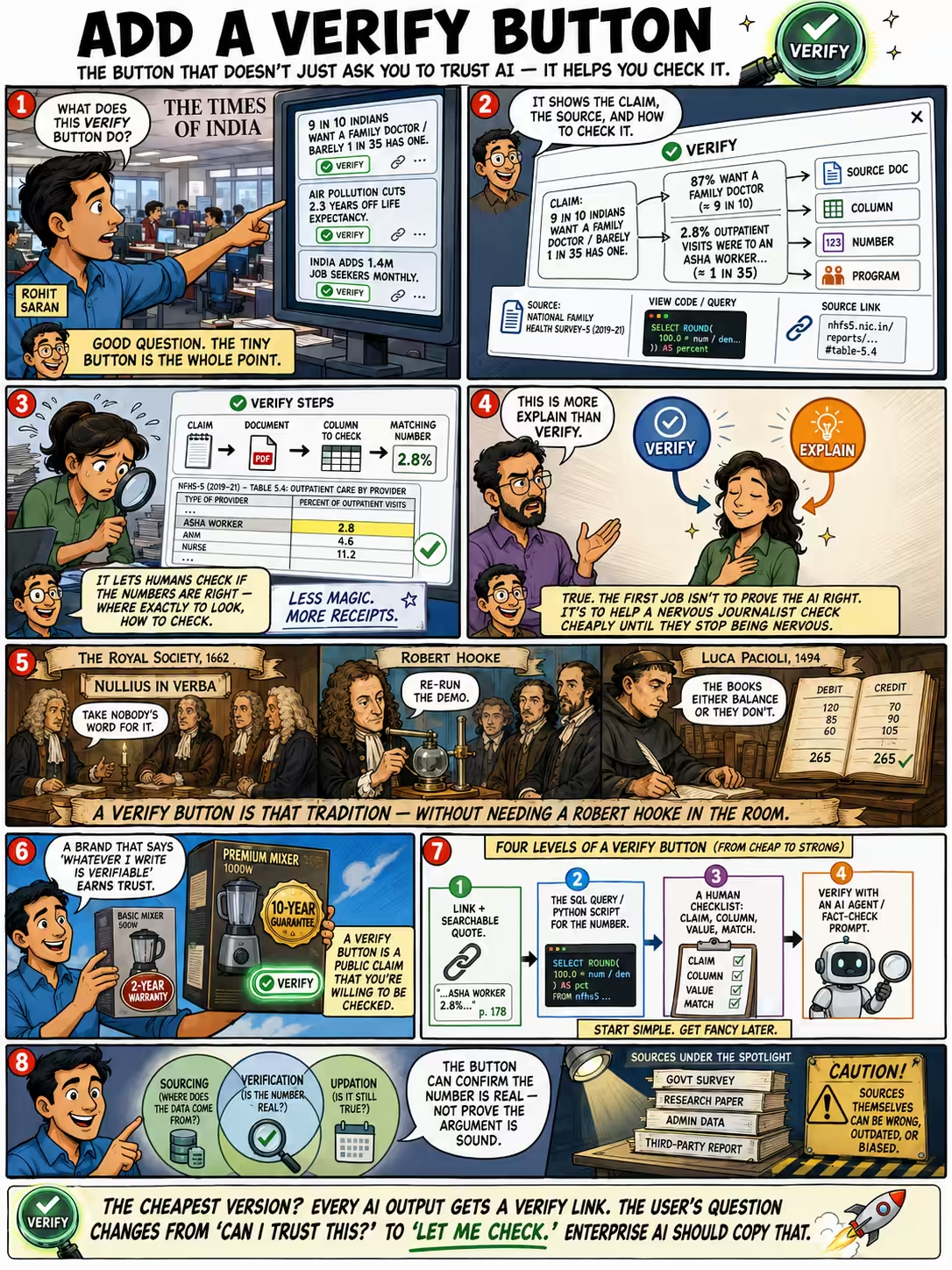
Rohit Saran looked at the Statoistics cards my AI agents are generating for The Times of India, and asked about a small button under each one.
In the list of Statoistics that you had put, I saw there’s a button called ‘Verify.’ What was that meant to be or will do in future?
That verify button explains the claim, mentions the sources, and shows how to check the claim.
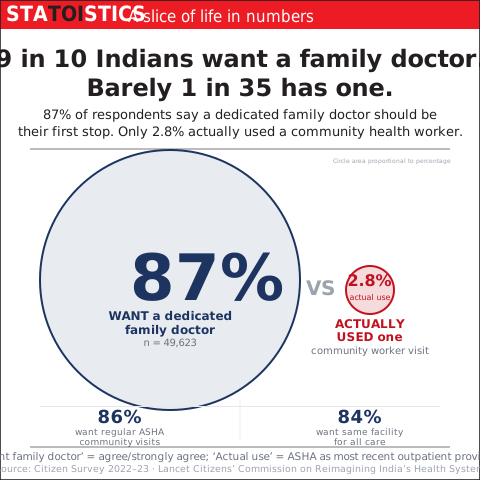
One card said “9 in 10 Indians want a family doctor and barely 1 in 35 has one”. The button breaks that down:
- “87% want a family doctor, 2.8% outpatient visits were to an Asha worker…”
- It identifies in the source document what are the columns that we were looking at, what numbers it verified.
- It links to the program that it wrote to do the verification.
I said, “it lets humans check if the numbers are right - by giving them steps – where exactly to check, how to check if it is correct.”
Sajeev pushed back: “It’s more ’explain’ than ‘verify’ really.”
True. Saurabh had asked for exactly this earlier: while a person is checking by hand, give them something that shows how the AI got to its answer. A verify button’s first job is not to prove the AI is right. It’s to let a nervous journalist check, cheaply, until they stop being nervous.
This instinct is old. The Royal Society took nullius in verba as its motto around 1662, “take nobody’s word for it.” They didn’t print claims and ask you to trust the author. In 1663 they made Robert Hooke their Curator of Experiments, whose job was to re-run the demonstration in front of the Fellows. A verify button is that, without Hooke.
(Merchants got there two centuries earlier: double-entry bookkeeping, codified by Pacioli in 1494, means every entry has a counter-entry and the books either balance or they don’t.)
Rohit’s reason for liking it went somewhere I hadn’t fully thought through. He went to brand.
It’s like why a product with 10-year guarantee is likely to be made better than a product with 2-year warranty, because the company has confidence to tell the customer, ‘Look, I am standing behind this product for 10 years.’
And later:
Any brand that is saying, ‘Whatever I write is verifiable,’ is so much more in this age of misinformation.
His version of why this matters for a newspaper: “a brand is only about trust. Rest is news is anyway a commodity.” A verify button is a public claim that you’re willing to be checked.
Here’s how I actually build one “Verify” buttons, in increasing order of effort.
- Link plus a searchable string. A hyperlink may still be wrong. I want a link and a short quote I can paste into the page’s search box and find. “When I click on that link, I should be able to literally search for and find that piece of text, verifying that it did not hallucinate” Then even a plain program (not even an LLM) can open every link and confirm the text is there.
- For numbers, the SQL query. If it’s data, the SQL query (or Python script) that fetches that particular result is the closest equivalent. The button should just run the query against live data and shows the number. The user doesn’t need to know SQL - they just see that the number matches.
- The procedure as a checklist. The button breaks the card into steps: this is the claim, this is the number, this is the column it came from, check that the D1A value matches. A person ticks down it.
- Verify with an AI agent. Add a link that opens the claim in Google AI mode with a pre-filled prompt asking it to fact-check the claim. For example: Fact-check with step-by-step evidence: According to Citizen Survey 2022-23, 87% of Indians want a dedicated family doctor but only 2.8% actually use one. How might it have changed since the publication?
Rohit framed verification as three jobs, not one: “Verification has sourcing, verification, and updation.” The last clause lets you also ask whether the number has gone stale since you published it.
Getting the source right is not the same as getting the conclusion right. Rohit said: “you are asking AI not only to get right source and right data, but now we are asking to interpret.” And interpretation is subjective on both ends. The button can confirm the number is real but not prove the argument is sound.
Of course, the sources could be wrong. “Check the source” assumes good data quality. Luckily, data is more often right than wrong, and verification can shine a light on bad data.
We can start simple. The cheapest version: every AI output has a “Verify” link to a search query the user can easily inspect. That changes their question from “can I trust this?” to “let me check.”
If this can establish trust and a brand for India’s largest newspaper, enterprises AI apps might do well to follow.