When I’m in front of my laptop, I usually forget the world around. Sadly, the world around has important things that need to get done on time. Like eating medicines, turning off the washing machine or the hob, etc.
The one thing I’ve been lacking on my machine was a simple alarm system. I’d like to set an alarm to remind me to do something in 5 minutes, for example. And it should be dead simple to set up.
After hunting around a fair for freeware to do this, I’ve finally settled on writing this tiny piece of Visual Basic code.
Set WshShell = CreateObject("WScript.Shell")
If WScript.Arguments.length < 2 Then
  WScript.Echo "Usage: alarm <time-in-minutes> <message>"
Else
  WScript.Sleep WScript.Arguments.Item(0) * 60 * 1000
  msg = ""
  For i = 1 to WScript.Arguments.Count - 1
      msg = msg + WScript.Arguments.Item(i) + " "
  Next
  WshShell.Popup msg, -1, "Alarm", 64
End If
I’ve saved this as “alarm.vbs” somewhere in my path. When I need to set an alarm, I just type
alarm 5 Turn off the hob
This pops up a window in 5 minutes with the alarm:
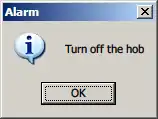
This turned out to be a life-saver yesterday. I had to catch a flight at the Bangalore airport, and traffic is notoriously bad. To be on the safe side, I set up the following:
alarm 25 Catch the flight
alarm 30 You really need to go now
alarm 35 You've missed the flight
Turned out to be a wise thing. I ignored the first alarm. On the second, I said “OK, OK, just 1 minute…” and it really took the third alarm to get me going. Just barely made it to the flight.
Comments